Fantasy Engine user guide 1.0.0 / For members
Wallet
Member
The member's balance and everything that moves it.
Wallet#
Last updated: 2026-11-19 · v1.0.0
Profile → Credits Wallet (or the balance in the top bar) shows the balance with two decimals and its value in the site's currency ("1030.10 Credit", "~ 1030.10 USD"), and the transactions. The balance is rounded down to the cent, never up, and that shown figure can be spent in full: a contest whose entry fee equals it can be entered, and All current balance withdraws exactly it.
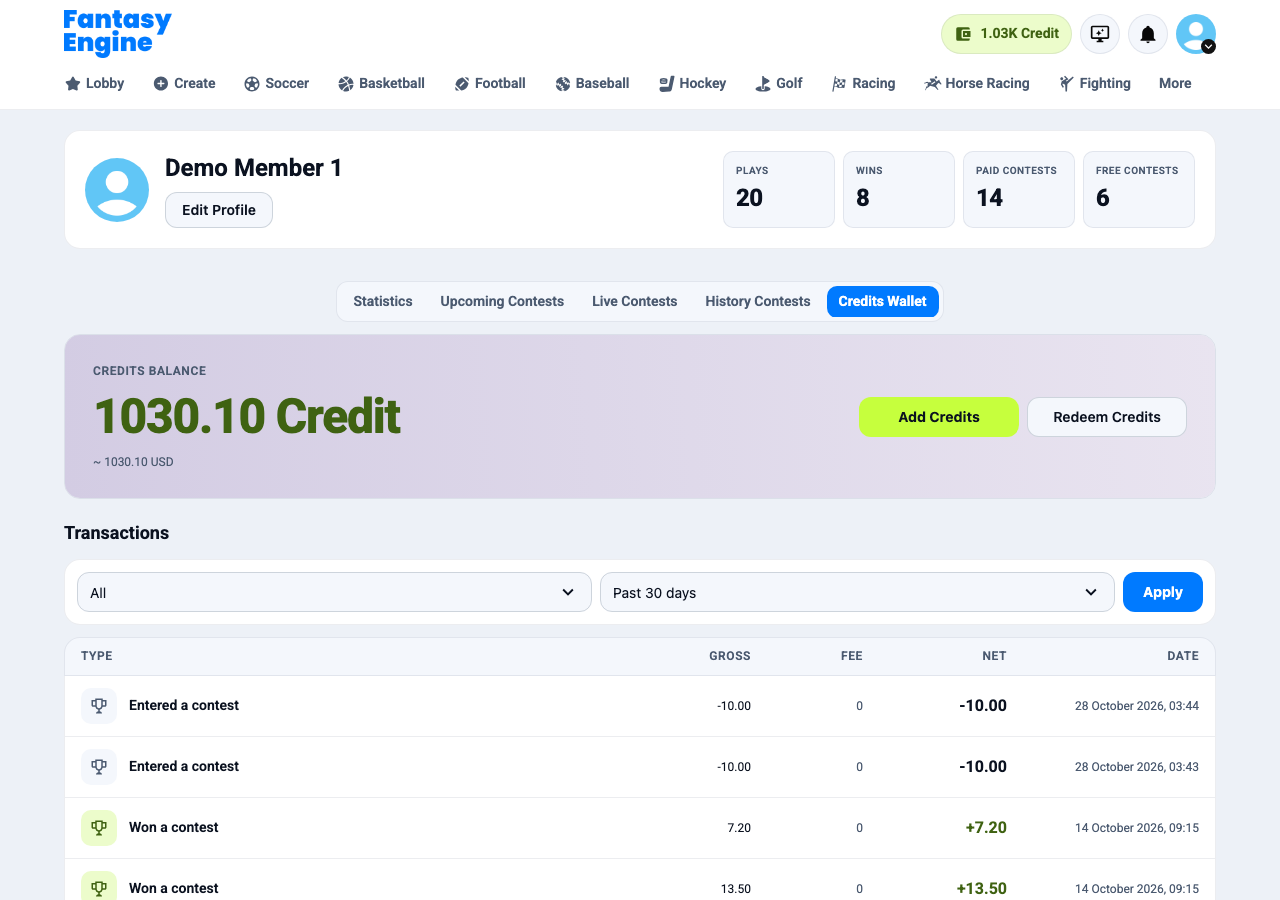
- Add Credits (website): choose a deposit package or amount and pay with one of the site's payment methods, PayPal or Stripe (those the site switched on). In the Android and iOS apps Add Credits shows "This function is not available on the app! Please tap here to deposit."; here opens the wallet of the website in the browser (in-app purchase through the App Store / Google Play is not switched on in version 1.0.0). In the amount box a comma counts as the decimal point when it is followed by one or two digits ("5,5" is 5.5, "12,50" is 12.50); any other comma, such as "1,000", is not read as a number and the amount is refused ("The amount field must have 0-2 decimal places."). While the site has no payment method, Add Credits shows only that notice and Contact admin, without an amount to fill. The Add Credits of an empty wallet and of the "Not enough credits" window open the same Add Credits.
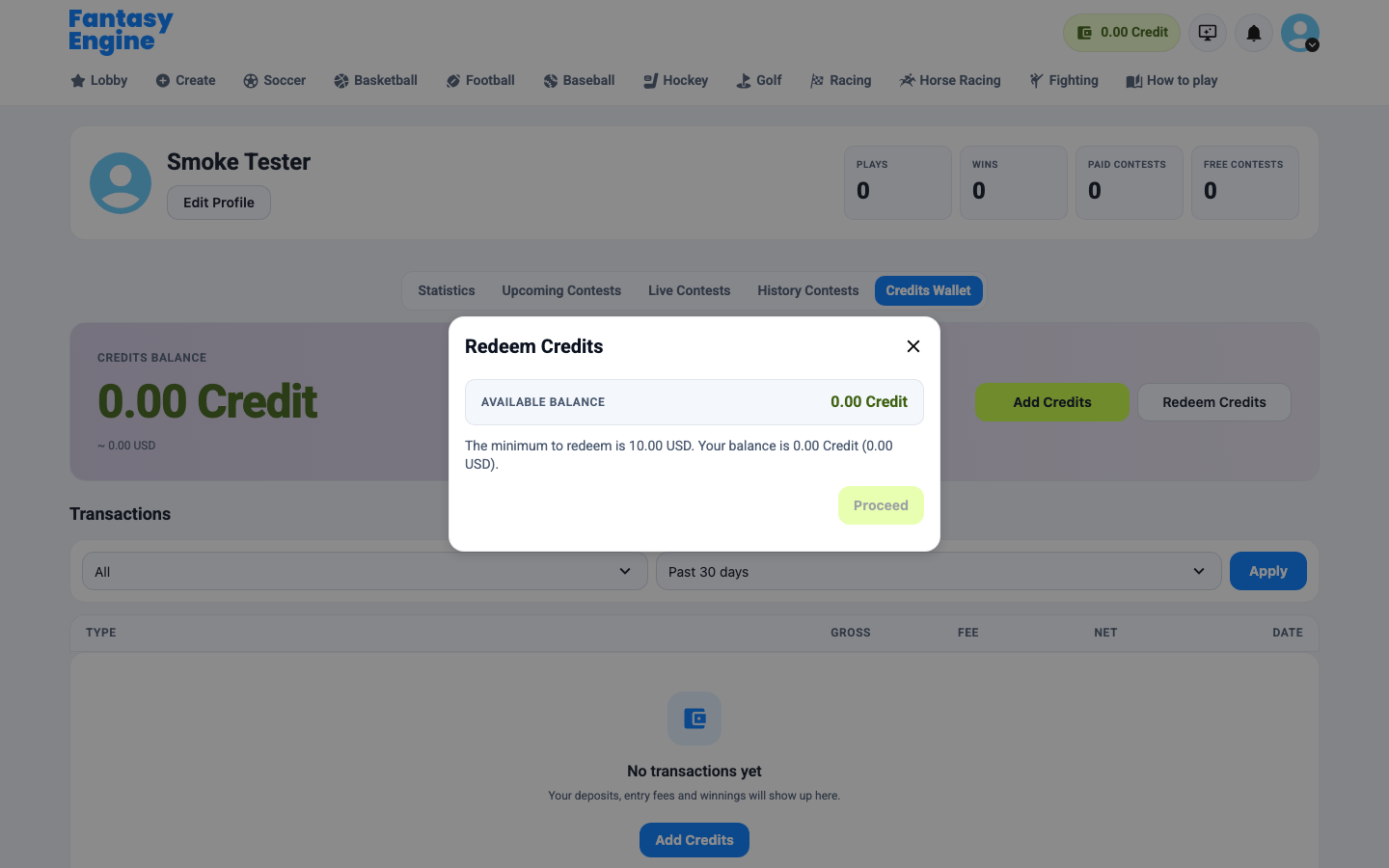
- Redeem Credits: withdraw to PayPal or a bank account. It is offered only while the site allows withdrawals and the member's role may withdraw (Sign-in security): otherwise the wallet has no Redeem Credits button, the menu has no Redeem Credits row, and a link to the page opens the wallet. The page shows the minimum amount and the fee; the site may ask you to verify your profile first, and checks every request before paying it out. Amount: type a figure in the box (its value in the site's currency shows beside it; a comma followed by one or two digits counts as the decimal point, as in Add Credits, and in the Android and iOS apps the box opens the number pad with a decimal key) or choose All current balance; the request is for the figure typed unless All current balance is chosen, and typing in the box chooses the box again. Below the minimum the form is replaced by "The minimum to redeem is 10.00 USD. Your balance is 0.00 Credit (0.00 USD)." and Proceed is disabled.
- Transactions: filter by type and period (past 30 days ...) and Apply. The type list holds only the types this site uses; deposits and withdrawals are listed as Add Credits and Redeem Credits, the names of the two buttons. Each line: type (Entered a contest, Left a contest, Refund - contest cancelled, Won a contest, deposits, withdrawals ...), gross, fee, net and date.
Refunds are automatic: leaving before the start, or a cancelled contest, puts the fee back at once.
Change log#
Last updated: 2026-11-19 · v1.0.0
| Date (GMT+7) | Section | What changed |
|---|---|---|
| 2026-10-28 | all | First version, checked against daily-fantasy 7b8ff49; screenshots of the local demo site (AdminCP 1280, web app 1280 / 390, light). |
| 2026-10-29 | wallet, notifications, profile | Two decimals, Add Credits without a payment method, redeem minimum, type filter of the used types; notice texts (entry fee with the contest, finished / won with the place and prize); Statistics tab with played leagues only. Wallet and profile re-shot, notifications and redeem shots from today's UI fix run (1440, light). |
| 2026-11-04 | enter-draft-player, wallet | Salaries are live until the contest start: a held lineup is saved again only within the cap at the current salaries (also on the Rules tab of a draft contest). The transaction type filter names deposits and withdrawals Add Credits / Redeem Credits. |
| 2026-11-05 | members-wallet, wallet | In-app purchase is not switched on in 1.0.0: the apps' Add Credits sends the member to the website wallet; deposits on the website through PayPal or Stripe; the eWallet setting Accept sandbox and test store purchases (no effect in 1.0.0); the store credentials live on the AdminCP card Mobile Application → General Configuration → In-App Purchase (nothing to fill for 1.0.0). Re-checked against daily-fantasy 5e767e8. |
| 2026-11-16 | all, change-log | This copy of the guide describes version 1.0.0 (a separate copy describes 1.1.0). Internal labels taken out of older rows and the page-source comment; wording only, those Last updated lines stay. |
| 2026-11-19 | members-wallet, wallet | A withdrawal needs the role's permission Transfer funds, also while Only verified profiles can transfer funds is on (a verified profile is then asked for as well); a member without it gets "You cannot transfer funds from your wallet.". Redeem Credits: the request is for the figure typed unless All current balance is chosen, and typing in the box chooses it again (also in the Android and iOS apps). Text only, screenshots unchanged. |
| 2026-11-19 | sign-in-security, members-wallet, member-accounts, wallet, profile | Checked against c0645f6. Sign-in security: the screens that ask for the current password (Change Password, Account, Delete Account, two-factor setup and removal) count wrong passwords, 10 per account in 15 minutes and 30 per visitor address, then "Too many requests in 1 minute. Try again later." until the 15 minutes have passed; the right password is never counted. A member without Transfer funds no longer sees Redeem Credits. Proxy box: the IP address ban judges the visitor address behind a proxy, its message and the IPv4-only list. Members and their money: no Redeem Credits for a role without Transfer funds or while fund transfer is off; balances shown and checked at two decimals, rounded down; the member list of Transfer Mass Funds shows names as plain text. Member accounts: the same for the protected accounts picker. Wallet: the same rounding, an entry fee equal to the balance and All current balance accepted; Redeem Credits hidden (button, menu row, link) when the member may not withdraw; a comma followed by one or two digits counts as the decimal point in the amount boxes ("1,000" is refused), the apps open a number pad with a decimal key. Profile: the Enter Password window after 10 wrong passwords; password boxes do not capitalise or correct. No screenshot changed. |
| 2026-11-19 | all | Moved to the documentation site: this page holds the sections wallet of the former single-page user guide. Page frame, headings and links between the pages updated; the text of the sections is unchanged. |