Fantasy Engine user guide 1.0.0 / For members
Profile and settings
The member's profile and account settings.
Profile and settings#
Last updated: 2026-11-19 · v1.0.0
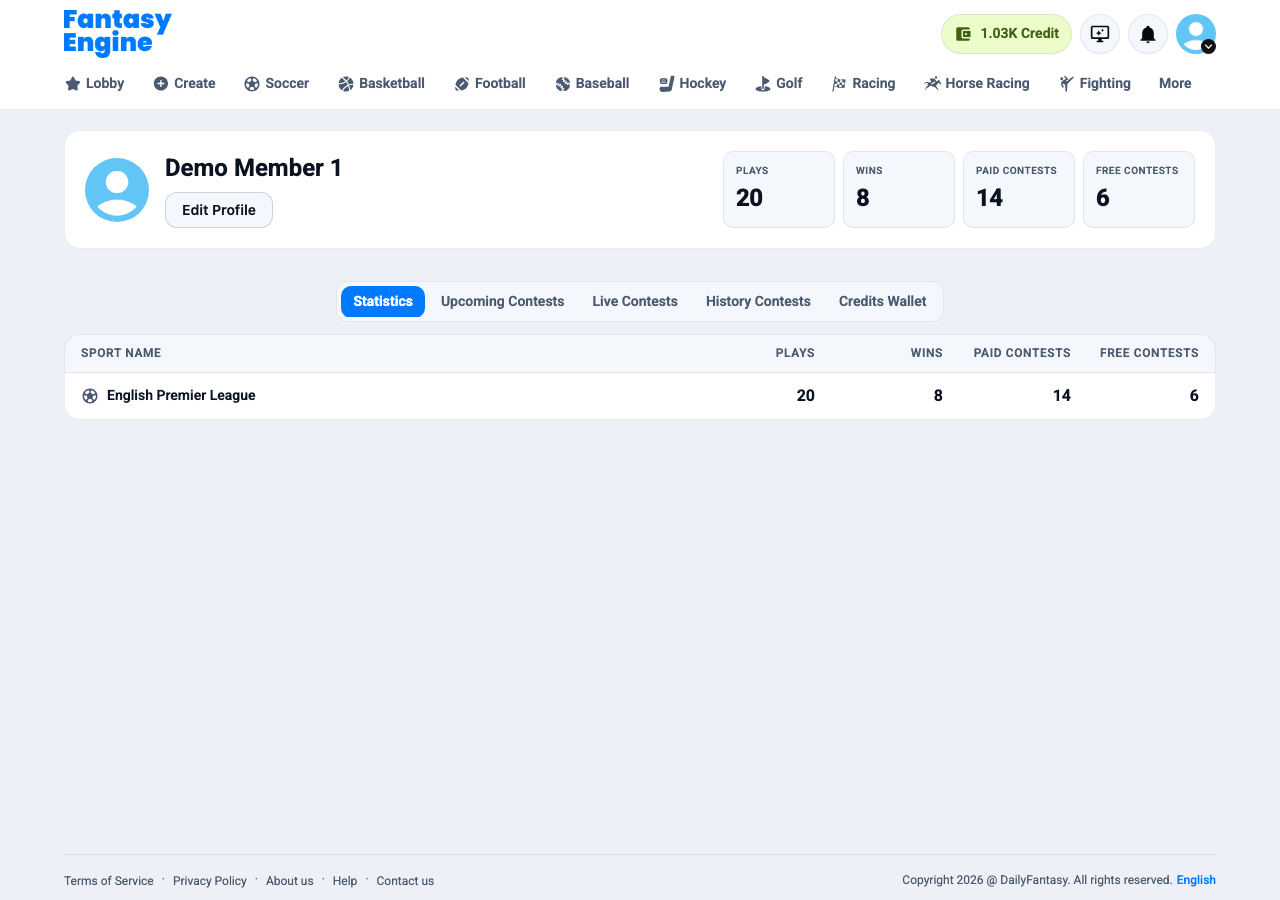
The profile shows the member's Plays, Wins, Paid contests and Free contests, and tabs Statistics (the same counts per league, only the leagues he played; a new member sees "No stats found" and Go to Lobby), Upcoming Contests, Live Contests, History Contests and Credits Wallet. On a phone the tabs do not fit side by side: the bar scrolls sideways, the selected tab is always shown whole, and with the last tab (Credits Wallet) selected the bar ends at the right edge (the tab before the first whole one may show cut at the left). Edit Profile and Settings hold the account: profile, avatar, password, language, display (light / dark), two-factor authentication, account deletion.
- Two-factor authentication is offered only while the site has it on (AdminCP → Site Settings → General Configuration → Login & Registration → Two-factor authentication (2FA), off by default). While it is off, a link to the two-factor page opens the profile instead, and Back from there does not return to an empty two-factor page.
- Long values in the apps: on the profile form a long Timezone, Country, State or City ("Greenwich Mean Time (Lisbon, London)") wraps onto a second line of its field instead of being cut; the drop-down fields (Gender ...) have the size and height of the text fields.
Delete your account#
Where the button is:
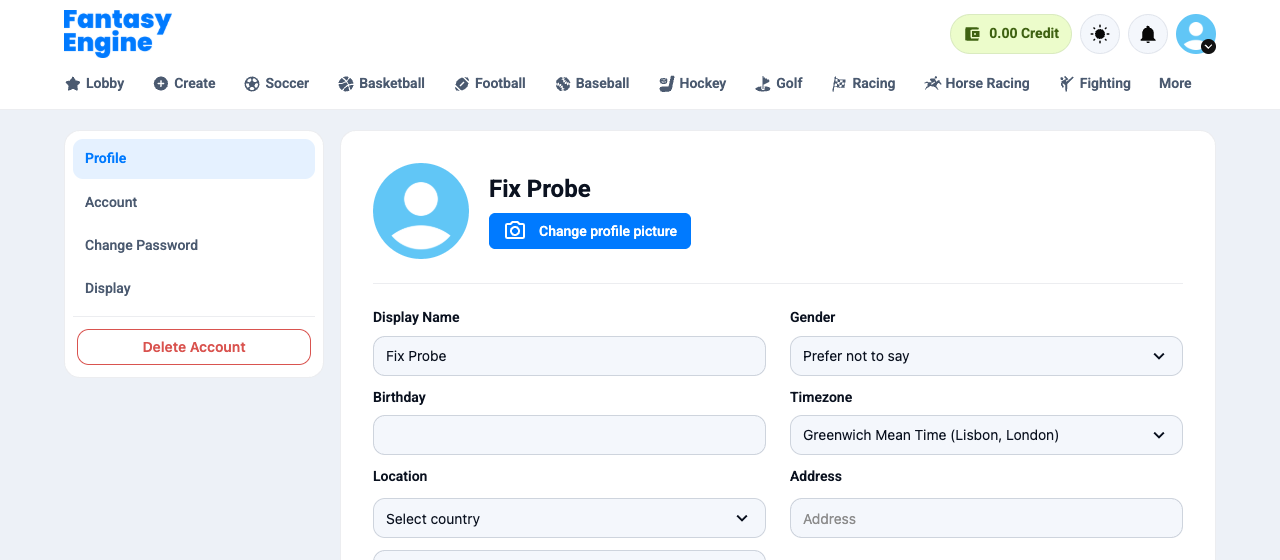
- Computer (a browser window wider than 1024 px): the settings page (Edit Profile on the profile) has a column Profile, Account, Change Password, Display ...; under it, separated by a line, the red outlined button Delete Account.
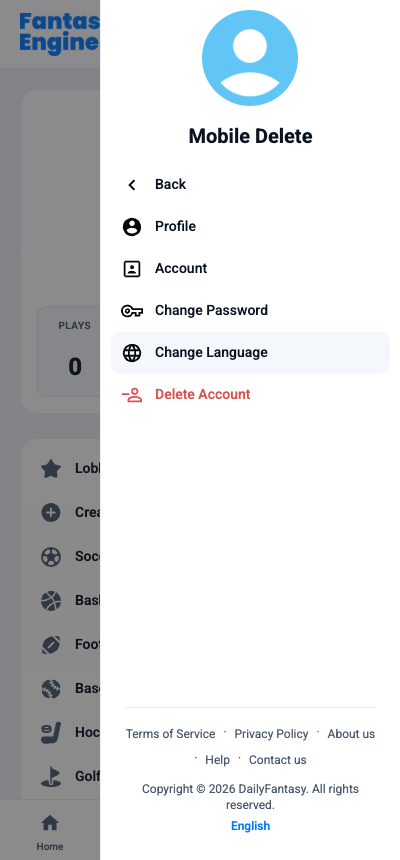
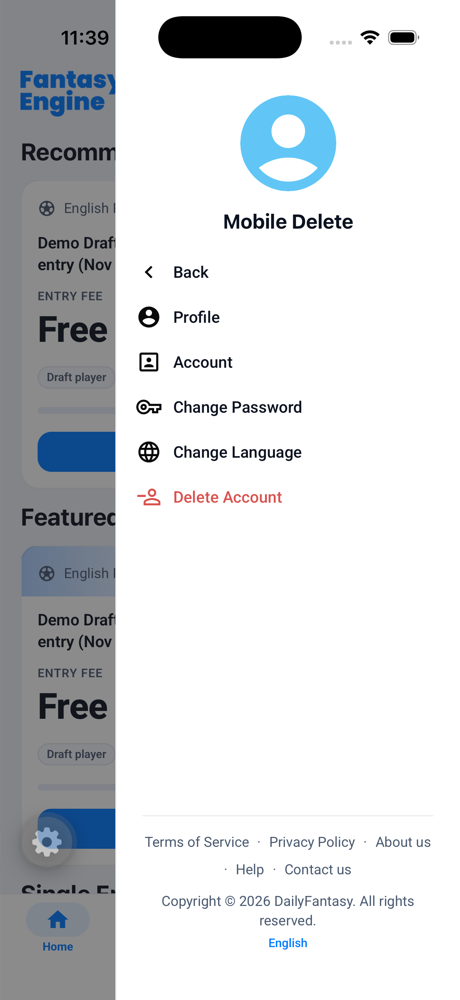
- Phone or tablet browser (1024 px or narrower) and the Android / iOS apps: the avatar at the top right opens the menu drawer → Settings → the last row, in red, Delete Account (after Profile, Account, Change Password, Change Language).
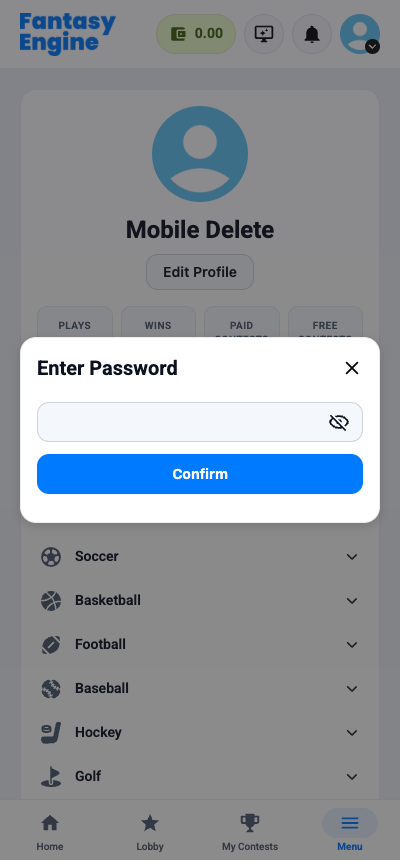
- Press Delete Account (on a phone the drawer closes first). A window Enter Password opens.
- Type the account's password and press Confirm (a password box never capitalises or corrects what is typed). A wrong password shows "The password is incorrect." and the window stays; closing it with × deletes nothing. After 10 wrong passwords within 15 minutes the window answers "Too many requests in 1 minute. Try again later." until the 15 minutes have passed (Sign-in security, screens that ask for the current password).
- With the right password the account is deleted straight away (there is no second question; while the request runs the button or the drawer row shows a spinner and cannot be pressed again) and the app starts again signed out: the website on the login page, the apps on the landing page. The same e-mail and password no longer sign in.
What is removed, and who never sees the button (the site's first admin account, the protected demo accounts, or every member while the site does not allow deletion): Member accounts: deletion and protected accounts. A member who may not delete sees no button and no empty space for it.
Members see free contests only, no balance, fee, prize or wallet, and the counts of free play (Money-off mode).
Change log#
Last updated: 2026-11-19 · v1.0.0
| Date (GMT+7) | Section | What changed |
|---|---|---|
| 2026-10-28 | all | First version, checked against daily-fantasy 7b8ff49; screenshots of the local demo site (AdminCP 1280, web app 1280 / 390, light). |
| 2026-10-29 | wallet, notifications, profile | Two decimals, Add Credits without a payment method, redeem minimum, type filter of the used types; notice texts (entry fee with the contest, finished / won with the place and prize); Statistics tab with played leagues only. Wallet and profile re-shot, notifications and redeem shots from today's UI fix run (1440, light). |
| 2026-11-04 | member-accounts (new), profile | Delete Account: the member's steps on a computer (settings column) and on a phone / in the apps (avatar menu → Settings → Delete Account), the Enter Password window, what a deletion removes and what it leaves; the AdminCP settings User account deletion (User Configuration) and Lock delete and account setting change. (General Settings), the first admin account, the Users list. New shots profile__delete-account-column (web 1280), profile__settings-list (web 400, iOS), profile__password-modal (web 400), from the 2026-11-04 checks (throwaway members, deleted). |
| 2026-11-05 | profile | The profile tab bar scrolls on a phone with the selected tab whole (the last tab ends at the right edge); two-factor authentication only while the site has it on, the redirect to the profile leaves no empty page behind Back; long Timezone / Country / State / City values wrap in the apps; drop-down fields the size of the text fields. |
| 2026-11-16 | profile | Delete Account sends one request: while it runs the button or the drawer row shows a spinner and cannot be pressed again. |
| 2026-11-16 | all, change-log | This copy of the guide describes version 1.0.0 (a separate copy describes 1.1.0). Internal labels taken out of older rows and the page-source comment; wording only, those Last updated lines stay. |
| 2026-11-19 | sign-in-security, members-wallet, member-accounts, wallet, profile | Checked against c0645f6. Sign-in security: the screens that ask for the current password (Change Password, Account, Delete Account, two-factor setup and removal) count wrong passwords, 10 per account in 15 minutes and 30 per visitor address, then "Too many requests in 1 minute. Try again later." until the 15 minutes have passed; the right password is never counted. A member without Transfer funds no longer sees Redeem Credits. Proxy box: the IP address ban judges the visitor address behind a proxy, its message and the IPv4-only list. Members and their money: no Redeem Credits for a role without Transfer funds or while fund transfer is off; balances shown and checked at two decimals, rounded down; the member list of Transfer Mass Funds shows names as plain text. Member accounts: the same for the protected accounts picker. Wallet: the same rounding, an entry fee equal to the balance and All current balance accepted; Redeem Credits hidden (button, menu row, link) when the member may not withdraw; a comma followed by one or two digits counts as the decimal point in the amount boxes ("1,000" is refused), the apps open a number pad with a decimal key. Profile: the Enter Password window after 10 wrong passwords; password boxes do not capitalise or correct. No screenshot changed. |
| 2026-11-19 | all | Moved to the documentation site: this page holds the sections profile of the former single-page user guide. Page frame, headings and links between the pages updated; the text of the sections is unchanged. |