Fantasy Engine user guide 1.0.0 / Server services
For the developer / QC team that sets up e-mail: the AdminCP settings, sending at once or through the queue, testing and troubleshooting.
How the site sends mail#
Last updated: 2026-11-19 · v1.0.0
The site sends: sign-up verification, password recovery codes, password-changed notices, member invitations, the daily digest of unread notifications and the Fantasy Engine mails: contest entered (the picks), contest cancelled (refund), contest won (prize) and the invitation to a contest. Every mail is built from a mail template (AdminCP → Site Settings → Mail Templates) in the member's language.
- The SMTP account is set in the AdminCP, not in
.env: theMAIL_*lines of.envare ignored. - A mail goes out at once during the request, or through the outbox when Email queue is on (Send at once or queue).
- Failures never break the page that sent the mail: they are written to
storage/logs/shaun-mail-YYYY-MM.log. - Members can unsubscribe through the link in each mail; account mails (verification, password) are sent anyway.
AdminCP → E-mail Settings#
Last updated: 2026-11-19 · v1.0.0
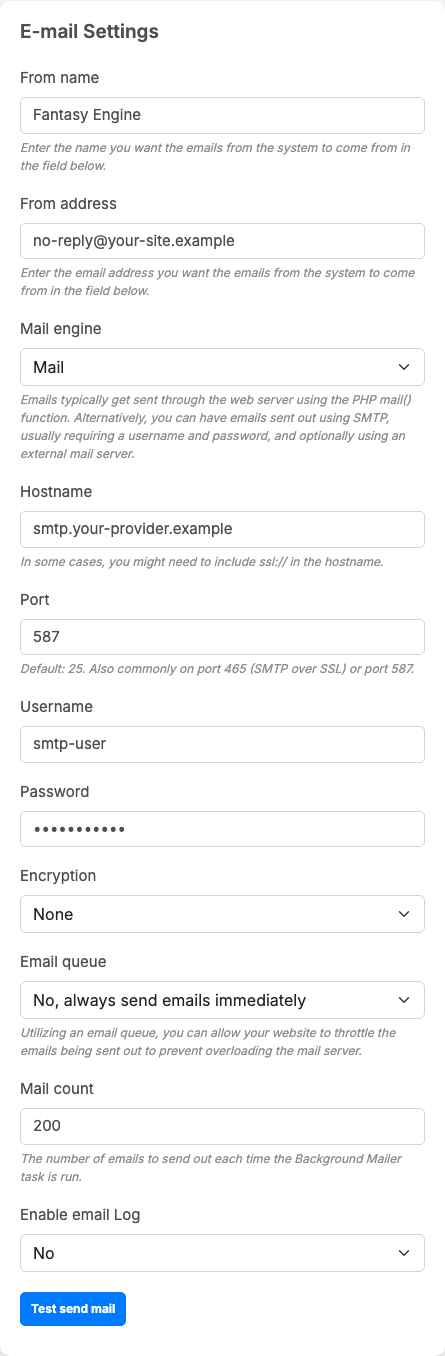
AdminCP → Site Settings → General Configuration → E-mail Settings. Each field saves when you leave it.
| Field | Value | Notes |
|---|---|---|
| From name | Fantasy Engine | empty = the site title |
| From address | [email protected] | empty = the site e-mail. Use an address of a domain your SMTP account may send for (SPF / DKIM), or mail lands in spam |
| Mail engine | SMTP | "Mail" = the server's sendmail binary (/usr/sbin/sendmail -bs -i); the installed default, rarely configured on a web server |
| Hostname | smtp.your-provider.example | with SMTP and an empty hostname no mail is sent, silently |
| Port | 587 or 465 | |
| Username, Password | the SMTP account | |
| Encryption | TLS for port 587, SSL for 465 | see the note below |
| Email queue | No (small sites) / Yes | Send at once or queue |
| Mail count | 200 | mails sent per scheduler minute when the queue is on |
| Enable email Log | No | Yes writes a line for every mail sent to the mail log |
TLS (port 587): the mailer connects, then switches to encryption with STARTTLS - every provider on 587 offers it. SSL (port 465): encrypted from the first byte (implicit TLS). None: the same connection as TLS - the mailer still uses STARTTLS when the server offers it, and sends unencrypted only to a server that does not; with port 465 choose SSL, not None.
Verified on 2026-10-22 on a test web-installer install of the 9c4fba6 with a local SMTP sink: Encryption = TLS gives the mailer the scheme smtp and the AdminCP test mail arrived; SSL gives smtps (implicit TLS), None smtp (tests/Feature/Core/Admin/MailEncryptionTest.php).
Send at once or queue#
Last updated: 2026-10-28 · v1.0.0
| Email queue | What happens | Good for |
|---|---|---|
| No, always send emails immediately | the mail is sent inside the request (sign-up waits for the SMTP server) | small sites, a fast SMTP provider |
| Yes, enable email queue | the mail is stored in the outbox table mail_recipients; the scheduled shaun_core:mail_send sends Mail count of them every minute, oldest first | larger sites, providers with a rate limit |
- Bulk mails (invitations and other mass sends) always go through the outbox, whatever the setting, so a large send never delays a password reset.
- The outbox needs the cron line (Install → Scheduler). A mail that fails in the outbox is logged and removed (it would block the ones behind it).
QUEUE_CONNECTIONdoes not change mail. OnlySHAUN_QUEUE=truemoves mails to the queuesmail_normal/mail_many, which then need a worker of their own (Install → Queue worker); leave it unset.
mysql -e "SELECT COUNT(*) FROM fantasyengine.mail_recipients;"   # mails waiting
php artisan shaun_core:mail_send                                  # send one batch now
Verified on 2026-10-22 on a test install of the 1.0.0 standard package with a local SMTP sink: the AdminCP test mail and a template mail arrived; with Email queue on, a mail waited in the outbox and shaun_core:mail_send delivered it. (The same run showed the "TLS" encryption value failing; that was fixed in 9c4fba6 - see E-mail settings.)
Send a test mail#
Last updated: 2026-10-22 · v1.0.0
- Save the E-mail Settings, then press Test send mail at the bottom of the card.
- Type an address you can read and press Submit.
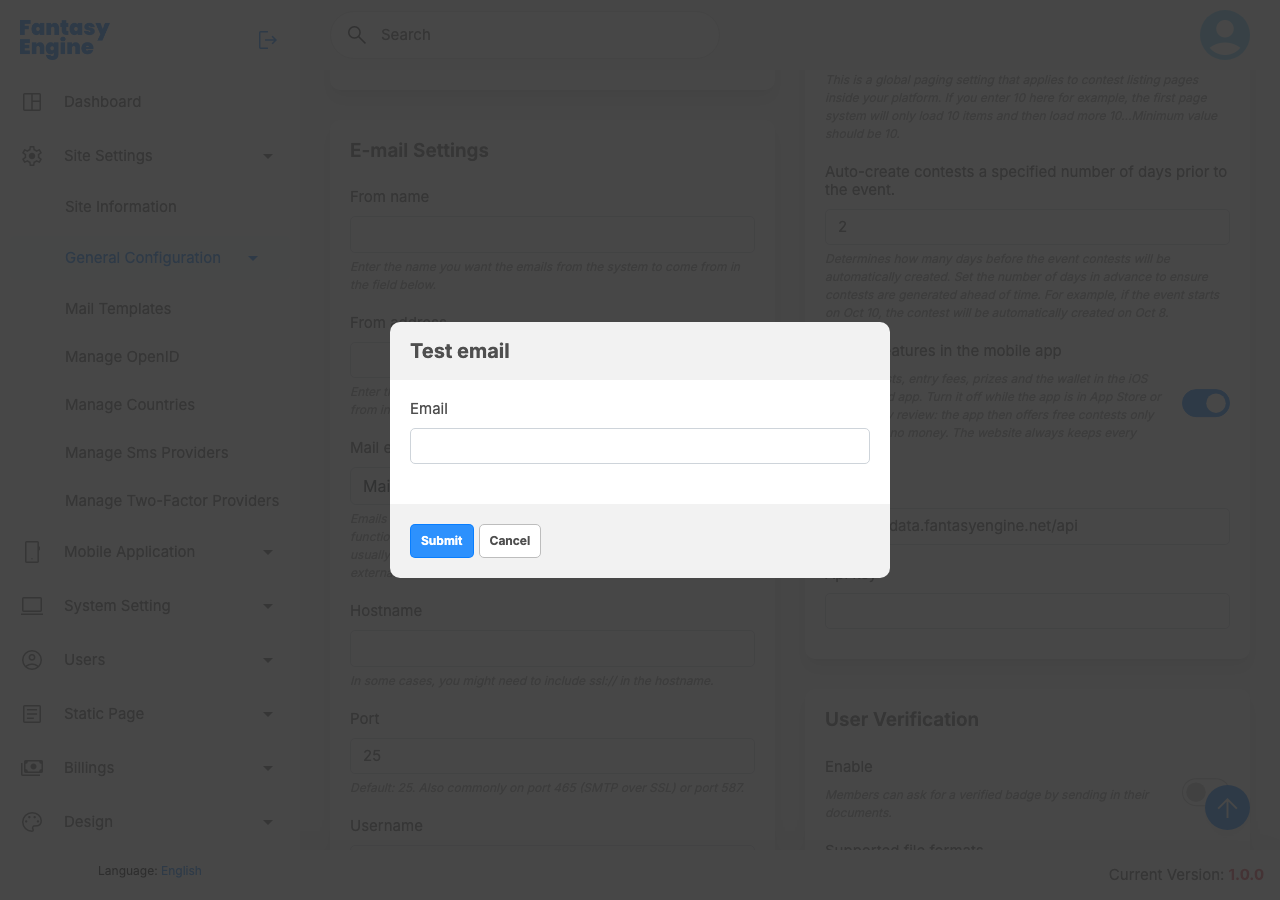
mail-test - the Test email dialog over E-mail Settings (2026-10-22) - "Test email was sent successfully! Please check your inbox to make sure it is delivered." means the SMTP server accepted it: a plain-text mail with the subject Test Email and the body "Text to e-mail". Any other answer is the mailer's own error message (wrong password, refused connection, wrong port for the Encryption value).
- The test bypasses templates and the outbox. To check a real template mail, use Forgot password on the website with a member's address.
php artisan tinker --execute "Illuminate\Support\Facades\Mail::raw('Text to e-mail', fn (\$m) => \$m->subject('Test Email')->to('[email protected]')); echo 'sent';"sentVerified on 2026-10-22 on a test web-installer install of the 9c4fba6 with a local SMTP sink: Encryption = TLS gives the mailer the scheme smtp and the AdminCP test mail arrived; SSL gives smtps (implicit TLS), None smtp (tests/Feature/Core/Admin/MailEncryptionTest.php).
Mail templates#
Last updated: 2026-10-29 · v1.0.0
AdminCP → Site Settings → Mail Templates lists every mail with its subject and content per
language. Words in brackets are filled at sending time ([site_name], [recipient_name],
[link] ...); the list of a template is shown beside it. [header] and
[footer] insert the shared header and footer templates.
Known in 1.0.0: the Fantasy Engine templates carry no [header] / [footer].
Fantasy Engine - Invite friend (sent from a contest's Invite tab) reads, with the subject
[[site_name]] You have been invited to join the contest [contest_name]:
<p>[sender_name] has invited you to play the contest "[contest_name]".</p>
<p>[message_content]</p>
<p>Click <a href="[contest_link]">here</a> to join.</p>
[contest_link] opens the contest's page in the app. A site installed before 2026-10-29 still has the
seeded text with a broken [sender_name token ("[sender_name has invited you play ..."), printed as it
is: the upgrade guide, step 5 repairs it (a text you changed is left
alone).
Troubleshooting#
Last updated: 2026-10-22 · v1.0.0
| Symptom | Cause and fix |
|---|---|
| Nothing arrives, no error anywhere | Mail engine is still "Mail" (sendmail) on a server without sendmail, or SMTP with an empty Hostname (silently skipped). Choose SMTP and fill the server. |
| Every mail fails or times out right after connecting | Encryption does not match the port: TLS (or None) for 587, SSL for 465. |
| "Connection could not be established" | wrong host / port, or the server's firewall blocks outgoing SMTP (many hosts block 25 and sometimes 465 / 587). |
| "Failed to authenticate" | username / password; some providers need an app password. |
| Mails arrive late | Email queue is on and cron does not run, or Mail count is small for the volume. |
| Mails land in spam | From address not covered by the SPF / DKIM records of its domain. |
| A member gets nothing | the address is on the unsubscribe list, or the member has no e-mail on file. |
| Where to look | storage/logs/shaun-mail-YYYY-MM.log (every failure; every send with Enable email Log). |
Verified on 2026-10-22 on a test web-installer install of the 9c4fba6 with a local SMTP sink: Encryption = TLS gives the mailer the scheme smtp and the AdminCP test mail arrived; SSL gives smtps (implicit TLS), None smtp (tests/Feature/Core/Admin/MailEncryptionTest.php).
Change log#
Last updated: 2026-11-19 · v1.0.0
| Date (GMT+7) | Section | What changed |
|---|---|---|
| 2026-10-22 | all | First version, checked against daily-fantasy c68e20c; settings, test, queue and the TLS failure verified on a test install. |
| 2026-10-22 | mail-settings, mail-test, mail-troubleshooting | Encryption "TLS" works (it maps to the smtp scheme with STARTTLS, SSL to smtps): the "do not choose TLS" warning and its troubleshooting row removed, TLS recommended for 587; checked against the 9c4fba6. |
| 2026-10-28 | mail-queue | The verification note no longer reads as if "TLS" still failed (fixed in 9c4fba6). |
| 2026-10-29 | mail-templates | The Invite friend template text fixed in 1.0.0 (sender name filled, "invited you to play"), its link opens the contest page; the repair for a site installed before points to the upgrade guide. |
| 2026-11-16 | all, change-log | This copy of the guide describes version 1.0.0 (a separate copy describes 1.1.0). Re-checked against daily-fantasy 3e10186: the fixes made to 1.0.0 since it shipped change nothing this guide describes (the .env keys are now read through the configuration, with the same values). Internal labels taken out of older rows, "checked" lines and the page-source comment; wording only, the Last updated lines stay. |
| 2026-11-19 | all | Moved to the documentation site: this page holds the sections mail-overview, mail-settings, mail-queue, mail-test, mail-templates, mail-troubleshooting of the former E-mail settings document. Page frame, headings and links between the pages updated; the text of the sections is unchanged. |
| 2026-11-19 | mail-overview, mail-settings | References to the tabs of the former single-page document replaced by links to the sections they meant; wording only. |