Fantasy Engine user guide 1.0.0 / Server services
Realtime: Reverb or Pusher
For the developer / QC team that sets up live updates: settings, .env keys, running Reverb, Pusher, verification and the polling fallback.
What is realtime, and what happens without it#
Last updated: 2026-11-19 · v1.0.0
Realtime is optional. The server pushes a small "something changed" event over a WebSocket; the app then re-reads the screen. Without it the same screens poll.
| Screen | With realtime | Without (polling) |
|---|---|---|
| Contest ranking / my entry while the contest is live | every scheduler minute the live contests are re-scored; when points, ranks or the status changed, or the "Results pending review" window of a fed league starts or ends, the event DailyFantasy.Contest.Live goes to the private channel of the contest and the open pages re-read within 5 s | re-read every 60 s while the contest is live; a contest whose start passed is re-read every minute until it shows as live. The page decides from its own answers, so a page left open behind another page also switches to live polling and stops (re-reads and channel) once an answer says the contest is complete. |
How the socket is opened#
- The app opens one socket, only for a signed-in member and only while AdminCP → Broadcast is
enabled; it reads host, port, key and TLS from
/api/init. - Channels are private: the socket authorises them at
POST /broadcasting/authwith the member's bearer token. A refused channel or a socket that cannot connect within 30 s makes the screen fall back to polling. - The protocol is Pusher's. Run either Laravel Reverb on your server (free, shipped) or use a Pusher Channels account.
AdminCP → Broadcast#
Last updated: 2026-11-19 · v1.0.0
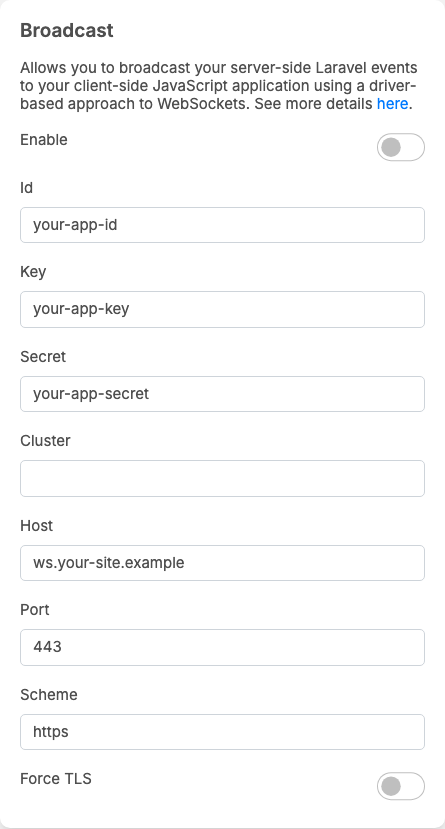
AdminCP → Site Settings → General Configuration → Broadcast. The same fields serve the server (publishing) and the app (connecting):
| Field | Reverb behind HTTPS | Pusher Channels | Used by |
|---|---|---|---|
| Enable | on | on | both; off = no socket, every screen polls |
| Id | PUSHER_APP_ID of .env | app_id | server |
| Key | PUSHER_APP_KEY | key | both |
| Secret | PUSHER_APP_SECRET | secret | server |
| Cluster | (empty) | e.g. mt1, eu, ap1 | both |
| Host | ws.your-site.example | (empty: built from the cluster) | both |
| Port | 443 | 443 | both |
| Scheme | https | https | server |
| Force TLS | on | on | both: on = the app connects with wss:// |
The .env keys involved: PUSHER_APP_ID, PUSHER_APP_KEY,
PUSHER_APP_SECRET (the app the Reverb server accepts), REVERB_SERVER_HOST and
REVERB_SERVER_PORT (where it listens). BROADCAST_DRIVER stays log: the
Enable switch selects the Pusher driver at run time. PUSHER_HOST/PORT/SCHEME/CLUSTER and
REVERB_APP_* are not read.
It writes PUSHER_APP_ID / KEY / SECRET (random, 16 characters each) together with
REVERB_SERVER_HOST=127.0.0.1 and REVERB_SERVER_PORT=6060. Copy the three values into the
Id / Key / Secret fields of the Broadcast card. A command-line install adds the lines itself (Run Reverb,
step 1; long random values, e.g. openssl rand -hex 16).
Verified on 2026-10-22 on a test web-installer install of the 9c4fba6: the written .env holds PUSHER_APP_ID / KEY / SECRET, Reverb started with them, a WebSocket with that key got pusher:connection_established, a wrong key "Application does not exist" (4001), and a publish signed with the secret was accepted (tests/Feature/Core/Install/EnvironmentWizardTest.php). Earlier the same day on the 1.0.0 package: a pusher-js client connected and a wrong secret was refused ("Authentication signature invalid.").
Run Reverb#
Last updated: 2026-10-22 · v1.0.0
- In
.env(after the web installer these lines are there already, with random values; a command-line install adds them):PUSHER_APP_ID=your-app-id PUSHER_APP_KEY=your-app-key PUSHER_APP_SECRET=your-app-secret REVERB_SERVER_HOST=127.0.0.1 REVERB_SERVER_PORT=6060 - Start it once by hand to see it work:
Expectedphp artisan reverb:start --debug
WithINFO Starting server on 127.0.0.1:6060.--debugevery connection is printed ("Connection Established ..."). - Keep it running with Supervisor:
/etc/supervisor/conf.d/fantasyengine-reverb.conf
[program:fantasyengine-reverb]
command=php /var/www/fantasyengine/artisan reverb:start
user=www-data
autostart=true
autorestart=true
minfds=10000
stdout_logfile=/var/www/fantasyengine/storage/logs/reverb.log
supervisorctl reread && supervisorctl update && supervisorctl status fantasyengine-reverb - After every update of the site:
php artisan reverb:restart.
Each open app keeps one connection: raise the open-file limit (minfds, ulimit -n) above
the number of members online at once. For more than one Reverb server see Laravel's Reverb documentation (Redis
scaling, REVERB_SCALING_ENABLED).
Verified on 2026-10-22 on a test web-installer install of the 9c4fba6: the written .env holds PUSHER_APP_ID / KEY / SECRET, Reverb started with them, a WebSocket with that key got pusher:connection_established, a wrong key "Application does not exist" (4001), and a publish signed with the secret was accepted (tests/Feature/Core/Install/EnvironmentWizardTest.php). Earlier the same day on the 1.0.0 package: a pusher-js client connected and a wrong secret was refused ("Authentication signature invalid.").
Reverb behind the web server#
Last updated: 2026-10-22 · v1.0.0
Reverb listens on a local port without TLS; the web server terminates TLS and forwards. A sub-domain of its own is the simplest:
nginxserver {
listen 443 ssl http2;
server_name ws.your-site.example;
ssl_certificate /etc/ssl/ws.your-site.example/fullchain.pem;
ssl_certificate_key /etc/ssl/ws.your-site.example/privkey.pem;
location / {
proxy_http_version 1.1;
proxy_set_header Host $http_host;
proxy_set_header Upgrade $http_upgrade;
proxy_set_header Connection "Upgrade";
proxy_set_header X-Forwarded-For $proxy_add_x_forwarded_for;
proxy_read_timeout 120s;
proxy_pass http://127.0.0.1:6060;
}
}<VirtualHost *:443>
ServerName ws.your-site.example
ProxyPreserveHost On
RewriteEngine On
RewriteCond %{HTTP:Upgrade} websocket [NC]
RewriteRule ^/(.*) ws://127.0.0.1:6060/$1 [P,L]
ProxyPass / http://127.0.0.1:6060/
ProxyPassReverse / http://127.0.0.1:6060/
# SSLEngine on + certificate lines
</VirtualHost>Then the Broadcast card: Host ws.your-site.example, Port 443, Scheme
https, Force TLS on. The server publishes through the same address (/apps/...), the apps
connect to it (/app/...).
Without a proxy: Host 127.0.0.1, Port 6060, Scheme http, Force TLS off.
The Android emulator reaches the Mac's localhost only through adb reverse tcp:6060 tcp:6060.
The proxy blocks follow the Laravel Reverb documentation; they were not run on the test machine (the local test connected straight to the port).
Using Pusher Channels instead#
Last updated: 2026-10-29 · v1.0.0
- Create a Channels app at pusher.com. Its App Keys page lists app_id, key, secret and cluster.
- Fill the Broadcast card: Id, Key, Secret, Cluster; leave Host empty; Port
443; Schemehttps; Force TLS on; Enable on. The server then publishes toapi-<cluster>.pusher.comand the apps connect to Pusher's default host of that cluster (/api/initsends it asbroadcastCluster). - Enable client events is not needed; private channels are authorised by this site.
No Reverb process and no PUSHER_APP_* lines are needed in this case.
Read from the code; not run (no Pusher account on the test machine).
Verify#
Last updated: 2026-10-29 · v1.0.0
/api/initcarries the settings:
Expectedcurl -s https://your-site.example/api/init | php -r '$c = json_decode(stream_get_contents(STDIN), true)["data"]["config"]; foreach ($c as $k => $v) if (str_starts_with($k, "broadcast")) echo "$k=" . json_encode($v) . "\n";'
Own host, empty cluster: with Reverb (or another server set by Host) leave Cluster empty. The site sends the empty cluster as text,broadcastEnable=true broadcastKey="your-app-key" broadcastCluster="" broadcastHost="ws.your-site.example" broadcastPort="443" broadcastScheme="https" broadcastForceTLS=truebroadcastCluster="", and the app connects with it (from daily-fantasy 3595305 / 06c33e2). A site older than that answeredbroadcastCluster=null: the socket then did not open and the app fell back to polling every minute. Store apps built earlier connect too once the site is updated, because the fix is in the site's answer.- The server can publish (same check the code makes, with the values of the card):
Expected (an empty object; a wrong secret throws "Authentication signature invalid.")php artisan tinker --execute "\$c = config('broadcasting.connections.pusher'); \$p = new Pusher\Pusher(\$c['key'], \$c['secret'], \$c['app_id'], \$c['options']); var_dump(\$p->trigger('test-channel', 'test-event', ['ok' => 1]));"object(stdClass)#... (0) { } - A browser can connect: sign in to the web app, open the browser's developer tools → Network → WS. A connection
to
wss://ws.your-site.example/app/your-app-key?protocol=7...stays open; with Reverb's--debugthe console prints "Connection Established". - End to end: open the ranking page of an entry in a live contest; when the next scheduler minute changes a score the page refreshes without a reload.
The broadcastCluster line and the own-host note re-checked on 2026-10-29 against the code of 94fe444 (AppController.php casts the setting to a string since 3595305; PusherService.js turns a missing cluster into '' since 06c33e2); read from the code, not run again. Verified on 2026-10-22 on a test install of the 1.0.0 standard package: Reverb started on a local port, a pusher-js client connected with the key from the settings and a wrong key was refused; a publish with the right secret was accepted and one with a wrong secret refused ("Authentication signature invalid.").
Troubleshooting#
Last updated: 2026-11-02 · v1.0.0
| Symptom | Cause and fix |
|---|---|
| Screens update only every minute | realtime is off or the socket fails: the app falls back to polling. Check Enable, then the WS connection in the browser. |
| No WebSocket is opened at all with an own host and an empty Cluster | the site is older than daily-fantasy 3595305: /api/init answers broadcastCluster=null and the app does not connect. Update the site: the answer becomes "" and installed apps connect without a new build. |
| WebSocket closes at once ("Application does not exist", code 4001) | the Key differs from PUSHER_APP_KEY, or .env has no PUSHER_APP_* lines (a command-line install that skipped them; restart Reverb after adding them). |
| WebSocket never connects on an https site | Force TLS is off (the app tries ws://), the port is not the proxy's, or the proxy does not forward the Upgrade header. |
| Connected, but pages do not refresh | the server cannot publish: wrong Secret / Id, or the host is not reachable from the server itself. Run the tinker check of Verify. Publishing errors are swallowed so a contest is never held up by them. |
| Live contests refresh late | with QUEUE_CONNECTION=database the re-score job runs in the scheduled queue worker of the same minute; cron must run every minute. |
/broadcasting/auth answers 401 / 403 | the member is not signed in, or the Authorization header is stripped on the way (Install → Verify). |
| Too many connections / Reverb dies under load | raise the open-file limit (minfds, ulimit -n). |
The web app is served from another domain than the API and its screens only poll; the browser console shows /broadcasting/auth blocked by CORS policy | the site is older than 2026-11-02: config/cors.php did not list the channel login. Update the site (its paths then read api/*, sanctum/csrf-cookie, broadcasting/auth); with a cached config run php artisan config:clear. The web build served by the site itself and the mobile apps are not affected. |
Change log#
Last updated: 2026-11-19 · v1.0.0
| Date (GMT+7) | Section | What changed |
|---|---|---|
| 2026-10-22 | all | First version, checked against daily-fantasy c68e20c; Reverb connect and publish verified on a test install. |
| 2026-10-22 | rt-settings, reverb-run, rt-troubleshooting | The web installer now writes PUSHER_APP_ID / KEY / SECRET (the names Reverb reads): the "add the lines yourself" warning replaced, the 4001 row no longer blames the installer; re-verified on a wizard install of the 9c4fba6. |
| 2026-10-28 | rt-overview | A live contest also broadcasts when its "Results pending review" window (settle delay of a fed league) starts or ends. The other sections were re-checked against the 7b8ff49: no change. |
| 2026-10-28 | rt-verify | The expected /api/init lines in the order the site prints them (broadcastEnable first). |
| 2026-10-28 | rt-settings | Shot renamed rt-settings__broadcast after its section (same image). |
| 2026-10-29 | pusher-hosted, rt-verify, rt-troubleshooting | Re-checked against daily-fantasy 06c33e2 / 3595305 (dated 94fe444): broadcastCluster is sent as text, "" with an own host and no cluster (before: null, and the socket did not open); the "own host, empty cluster" note in Verify, a troubleshooting row for an older site. |
| 2026-11-02 | rt-troubleshooting | Row for a web app on another domain than the API: the channel login /broadcasting/auth is in the CORS paths since 2026-11-02. |
| 2026-11-04 | rt-overview | Re-checked against daily-fantasy bd2f162: the standings page polls and stops on its own answers (also when hidden behind another page). |
| 2026-11-16 | all, change-log | This copy of the guide describes version 1.0.0 (a separate copy describes 1.1.0). Re-checked against daily-fantasy 3e10186: the fixes made to 1.0.0 since it shipped change nothing this guide describes (the .env keys are now read through the configuration, with the same values). Internal labels taken out of older rows, "checked" lines and the page-source comment; wording only, the Last updated lines stay. |
| 2026-11-19 | all | Moved to the documentation site: this page holds the sections rt-overview, rt-settings, reverb-run, reverb-proxy, pusher-hosted, rt-verify, rt-troubleshooting of the former Realtime document. Page frame, headings and links between the pages updated; the text of the sections is unchanged. |
| 2026-11-19 | rt-overview | This guide describes Fantasy Engine only: the snake draft notes taken out of rt-overview (the snake draft product has its own documents). |
| 2026-11-19 | rt-settings | References to the tabs of the former single-page document replaced by links to the sections they meant; wording only. |