Fantasy Engine user guide 1.0.0 / AdminCP
Contests and prizes
Create, change, cancel and complete contests; templates that create them for you.
Contests#
Last updated: 2026-11-16 · v1.0.0
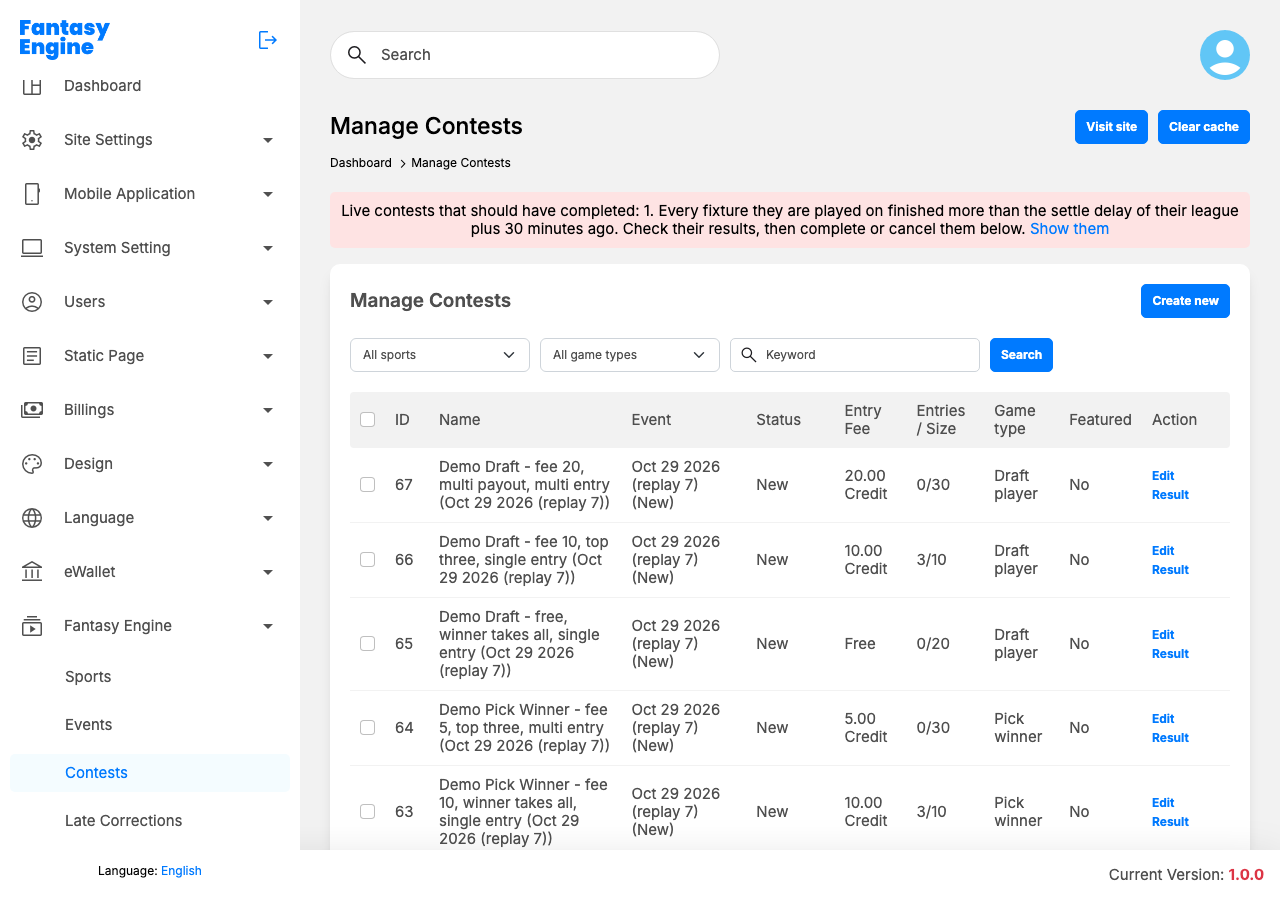
Fantasy Engine → Contests: filters All sports, All game types and a keyword; columns ID, Name, Event (with its status), Status, Entry Fee, Entries / Size, Game type, Featured; row links Edit and Result.
Live contests that should have completed#
In a league with the data feed a contest completes by itself once its games are over and the settle delay has passed. If one is still Live 30 minutes after that (the scheduler stopped, a result is stuck), a red notice at the top of this list says "Live contests that should have completed: n. Every fixture they are played on finished more than the settle delay of their league plus 30 minutes ago. Check their results, then complete or cancel them below." with Show them, which lists only those contests (Show all contests goes back). Check their results, then use Complete or Cancel. The same contests are on the Data Feed overview. Leagues without the feed are never listed: you complete their events yourself.
| Bulk action | What happens |
|---|---|
| Delete | only a contest without entries that is not live or being cancelled; otherwise refused with the reason |
| Cancel | confirm "If you select this option, all picks will be deleted and all entry fees will be refunded." New and live contests go to Pending cancel; every paying entry is refunded, each member gets a notification and, for a refund, an e-mail; the contest ends as Cancel. Complete or already cancelled contests are skipped (counted in the message). |
| Featured / Un-Featured | shows or removes the contest in the Featured block of the members' home page |
| Complete | confirm "Before marking a contest as completed, please make sure all results are updated. Are you sure you want to continue?" Completes and pays at once, without waiting for a settle delay; a contest none of whose games is final, or a paid one below its minimum entries, is cancelled and refunded. The message counts completed / cancelled and refunded / waiting for results / skipped. |
Create a contest#
| Field | Rule |
|---|---|
| Sport | the league; only leagues that offer a game type are listed (an edited contest keeps its own) |
| Event | a coming event of the league that still has a scheduled game whose kick-off time is known and still ahead; an event leaves the list at its last kick-off, also while the scheduler has not yet marked its games started |
| Fixtures | tick the games the contest is played on (at least one). A game whose time is not announced is shown with TBA, unticked and disabled; a game that started, finished, was called off or whose kick-off has passed is not listed (also while its status still says it is scheduled), and one chosen just before its kick-off is refused ("A fixture that has started, finished or been called off cannot be chosen.", "A fixture whose kick-off time has passed cannot be chosen.", "A fixture whose kick-off time is not announced yet cannot be chosen."). Editing a contest keeps the games it already lists. |
| Game Type | the game types the league offers: Pick winner (team leagues), Draft player (leagues with an active position) |
| Contest Name | up to 255 characters |
| Entry Type | Single Entry or Multi Entry |
| Size | number of entries, 2 to 10,000 |
| Entry Fee | picked from the Entry Fee list of the Fantasy Engine settings (Free = 0), as in the app; opens once a size is typed. To offer another fee, add it to that setting (at most 500). |
| Prize Type | Winner take all; Top three (size at least 3); Multi payout: rows From / To place and %, places from 1 without gap or overlap, within the size, each share above 0, total exactly 100% (Add ranking, Remove; the form shows a sample table). A free contest is always winner take all, for the ranking only. |
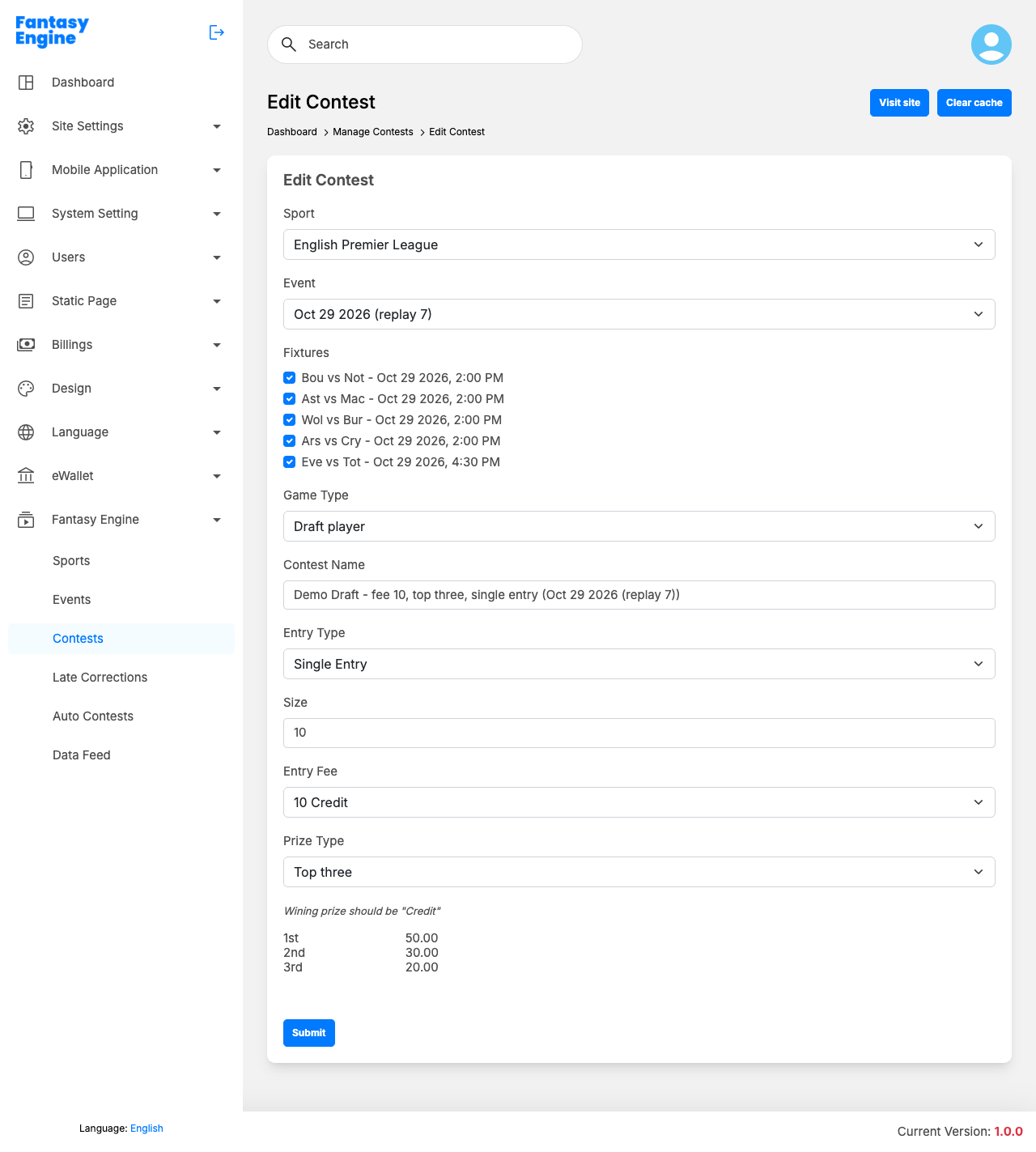
The site fills in the rest when the contest is saved and keeps it on the contest for good: the start (the first kick-off of its games), the minimum entries, the site profit %, the top-three percentages, the active scoring categories and their points, the lineup positions and quantities of a draft, the pick points and the salary cap. Changing a setting, a category or a position later does not change a contest already created.
Edit a contest#
Only a New contest that has not started can be edited. Once its start time or the kick-off of its first game has passed (also on a site whose scheduler has not yet moved it to Live), Save is refused with the message "Only a contest that has not started can be changed."; the Edit page still opens. Without entries every field can change. Once it has an entry only the name, the size (not below the entries) and the entry type can change: the fee, prizes, game type, event and games are locked.
Members' contests#
Members can create contests in the app too (Create a contest); they appear in this list like yours. Three settings (Fantasy Engine settings) control it: Members can create contests (on by default), Max open contests per member (10) and Max contests a member can create per day (5, counted over the last 24 hours, cancelled ones included); 0 = no limit. Your own contests in the AdminCP are never limited.
Prizes and the site's share#
Last updated: 2026-10-29 · v1.0.0
- Prize pool = the entry fees paid, less the Site profit % (a setting, stored on each contest when it is created). While a contest is open the app shows it as Max prize pool: the pool of a full contest. Once it is live, complete or cancelled the app shows the Prize pool of the entries that really paid (automatic entries do not count). A pool of 0 (a free contest, a cancelled one) reads No prize. The prizes actually paid always come from the fees actually paid. Amounts are shown with two decimals ("90.00 Credit").
- Top three splits the pool by the First / Second / Third place winning percent settings (50 / 30 / 20 by default). Multi payout splits it by the contest's own table.
- Ties: entries with the same points share the rank and split the prizes of the places they cover equally.
- Every prize is rounded down to the cent: the prizes never add up to more than the entries paid (the one exception is a re-settle top-up, paid by the site: Late Corrections).
- Minimum entries of a paid contest at its start: 2 (winner take all), 3 (top three), the last paid place (multi payout). Fewer paying entries = cancelled and refunded.
- Prizes are paid into the members' balances when the contest completes; the site's share stays with the site. Results are final once paid: a stat correction published after the payout never takes a prize back.
A contest's results#
Last updated: 2026-11-16 · v1.0.0
Result in the contest list shows the contest (status, fee, entries / size, game type), its games with the scores, and the standings: rank, member, points and prize. Press an entry to see its picks (pick winner: your pick, the result and the points of each game; the pick is green when it was right, red when it was wrong, and has no colour while its game has no result that counts: not played yet, postponed or cancelled; draft: each player, his position and points; a player in a Flex slot shows "FLEX (TE)", the slot with his own position).
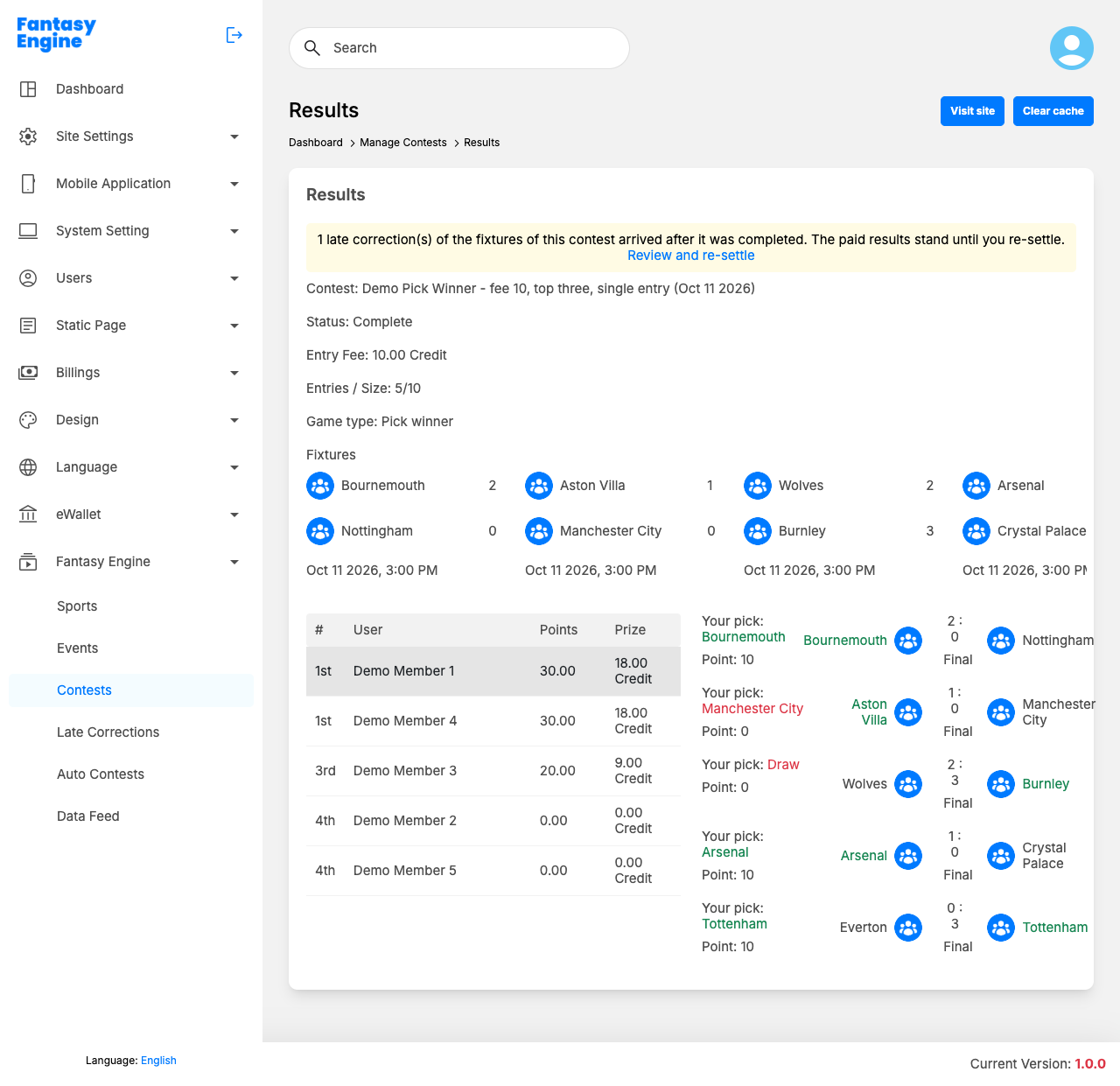
When late corrections of its games arrived after the contest was completed, the page says "n late correction(s) of the fixtures of this contest arrived after it was completed. The paid results stand until you re-settle." with a Review and re-settle link; after a re-settle it says when and by whom, with the totals.
Auto contests#
Last updated: 2026-11-16 · v1.0.0
Fantasy Engine → Auto Contests holds templates. Twice a day (01:30 and 13:30 UTC), for every coming event of a template's league that starts within the Auto-create contests a specified number of days prior to the event setting (2 days by default), the site creates one contest per template and per game type ticked in it, on the scheduled games of the event whose kick-off time is known. Run now does it at once.
- Only an active event that is still New gets contests; an event you set Inactive is skipped and gets its contests on the first run after you set it Active again.
- A game type the league does not offer (Draft player in a league without an active position, such as MMA) is skipped; the site's log notes it once per run, and the contests come on a later run once the league offers the type.
- An event whose games all wait for their time (TBA) gets nothing yet, and gets its contests on a later run once a time is announced. A contest made from a template never takes a TBA game, even after its time is announced.
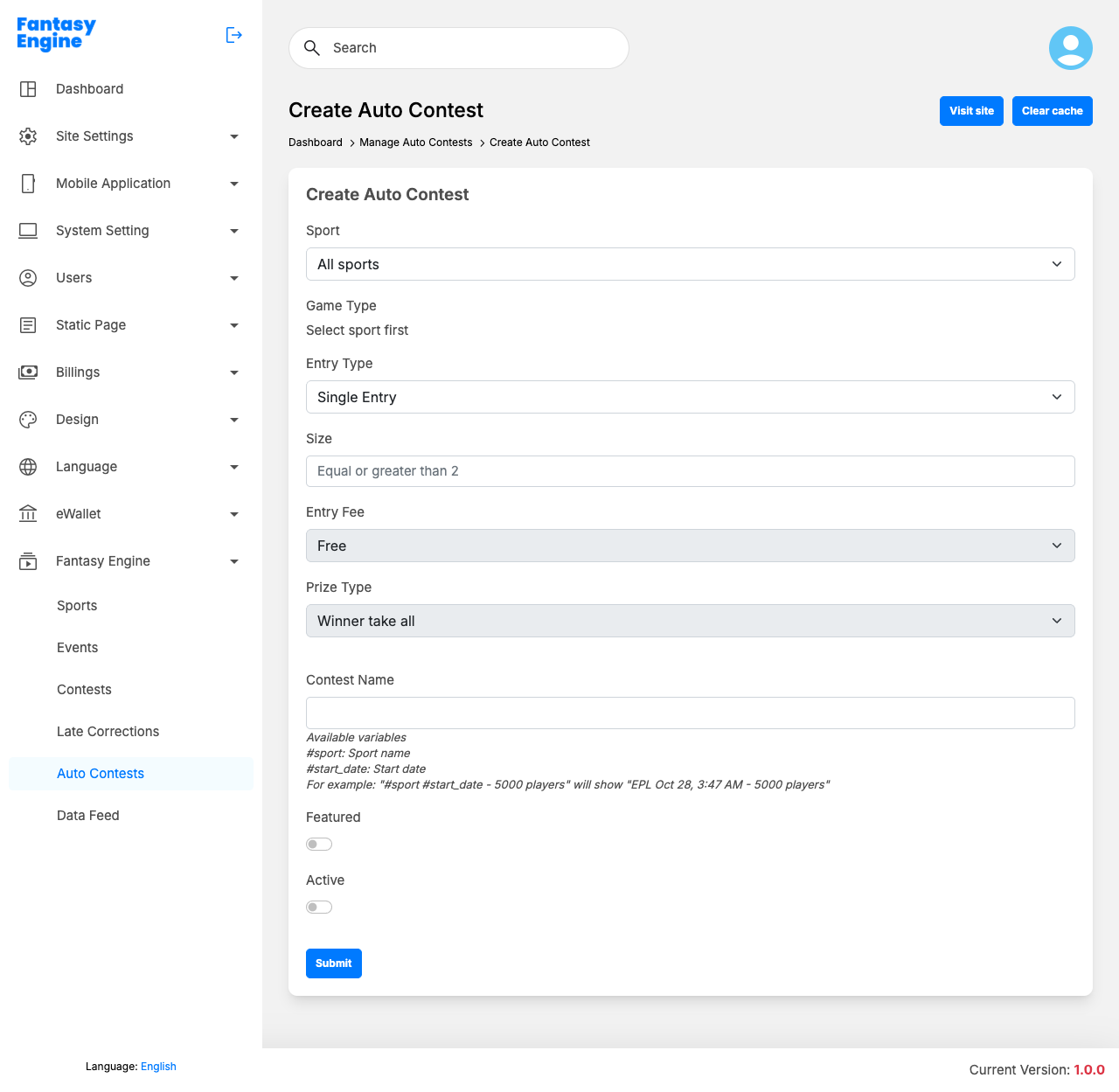
| Field | Rule |
|---|---|
| Sport | the league |
| Game Type | one or more of the league's game types (one contest each) |
| Entry Type, Size, Entry Fee, Prize Type | as for a contest (size 2-10,000, the fee from the settings list, top three needs size 3, multi payout table totals 100%) |
| Contest Name | may hold #sport (the league abbreviation) and #start_date (the first known kick-off, short date format): "#sport #start_date - 5000 players" gives "EPL Oct 29, 2:00 PM - 5000 players" |
| Featured | the contests go to the Featured block |
| Active | only active templates run |
An event gets its automatic contests once: after a run that made at least one contest on it, it is marked as done. A template created or switched on later is used only for events not handled yet. Two runs at the same time (the scheduled run and Run now, or a double click) never make the contests of one event twice: the second waits and finds the event done.
Change log#
Last updated: 2026-11-19 · v1.0.0
| Date (GMT+7) | Section | What changed |
|---|---|---|
| 2026-10-28 | all | First version, checked against daily-fantasy 7b8ff49; screenshots of the local demo site (AdminCP 1280, web app 1280 / 390, light). |
| 2026-10-28 | contests-admin, auto-contests, enter-draft-player, data-feed | The AdminCP entry fee is a drop-down of the settings list (500 = the upper limit of that list); "Salary Cap" label; Data Feed screen re-shot without the removed buttons. |
| 2026-10-28 | contest-results, how-to-play, site-settings | Shots renamed after the section that shows them: contest-results__contest-result, how-to-play__help; the Fantasy Engine settings card is shared with the install guide and keeps its first section's name, first-settings__fantasy-engine-settings. |
| 2026-10-29 | contests-admin, prizes, auto-contests | Live contests that should have completed: notice and filter; create lists only leagues with a game type, rounds with a known-time game, and refuses TBA / started / past games; member contest settings; Max prize pool / real pool / No prize, two decimals; auto contests skip inactive events, game types a league does not offer and TBA games. Contest list re-shot. |
| 2026-10-30 | teams-players, guide-overview, enter-draft-player, contest-results, live-results | NFL Flex: the Player Positions field "Flexible slot: takes players of" and the list's "Takes RB, WR, TE", the NFL lineup (13 slots with FLEX 1, from Sync data), the form's refusals, no player on a flexible position, the delete guard of a flexible slot, a contest keeps a lineup without Flex; Draft player needs a plain position; the enter page's Flex slot ("RB / WR / TE", own slots first, FLEX filter), "FLEX (TE)" in the AdminCP result and FLEX over the position on the standings. New shots teams-players__flex-position-form, __flex-positions-list, enter-draft-player__flex-lineup (a test NFL league, removed after). |
| 2026-10-30 | results, contests-admin | The Complete confirmations quoted as the AdminCP shows them since the grammar fixes ("Before marking an event / a contest as completed, ... Are you sure you want to continue?"). |
| 2026-11-16 | contests-admin, create-contest | Checked against 3e10186: the create lists (AdminCP and app) never offer a game whose kick-off has passed, a round with no game still to start or a league with no such round, also while the scheduler has not marked the game started; saving an AdminCP contest whose start time or first kick-off has passed is refused with "Only a contest that has not started can be changed."; the Edit page still opens. Text only. |
| 2026-11-16 | contest-results | A Pick winner pick in an entry's results is green when right, red when wrong, and has no colour while its game has no result that counts (not played yet, postponed or cancelled). Text only; the screenshot shows a completed contest and still matches. |
| 2026-11-16 | auto-contests | Two runs at the same time never make the contests of one event twice. |
| 2026-11-16 | all, change-log | This copy of the guide describes version 1.0.0 (a separate copy describes 1.1.0). Internal labels taken out of older rows and the page-source comment; wording only, those Last updated lines stay. |
| 2026-11-19 | all | Moved to the documentation site: this page holds the sections contests-admin, prizes, contest-results, auto-contests of the former single-page user guide. Page frame, headings and links between the pages updated; the text of the sections is unchanged. |