Fantasy Engine user guide 1.1.0 / For members
Profile and settings
The member's profile and account settings.
Profile and settings#
Last updated: 2026-11-25 · v1.1.0
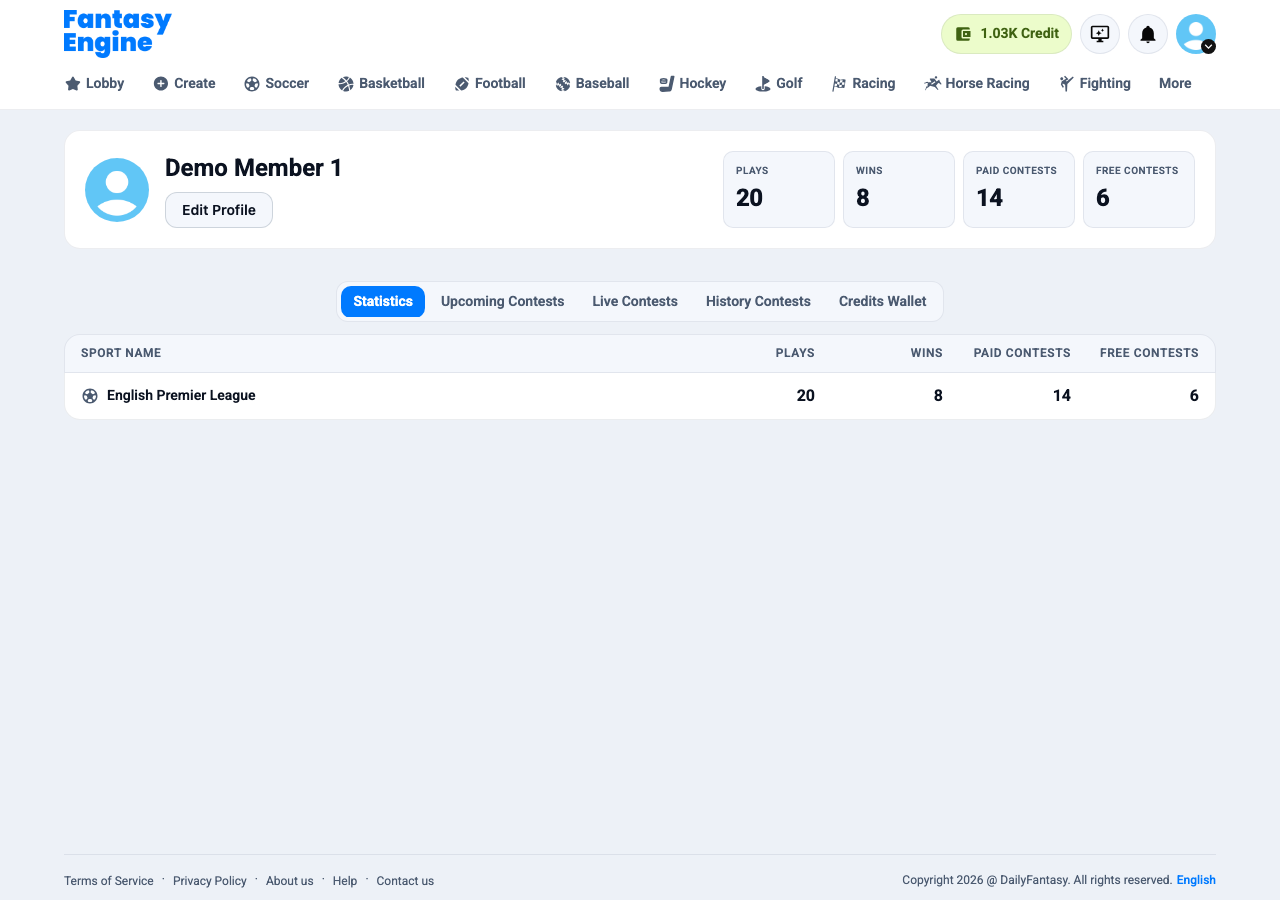
The profile shows the member's Plays, Wins, Paid contests and Free contests, and tabs Statistics (the same counts per league, only the leagues he played; a new member sees "No stats found" and Go to Lobby), Upcoming Contests, Live Contests, History Contests and Credits Wallet. On a phone the tabs do not fit side by side: the bar scrolls sideways, the selected tab is always shown whole, and with the last tab (Credits Wallet) selected the bar ends at the right edge (the tab before the first whole one may show cut at the left). Edit Profile and Settings hold the account: profile, avatar, password, language, display (light / dark), two-factor authentication, account deletion. An account without an e-mail address of its own (made by a Facebook sign-in, for example) has Add email and password in the place of Change Password (Add email and password).
The first theme: a visitor sees the site in the theme of AdminCP → Site Settings → General Configuration → Login & Registration → Default appearance mode (System = the device's setting, the default; Light; Dark), in the apps too; a change of that setting reaches him the next time the site or the app is opened. A theme picked under Display stays on this device or browser. A member who signs in on a device or browser where he has not picked one gets the theme stored on his account (his last pick, or the site's default when he signed up). The same setting is the theme a new member's account starts with.
- Two-factor authentication is offered only while the site has it on (AdminCP → Site Settings → General Configuration → Login & Registration → Two-factor authentication (2FA), off by default). While it is off, a link to the two-factor page opens the profile instead, and Back from there does not return to an empty two-factor page.
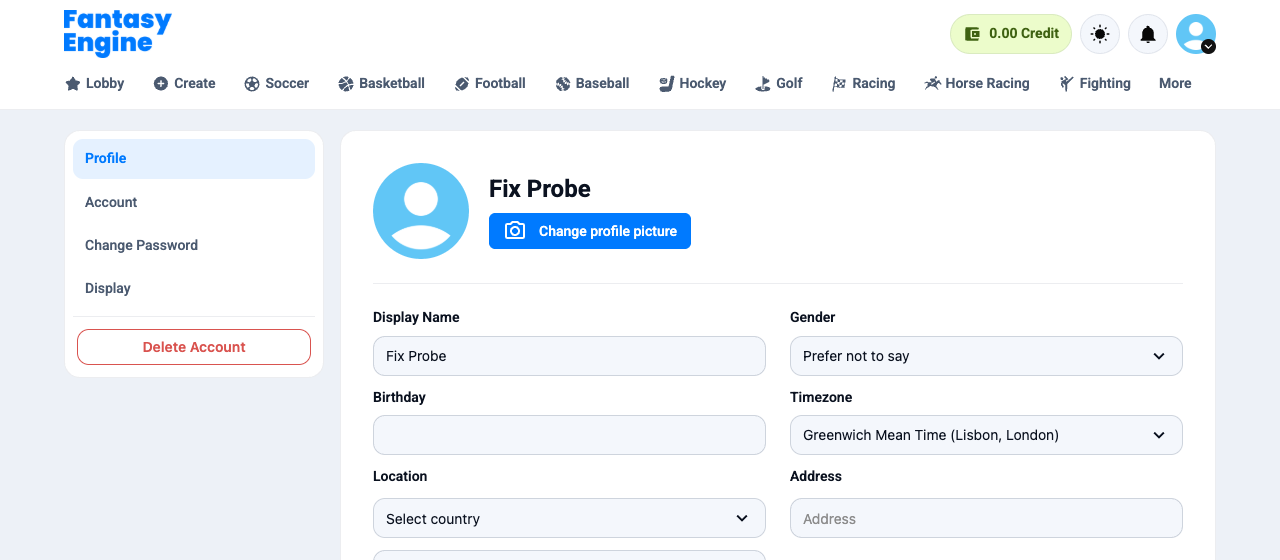
- Long values in the apps: on the profile form a long Timezone, Country, State or City ("Greenwich Mean Time (Lisbon, London)") wraps onto a second line of its field instead of being cut; the drop-down fields (Gender ...) have the size and height of the text fields.
Delete your account#
Where the button is:
- Computer (a browser window wider than 1024 px): the settings page (Edit Profile on the profile) has a column Profile, Account, Change Password, Display ...; under it, separated by a line, the red outlined button Delete Account.
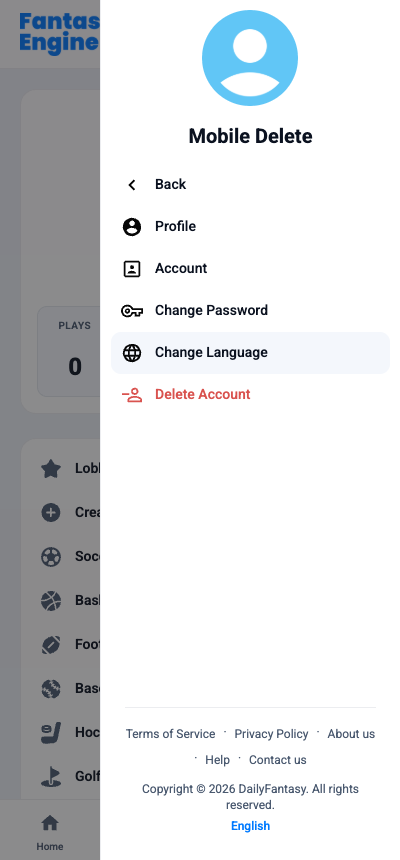
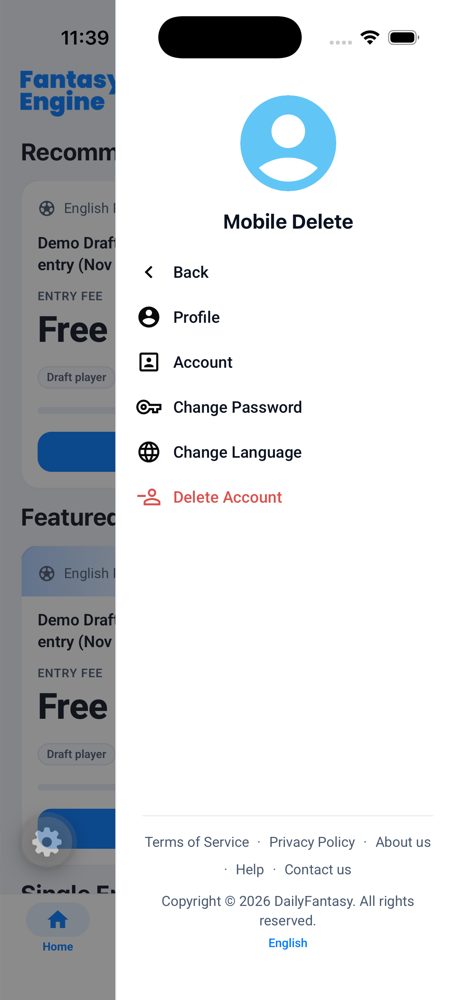
- Phone or tablet browser (1024 px or narrower) and the Android / iOS apps: the avatar at the top right opens the menu drawer → Settings → the last row, in red, Delete Account (after Profile, Account, Change Password, Change Language).
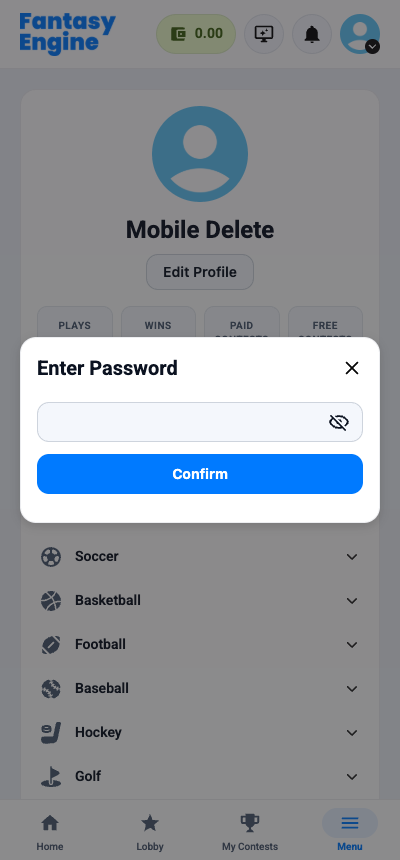
- Press Delete Account (on a phone the drawer closes first). A window Enter Password opens.
- Type the account's password and press Confirm. A wrong password shows "The password is incorrect." and the window stays; closing it with × deletes nothing. While the request runs the button (or the row) shows a spinner and takes no second press. An account without an e-mail address has no password yet: it adds one first (Add email and password).
- With the right password the account is deleted straight away (there is no second question) and the app starts again signed out: the website on the login page, the apps on the landing page. The same e-mail and password no longer sign in.
What is removed, and who never sees the button (the site's first admin account, the protected demo accounts, or every member while the site does not allow deletion): Member accounts: deletion and protected accounts. A member who may not delete sees no button and no empty space for it.
Members see free contests only, no balance, fee, prize or wallet, and the counts of free play (Money-off mode).
Add email and password#
Last updated: 2026-11-25 · v1.1.0
A member who signed up with Facebook (or another sign-in that does not share a verified e-mail address) has an account without an e-mail address of its own. He signs in with that provider only, and cannot change a password, set up two-step verification, send funds or delete the account. Add email and password gives the account both.
Where: the settings column on a computer, or the avatar menu → Settings on a phone and in the apps. The row Add email and password takes the place of Change Password while the account has no address; members whose account has one never see it (opened from a saved link, the page goes on to Account).
- The page says "Your account has no email yet. Add one and choose a password: we will send a code to this email to make sure it is yours." Type the e-mail address, a new password and the same password again, and press Send code. The address must be valid and not used by another account ("The email already exists.") nor banned ("The email has been banned."); the password must have at least 6 characters (with the site's Enable better password policies on, also an upper case letter, a number and a special character), and the two must match ("The confirm password does not match."). A refused field shows its reason under it and no mail is sent.
- A 6-digit code is mailed to that address. The page now says "Please check your email for a message with your code.", shows the code boxes (Enter your verification code) and "We sent your code to: address". Resend code mails a new code to the same address ("Your code has been sent."; the earlier code stops working); Back returns to the first step with the address and passwords kept.
- Type the code and press Save. A wrong code shows "Your code is incorrect. Please try again.", an old one "The code has expired." (after 6 minutes), and after 5 wrong tries "Too many wrong codes. Please ask for a new code.". If the address was taken by another account in the meantime, the page goes back to the first step and shows it there.
- When the code is right: "Your changes have been saved." The page moves on to Account, and the settings menu shows Change Password again. The member stays signed in on this device and is signed out on his other devices; from now on he signs in with the e-mail address and the password, or with the provider as before.
Limits (codes per hour, confirmations), the mail of the code and the AdminCP template: Sign-in security. An app built from version 1.0.0 does not have this page: its members use the website or the updated app.
Change log#
Last updated: 2026-11-25 · v1.1.0
| Date (GMT+7) | Section | What changed |
|---|---|---|
| 2026-10-28 | all | First version, checked against daily-fantasy 7b8ff49; screenshots of the local demo site (AdminCP 1280, web app 1280 / 390, light). |
| 2026-10-29 | wallet, notifications, profile | Two decimals, Add Credits without a payment method, redeem minimum, type filter of the used types; notice texts (entry fee with the contest, finished / won with the place and prize); Statistics tab with played leagues only. Wallet and profile re-shot, notifications and redeem shots from today's UI fix run (1440, light). |
| 2026-11-04 | member-accounts (new), profile | Delete Account: the member's steps on a computer (settings column) and on a phone / in the apps (avatar menu → Settings → Delete Account), the Enter Password window, what a deletion removes and what it leaves; the AdminCP settings User account deletion (User Configuration) and Lock delete and account setting change. (General Settings), the first admin account, the Users list. New shots profile__delete-account-column (web 1280), profile__settings-list (web 400, iOS), profile__password-modal (web 400), from the 2026-11-04 checks (throwaway members, deleted). |
| 2026-11-05 | profile | The profile tab bar scrolls on a phone with the selected tab whole (the last tab ends at the right edge); two-factor authentication only while the site has it on, the redirect to the profile leaves no empty page behind Back; long Timezone / Country / State / City values wrap in the apps; drop-down fields the size of the text fields. |
| 2026-11-09 | change-log | The name of an internal review file is taken out of older rows; only those words changed. |
| 2026-11-09 | profile | The first theme: visitors see the site's Default appearance mode (System by default), also in the apps; a pick stays on that device or browser; a member signing in elsewhere gets the theme stored on his account. |
| 2026-11-10 | pages-menus, change-log | Help, How to play and the menus: seven How to play pages, one per game type (was two); the static pages list re-shot (pages-menus__pages-list__admin-1280__2026-11-10.png, the 2026-10-28 shot deleted). The header and the page description name version 1.1.0, the version this guide describes. |
| 2026-11-10 | change-log | Internal review labels and the wording of the test sites taken out of older rows and "checked" lines; content unchanged, the Last updated lines of those sections stay. |
| 2026-11-10 | guide-overview, sports-leagues, contests-admin, auto-contests, contest-detail, create-contest, profile, change-log | Checked against 7a7a0c9. Overview: the seven game types one line each, linked to Sports and leagues; an event note for Survivor. Sports and leagues: a league you create offers Draft player once it has an active position. Contest page: the Scoring tab of every game type and the Survivor results rule. Create a contest (app): every game type the league offers, and what Showdown, Survivor and Tiers need of the chosen games, with their refusals. Re-shot: Manage Contests with the overdue notice and its round sentence, Create Auto Contest with the 1.1.0 game types and #fixture, the app's Create a contest form (2026-11-10; the 2026-10-28 / 2026-10-29 files removed). Profile: a page-source comment tidied (content unchanged, its Last updated line stays). |
| 2026-11-13 | statuses, events, sports-leagues, notifications, change-log | Checked against 6ab7daa with the fixes of 2026-11-13. A fed game moved more than 7 days after the other games of a contest counts as postponed for that contest only (no pick, no points, the contest completes without it; a contest of that game alone follows it; not when half or more of the games move together; a contest left with only called-off games on their dates is cancelled and refunded as unplayed). Saving the sport / league form changes no name in any language (whatever the AdminCP language); a save that carries a new name gives it to every language that still showed the old one, a translated name kept. The cancel notice reads "Contest "..." was cancelled: your fee was refunded." (no fee clause for a free contest or an auto-join entry), sent by the site with no member name or picture. |
| 2026-11-13 | enter-margin-pickem (new), guide-overview, sports-leagues, contests-admin, contest-results, pages-menus, create-contest, how-to-play, change-log | The new game type Margin pick'em: the winner of every game and the band of its winning margin (NFL 1-3 / 4-7 / 8-14 / 15+, NBA 1-5 / 6-10 / 11-15 / 16+, MLB 1 / 2 / 3-4 / 5+, NHL and soccer 1 / 2 / 3+, a draw in soccer); 2 points for the winner, 5 with the right band or a right draw; overtime, penalties, shoot-outs and NFL ties; offered in the fed soccer leagues, NFL, NBA, MLB and NHL, never in a league you create; the bands kept on the contest; the AdminCP result of an entry (a pick on a game the data feed moved weeks away from the contest is not judged); a late correction of the margin only; a site that changes the bands or points in the code also edits its How to play page. Eight game types in the overview, the league table, the contest form, the How to play pages and tabs. Screenshots of its app screens come with the app screens of the type. |
| 2026-11-13 | enter-margin-pickem, create-contest, how-to-play, pages-menus, change-log | Margin pick'em in the app: the entry screen (bands and points card, a team and a band per game, a draw where the league has draws, Pick needed and the messages of a missing pick), Your Selections with the band of each pick, the Scoring tab with the bands and points (also for a visitor), My Picks with the band chip and the points; the sentence on the Scoring and Rules tabs corrected (the Scoring tab now shows the bands). New screenshots: entry screen, Your Selections, Scoring tab on a phone, My Picks of a completed contest, AdminCP Result. Re-shot: Create a contest with the eight game types and How to play with its eight tabs (the 2026-11-10 files removed). Static pages caption: Survivor and Margin pick'em are on page 2. |
| 2026-11-13 | contest-results, enter-margin-pickem, change-log | AdminCP Result: in pick winner, confidence pick'em, score predictor and margin pick'em the pick is green when right, red when wrong and uncoloured while its game has no result that counts (not played yet, postponed, cancelled); a postponed game's pick was shown red before. The AdminCP Result screenshot of margin pick'em re-taken with the corrected colours (same file name). |
| 2026-11-13 | enter-draft-player, enter-showdown, enter-tiers, change-log | The player list is pressed on the row: a press adds the player (on a phone and in the apps, back to the lineup), a press on a picked row (light blue with a check) takes him out, a row no slot can take is greyed out and a press on it says why ("Your lineup has no open slot for this player. Remove a player to make room."). The sentence that a name opens the player's overview is taken out (the list never opened one). Shots re-taken: enter-draft-player__lineup, enter-showdown__lineup, enter-tiers__lineup; new enter-draft-player__select-player (phone); enter-draft-player__flex-lineup cut to the lineup (the list beside it showed the former plus / remove buttons). |
| 2026-11-13 | enter-draft-player, enter-showdown, enter-tiers, change-log | The lineup works like the list: a filled slot shows a check and a press on it takes its player out (the remove buttons are gone); an empty slot keeps "Select player" and, on a phone and in the apps, its add button. Make captain stays a control of its own and never takes a player out. Two hint lines: "Tap a player to add him. Tap him again to remove." above the list, "Tap a player in your lineup to remove him." above the slots. Shots re-taken: enter-draft-player__lineup, __select-player, enter-showdown__lineup, enter-tiers__lineup; new enter-draft-player__lineup (phone); enter-draft-player__flex-lineup cut to the position, name and salary columns (its action column showed the former remove buttons). |
| 2026-11-13 | enter-draft-player, change-log | Long player lists: more players load as you scroll, and the games, the position filter, the search box and the column titles stay at the top of the window (on a phone at the top of the select-player list); a new filter or search shows its players from the top. On a computer the lineup stays at the top of the window and the bar with Submit at its bottom while the players scroll; a lineup taller than the window scrolls on its own so its last slot can be brought above the bar. Text only; no new screenshots. |
| 2026-11-14 | enter-draft-player, enter-showdown, enter-tiers, change-log | On a phone and in the apps an empty lineup slot is pressed anywhere on its line to open its player list (before, only the small add button at its end opened it); the plus stays at its end. Text and one caption only; no new screenshots. |
| 2026-11-14 | sports-leagues, auto-contests, app-home, create-contest, enter-pick-winner, enter-margin-pickem, enter-showdown, enter-tiers, enter-draft-player, live-results, change-log | Screenshots brought up to date with the current app. Re-taken: the player lists of draft player, showdown and tiers scrolled with their filters kept at the top and the lineup and Submit bar kept in the window (computer), the phone lineup with the plus on every empty slot and the bar across the whole width, the phone select-player list scrolled under its kept filters; the standings of draft player, showdown and tiers with the players, the position column and the standings joined side by side; Create a contest listing only the coming rounds; the entry page on a phone with the full-width bar; the AdminCP league form and the Create Auto Contest form with Margin pick'em among the game types (eight on the league, seven for a template). Text: the Submit bar spans the whole width on a phone and in the apps; messages stack close, show once per message, sit above the Submit bar on an entry page and never block what is under them; the empty player list says "No players match your search" under the column titles; Create a contest lists only rounds with a kick-off still ahead and never a game whose kick-off has passed; the showdown and tiers lists keep their filters at the top like the draft list. The 2026-10-29 / 2026-11-10 / 2026-11-13 files of these shots are removed; the NFL Flex lineup picture is kept (its lineup columns look the same). |
| 2026-11-16 | player-detail (new), enter-draft-player, change-log | Player details: a press on a player's photo in the player list of draft player, showdown or tiers opens a window with his basic information (salary, shirt number, country, age, injury label, his game in the contest), FPPG and Std. dev. over his latest 20 finished games, the averages per game of each scoring category of the contest, his last 10 games (a table on a computer, one row per game on a phone and in the apps) and Select player / Remove player; points by the contest's own scoring. New screenshots on the web app at 1280 and 390. Checked against db92b46. |
| 2026-11-16 | enter-pick-winner, lobby, app-home, contest-detail, change-log | Checked against a1c521f. A contest the member is in and cannot enter again opens his entry (the latest of several) instead of a refusal: before the start with Edit and Leave, once live or over its standings and result; a contest he can still enter opens the enter page as before. On a multi-entry contest that is full, started or cancelled and that he is in, the lobby row shows My entry, the home card View/Edit (not Full) and the contest's page View/Edit or Results instead of the reason. No screenshot changed: the current shots show no such contest. |
| 2026-11-17 | contests-admin, auto-contests, create-contest, data-feed, guest-lobby, change-log | Checked against 9ab76d13. A game of the data feed more than 7 days after the middle kick-off of the other games is refused by the contest forms (AdminCP and app, the message quoted) and left out by templates. Contests: the red notice and the Data Feed card also list a Survivor contest whose open round is over in a league whose feed is switched off (only Complete closes that round; the list moves nothing). Visitors: the limit of 120 a minute counts lobby searches only (a word or a filter), not opening the lobby, a contest's page or How to play. |
| 2026-11-18 | members-wallet, change-log | Checked against c2d8799. Transfer Fund Requests: a request is decided once ("This payment request has already been handled."); a withdrawal needs the role permission Transfer funds, plus a verified profile when that setting is on. New box: PayPal / Stripe payments that are not credited by themselves (other amount or currency, a deposit started before the update) are listed in System Log; check at the gateway and credit with Transfer Mass Funds; sites sharing a gateway account need their own encryption key. |
| 2026-11-18 | member-accounts, change-log | An account is not deleted while its wallet holds a balance, a withdrawal waits, a deposit is not finished or an entry is in a contest that is not over: the four messages; AdminCP bulk delete keeps such accounts and names them with the reason. The line that a balance left in the wallet is not paid out is removed (a balance now blocks the deletion). |
| 2026-11-18 | sign-in-security (new), languages (new), change-log | New section Sign-in security: Bad login limit / Lockout time, member login, forgot password (5 codes an hour per address, 6 minutes, 5 wrong tries, one use, same answer for an unknown address), password change, two-factor codes, contact form, AdminCP login lockout (per account and visitor, three times the limit from all visitors) and its second step; proxy box. New section Languages and phrases: phrases saved as typed, language key, delete removes the files, upload rules, broken files listed and never overwritten, the Translate link of pages, HTML blocks and mail templates needs that content's permission. |
| 2026-11-18 | sign-in-security, change-log | Login: the tries are also counted per account and visitor address, so another spelling of the user name or e-mail (accents, capitals) gives no extra tries; the right password is refused from that visitor once they are used up; another visitor still signs in. Forgot password: at most 5 codes an hour per account however the e-mail is typed; past that the same e-mail (also in capitals) is refused as too many requests, an accented spelling gets the usual answer with no mail and no new code, and the last code mailed stays usable until it expires or has had 5 wrong tries. |
| 2026-11-18 | sign-in-security, change-log | Checked against ff48418 (the member, password-reset, two-factor and AdminCP lockout text re-checked, unchanged). New part Social sign-in: where the providers are set up, a sign-in is accepted only in the browser that started it ("400 Unable to determine state"), Apple needs https, 60 requests a minute per visitor address, an existing account is joined only when the provider verified the address and the account confirmed it by one password reset (both messages; Facebook never joins), an e-mail change takes the confirmation back, what a new account gets, the two-step screen after a provider sign-in. AdminCP login: the login and two-step forms take at most 300 sends a minute per visitor address ("429 Too Many Attempts."). |
| 2026-11-18 | members-wallet, results, sports-leagues, enter-pick-winner, enter-confidence-pickem, enter-survivor, contests-admin, auto-contests, site-settings, lobby, contest-detail, create-contest, data-feed, statuses, how-to-play, change-log | Checked against edb45f3. Send funds (member to member): off for every role on a new installation, switched on in Manage User Roles; an updated site keeps its setting; withdrawals still need Transfer funds. Penalties: a soccer game decided on penalties is a draw for Pick winner, Confidence pick'em and Survivor (the entry is out); an ice hockey shoot-out counts one goal for its winner; the help lines of the league form (Allow draw) and of the result form; the How to play pages say it and the Pick winner page of an updated site is repaired unless edited. Max entries per member in multi-entry contests: the setting (10), the AdminCP contest and template field (0 to 10,000, 0 = no limit), the member's create field (1 up to the setting), "Up to 3 entries per member" in the lobby and on the contest, My entry / View/Edit at the limit, the refusal, the edit rules (not below the entries a member holds, no switch to Single Entry while a member holds two or more), contests and templates made before 1.1.0 without a limit. Data feed: golf, Formula 1 and horse racing store player statistics; a final without a score stays in progress with a System Log warning; a one-event contest whose games were all called off is refunded at the next run, without the settle delay. No screenshot changed. |
| 2026-11-19 | add-email (new), sign-in-security, profile | Checked against 8e7fefb. New section Add email and password: the settings row that replaces Change Password for an account without an e-mail address (a Facebook sign-in, for example), the two steps (address, password and confirmation checked before a code is mailed; the 6-digit code, Resend code, Back), every refusal, the save and what follows (Change Password back, other devices signed out, sign-in with the address). Sign-in security: the limits of the screen (5 codes an hour per account, 20 per visitor, 10 confirmations per 15 minutes, 6 minutes, 5 wrong tries), the mail template Verify email it uses (its default text says 5 minutes, the site accepts 6), no other mail to an account without an address, what such an account cannot do until it adds one. Profile: the row in the settings menu, Delete Account shows a spinner and takes one press (text otherwise unchanged; the other changes of its sources since f8933e6 change nothing described). |
| 2026-11-19 | all | Moved to the documentation site: this page holds the sections profile, add-email of the former single-page user guide. Page frame, headings and links between the pages updated; the text of the sections is unchanged. |
| 2026-11-25 | all | Re-checked against e94aef78, the code of the 1.1.0 release: every section compared with the code changes since it was last checked; the sections whose code changed since then carry today's date. |