Fantasy Engine user guide 1.1.0 / Getting started
Install
For the developer / QC team that installs the product on a server: requirements, configuration, the installer, the web server, cron and the first checks.
What you install#
Last updated: 2026-11-25 · v1.1.0
Fantasy Engine is one Laravel 13 application (PHP) with an AdminCP, a REST API and a web app. The same source also builds the Android and iOS apps (Expo). It is delivered as a zip, the sale package:
| Package | File | Contains | Use it when |
|---|---|---|---|
| Standard | fantasyengine-<version>.zip | Laravel source, production vendor/ (no Composer run needed), the built web app in public/, an empty storage/ skeleton, .env_example | you run the website, the AdminCP and the web app |
| Full | fantasyengine-full-<version>.zip | everything of the standard package plus resources/expo: the app source with sample .env, .env.production, a sample eas.json (EAS Build profiles, no credential: Build the apps) and sample Firebase files under their real names | you also build the Android / iOS apps or change the web app |
Neither package contains a real .env, a firebase.json, tests or the developers' notes.
Both hold the files at the root of the archive (no top folder): unpack them straight into the site's folder. The
packages are built with build_release.sh (Linux, macOS, Git Bash) or build_release.ps1
(Windows PowerShell); both give the same files. The product version is the
one line of public/version.txt (1.1.0 today); the AdminCP shows it at the bottom right as
Current Version.
Measured for 1.0.0 on 2026-10-28 (daily-fantasy 7b8ff49): standard 38.7 MB / 21,250 files, full 46.7 MB / 21,966 files.
Verified on 2026-10-22: the standard package built by build_release.sh from daily-fantasy c68e20c was unpacked into a test folder and installed into an empty test database, once with the web installer and once from the command line.
Two ways to install#
Last updated: 2026-11-25 · v1.1.0
A. Web installer (recommended)#
Upload, point the web server at public/, open the site in a browser. Five screens: requirements,
database, site settings, admin account, finished. It writes .env for you.
B. Command line#
Create .env yourself, then run key:generate, three migrate passes and
shaun_core:install. Good for scripted servers and containers.
Both end with the same database: 79 tables, 122 migrations, every row of the packages table at the
product version (1.1.0). After either path you configure the web server, the cron line and the AdminCP settings
(the sections Web server, The cron line and First login, in that order).
Verified on 2026-10-22: the standard package built by build_release.sh from daily-fantasy c68e20c was unpacked into a test folder and installed into an empty test database, once with the web installer and once from the command line. Counts re-checked on 2026-10-28 against the 7b8ff49: 85 migration files in the code, and the test database built by the command-line path holds 77 tables and 85 migrations. Re-checked on 2026-10-29 against the 94fe444: 90 migration files (five more shaun_df_1_0_0_modify_table_*: contest creator index, contest lineup, fixture start time, player statuses, players), and the test database holds 77 tables and 90 migrations. Re-checked on 2026-10-30 against the 5daa011: 91 migration files (one more, shaun_df_1_0_0_modify_table_df_player_positions: the flexible lineup slot), and the test database and the dev site each hold 77 tables and 91 migrations. Re-checked on 2026-11-05 against the 5e767e8: still 91 migration files (the one-order-per-gateway-payment index of wallet_orders was added inside its 1.0.0 migration), the test database 77 tables and 91 migrations. Re-checked on 2026-11-10 against the 7a7a0c9 (1.1.0): 111 migration files in the code (the 1.0.0 ones and those of 1.1.0), and the local development site holds 79 tables and 111 migrations, every packages row at 1.1.0. Re-counted on 2026-11-19 (3a23da0): 115 migration files in the packages and 5 in database/migrations, and the test database built by the command-line path holds 79 tables and 120 migrations (the last one added keys the players of the data feed by league). Re-counted on 2026-11-20 (8ba2699): 116 migration files in the packages and 5 in database/migrations, and the test database built by the command-line path holds 79 tables and 121 migrations (the last one added keeps two players of the data feed with the same name in one team apart). Re-counted on 2026-11-20 (02120339): 117 migration files in the packages and 5 in database/migrations, and the test database holds 79 tables and 122 migrations (the last one added indexes the status of the fixtures; no new table).
The moving parts on a server#
Last updated: 2026-11-25 · v1.1.0
| Part | Needed | Guide |
|---|---|---|
Web server + PHP-FPM serving public/ | always | this guide, Web server |
| MariaDB / MySQL database | always | this guide |
Cron: php artisan schedule:run every minute | always - contests go live, complete and pay out from it | The cron line |
| Queue worker | optional (the scheduler drains the queue every minute) | The cron line |
| SMTP account | for any e-mail (sign-up, password reset) | |
| Reverb server (or a Pusher account) | optional: live updates; without it the app polls | Realtime |
| Firebase project | optional: push notifications (mobile and web) | Firebase & push |
| Fantasy Engine data feed (an api key that comes with your licence; outgoing HTTPS from the server) | optional: leagues fed automatically with teams, players, fixtures, live scores and player stats; without it the results are entered by hand | AdminCP → Fantasy Engine → Data Feed (The first settings to fill; the user guide) |
| Node.js + Yarn, Android Studio / Xcode | only to build the apps (full package) | Build the apps |
PHP#
Last updated: 2026-11-25 · v1.1.0
- PHP 8.3 or newer (the package refuses to run below 8.3.0). Tested with 8.3.31 and 8.4.10.
- PHP-FPM for the web server and the PHP CLI (same version) for cron and artisan.
Extensions#
| Extension | Why |
|---|---|
pdo, pdo_mysql | the database |
openssl, mbstring, tokenizer, json, curl, fileinfo, ctype, filter, hash, pcre, session | Laravel |
gd, exif | image uploads (avatars, logos) |
zip, xml, xmlreader, xmlwriter, simplexml, dom, libxml, iconv, zlib | Excel import / export of sports data (maatwebsite/excel) |
sodium | required by the dependency set |
bcmath or gmp, intl | recommended (money and phone-number libraries use them when present) |
The installer's requirement page checks every extension above except the recommended ones, under the heading
PHP extensions: openssl, pdo, pdo_mysql, mbstring, tokenizer, JSON, cURL, gd, zip, exif, fileinfo, ctype,
dom, filter, hash, iconv, libxml, pcre, session, simplexml, sodium, xml, xmlreader, xmlwriter, zlib - every
extension a package of the shipped vendor/ requires, plus the database driver and exif. A missing
one shows a red mark and the page offers no next step until it is installed (then reload the page).
PHP settings#
| Setting | Value |
|---|---|
memory_limit | 512M recommended (feed crawls and Excel imports of large leagues) |
upload_max_filesize, post_max_size | at least the AdminCP "Max upload size per file" plus some margin (e.g. 64M) |
max_execution_time | 120 or more for AdminCP imports |
proc_open, symlink | must not be in disable_functions: the scheduler starts each task as a process, the installer links public/storage |
opcache.enable | 1 - required on a production server (box below) |
opcache.memory_consumption | 256 (MB) |
opcache.max_accelerated_files | 32531: the package holds about 22,600 PHP files (with vendor/), more than the default 10000 |
opcache.validate_timestamps | 1 (the default) is safe. 0 is a little faster, but then PHP sees new files only after a reload: reload PHP-FPM after every update (the update steps already do) |
realpath_cache_size | 4096K (the PHP default; raise it if your host set it lower) |
Without OPcache PHP compiles the code again on every request. Every page of the web app is answered by PHP (the page
shell that loads the app): on a fast development machine it takes about 8 ms with OPcache and about 90-100 ms without,
and a small server core is several times slower, so a site without OPcache answers its pages in half a second or more
before anything is downloaded. Most Linux packages (php8.3-opcache) enable it by default; the official
Docker php images ship it switched off: add RUN docker-php-ext-install opcache to the image
(or docker-php-ext-enable opcache) and put the values above in an .ini file of
/usr/local/etc/php/conf.d/. Check the PHP that serves the web pages, not only the command line:
php-fpm8.3 -i | grep -E '^opcache\.(enable|memory_consumption|max_accelerated_files) 'opcache.enable => On => On
opcache.max_accelerated_files => 32531 => 32531
opcache.memory_consumption => 256 => 256Under Apache with mod_php use a page with <?php phpinfo(); (delete it afterwards), or
php -i inside the container. Also keep APP_DEBUG=false (with true the site runs
without its cache) and run php artisan optimize after the install and every update (.env keys).
PHP version and extension list read from composer.lock; installed and run on PHP 8.4.10 on 2026-10-22. The installer's list read from packages/shaunsocial/core/config/install.php of the 5daa011 on 2026-10-30 (kept equal to the ext-* of composer.lock by tests/Feature/Core/Install/RequirementsTest.php), its page shot from a test copy of that tree without .env. OPcache values and the page times measured on 2026-11-19 (one request at a time, median of 20, APP_DEBUG=false): 8.3-11.2 ms with OPcache, 87-100 ms without; the PHP file count from the package tree.
Database#
Last updated: 2026-10-22 · v1.1.0
- MariaDB 10.4+ or MySQL 8.0+ (tested with MariaDB 10.4.28 and 10.4.32).
- An empty database with
utf8mb4/utf8mb4_unicode_ciand a user with all rights on it. - The application stores dates in UTC. The database session time zone does not matter: the code compares with the PHP clock.
CREATE DATABASE fantasyengine CHARACTER SET utf8mb4 COLLATE utf8mb4_unicode_ci;
CREATE USER 'fantasyengine'@'localhost' IDENTIFIED BY 'a-strong-database-password';
GRANT ALL PRIVILEGES ON fantasyengine.* TO 'fantasyengine'@'localhost';
FLUSH PRIVILEGES;
Web server, TLS and other tools#
Last updated: 2026-11-25 · v1.1.0
| What | Requirement |
|---|---|
| Web server | Apache 2.4 with mod_rewrite (required) and mod_headers (recommended), or at least mod_expires (the same cache lifetimes without immutable; Apache), and AllowOverride All on the folder. With mod_expires and without mod_headers, a narrower AllowOverride must include Indexes: AllowOverride FileInfo Indexes Options=Indexes,MultiViews; without it every file answers 500. Or nginx. Document root = the public/ folder. |
| HTTPS | required in production: browsers allow web push and the mobile apps call the API only over HTTPS |
| Composer 2 | only when you deploy from the git source (the packages carry vendor/) |
| Node.js + Yarn 1.22 | only to build the web or mobile apps from the full package: Node 22 or 24 (this team builds with 24.x), npx [email protected] |
| Ports | the site on 443; a Reverb server, if used, listens on a local port (6060 by default) behind the web server |
| Outgoing HTTPS | only with the data feed: PHP must reach the feed address (AdminCP Api url, https://data.fantasyengine.net/api by default) on port 443 with an up-to-date CA certificate bundle (curl / OpenSSL). The site checks the feed's TLS certificate and sends nothing to an http:// address. |
The API accepts only the Authorization: Bearer ... header (no cookie). The shipped
public/.htaccess passes it on Apache; nginx passes it by default. A custom proxy or FastCGI setup
that drops it makes every web and app login end with "Something went wrong!". The check is in the Verification checklist.
Apache 2.4.56 + PHP-FPM 8.4.10 with the shipped .htaccess tested on 2026-10-22: the bearer header reached the API.
Unpack the package#
Last updated: 2026-11-25 · v1.1.0
- Copy the zip to the server and unpack it into the folder the site will live in (the zip has no top folder):
mkdir -p /var/www/fantasyengine unzip fantasyengine-1.1.0.zip -d /var/www/fantasyengine - Point the web server's document root at
/var/www/fantasyengine/public(Web server). - Give the PHP user write access (next section).
If the host serves the project folder itself, the root .htaccess serves only the files of
public/ and sends every page to the site through server.php. It refuses .env,
storage/ (logs included), vendor/, the composer files and every hidden path
(Project folder as document root). Prefer the
public/ docroot whenever you can.
Unpacked and served from public/ and, as a second test, from the project root (Apache 2.4.56) on 2026-10-22; the root .htaccess re-checked on Apache 2.4.58 on 2026-11-03 (project root and sub-folder).
File permissions#
Last updated: 2026-11-25 · v1.1.0
The web server user (here www-data) must be able to write:
| Path | Why |
|---|---|
storage/ (all of it) | uploads (storage/app/public), cache, sessions, logs |
bootstrap/cache/ | framework caches |
.env | the installer writes it; saving the AdminCP Site url rewrites APP_URL in it |
lang/, public/locales/ | language files: created at install, edited by AdminCP → Language |
the project root and public/ | during the web install (it creates .env and the public/storage link) |
public/_expo/ | for a site in a sub-folder (https://host/sub-folder): the web app is built for any address and the site writes its own path into public/_expo at install, when the AdminCP Site url changes and after an update (php artisan shaun_core:web_base does the same by hand). A site at a domain root never writes there. |
cd /var/www/fantasyengine
chown -R www-data:www-data .
find . -type d -exec chmod 755 {} \;
find . -type f -exec chmod 644 {} \;
chmod 640 .env firebase.json 2>/dev/null   # once they exist
.env keys#
Last updated: 2026-11-25 · v1.1.0
The web installer writes .env; for the command-line install copy .env_example to
.env and fill it. Many services are configured in the AdminCP, not here: mail, broadcast, push,
storage and the cache driver are read from the settings, so their .env lines are not used.
| Key | Example | Required | What it does |
|---|---|---|---|
APP_NAME | FantasyEngine | yes | prefix of the cache keys and the session cookie name (the site title is an AdminCP setting). The installer writes a random value. |
APP_ENV | production | yes | |
APP_KEY | base64:... | yes | encryption key, of this site only. The web installer writes one; .env_example leaves it empty, so a command-line install runs php artisan key:generate --force. While it is empty every page answers 500 (log: "No application encryption key has been specified."). The PayPal and Stripe payments carry a mark made from this key, and the site credits only payments with its own mark: two sites on one PayPal / Stripe account (a test or stage copy of a site included) need different keys, or each credits the other's payments too; give a copy its own key (php artisan key:generate --force) before it takes payments. Changing the key of a live site leaves the payments open at that moment uncredited: they are listed as a warning in AdminCP → System Setting → System Log; check them at the gateway and credit them by hand. |
APP_DEBUG | false | yes | true shows errors to visitors and switches the cache off: never in production |
APP_URL | https://your-site.example | yes | kept equal to the AdminCP Site url (saving that setting rewrites this line) |
APP_ADMIN_PREFIX | admin | yes | the AdminCP lives at /<prefix>; letters, digits, -, _ |
ALREADY_INSTALL | (unset) | no | leave it unset on a site with a .env file. true = the site counts as installed whatever its files say, and the installer stays closed (404): for a server that gives the site its settings as environment variables instead of a .env file. false = install mode, only for one command-line run (B. Command line). |
LOG_CHANNEL, LOG_LEVEL | shaun, warning | no | shaun (written by the sample and by the web installer) = the site log, one file a month, storage/logs/shaun-error-YYYY-MM.log, shown in AdminCP → System Setting → System Log; LOG_LEVEL decides what it keeps: warning keeps warnings and errors, info or debug more while you look for a problem. stack = laravel.log |
LOG_MONTHS | 12 | no | how many month files of the site log are kept; an older one is deleted when a new month starts. The logs that an AdminCP switch turns on keep fewer: the mail, SQL, internal and mobile logs 2 months, the SMS log 3 |
DB_CONNECTION | mysql | yes | |
DB_HOST, DB_PORT | 127.0.0.1, 3306 | yes | |
DB_DATABASE, DB_USERNAME, DB_PASSWORD | fantasyengine, fantasyengine, a-strong-database-password | yes | |
DB_PREFIX | (empty) | no | table prefix, only when the database is shared |
CACHE_DRIVER | file | yes | default store; AdminCP → System Setting → Cache Setting can switch to Redis / Memcached |
SESSION_DRIVER, SESSION_LIFETIME | database or file, 120 | yes | AdminCP sessions (the API uses tokens) |
SESSION_SECURE_COOKIE | true | recommended on an https site | the AdminCP session cookie travels over https only. The web installer writes true when it ran over https (behind a TLS proxy only when TRUSTED_PROXIES lists that proxy) and leaves it empty otherwise. Empty or missing: FORCE_HTTPS decides (true = the same as SESSION_SECURE_COOKIE=true). On a site installed from the command line or before 1.1.0, add SESSION_SECURE_COOKIE=true (or FORCE_HTTPS=true) when the site is reached over https only; leave both out on a site still opened over http, where a secure cookie would stop the AdminCP sign-in. |
QUEUE_CONNECTION | database or sync | yes | see Queue worker; the web installer writes database |
QUEUE_FAILED_PRUNE_HOURS | 720 | no | how many hours a failed queue job is kept (720 = 30 days); the scheduler deletes older ones once a day (queue:prune-failed, the scheduled commands) |
BROADCAST_DRIVER | log | no | leave it: the AdminCP Broadcast switch selects the Pusher protocol at run time |
PUSHER_APP_ID, PUSHER_APP_KEY, PUSHER_APP_SECRET | your-app-id, your-app-key, your-app-secret | for Reverb | the credentials the local Reverb server accepts; the same three values go into AdminCP → Broadcast (Realtime). .env_example leaves them empty: shaun_core:install gives each empty one a random value of 32 characters and prints "Generated PUSHER_APP_ID, PUSHER_APP_KEY, PUSHER_APP_SECRET in .env (Reverb credentials)."; a value you set is kept |
PUSHER_TIMEOUT, PUSHER_CONNECT_TIMEOUT | 5, 3 | no | seconds the site waits for the real-time server (Reverb or Pusher) when it publishes an update: for the whole request, and for the connection. A real-time server that does not answer then holds a page or a scheduler run for a few seconds only |
REVERB_SERVER_HOST, REVERB_SERVER_PORT | 127.0.0.1, 6060 | for Reverb | where php artisan reverb:start listens |
REDIS_HOST, REDIS_PASSWORD, REDIS_PORT | no | only for a Redis cache / queue / Reverb scaling | |
FORCE_HTTPS | true | behind a TLS proxy | generates https links when TLS ends at a load balancer |
TRUSTED_PROXIES | 203.0.113.10,203.0.113.11, a CIDR range such as 203.0.113.0/24, or * | behind a CDN, a load balancer or a reverse proxy on another host | the addresses (or CIDR ranges, comma separated) of the proxies in front of the site. Only a request that comes from one of them may name the visitor's address, and only through the header named by TRUSTED_PROXY_HEADER (next row); from any other caller every address header (X-Forwarded-For, Cf-Connecting-Ip, X-Real-Ip) is ignored and the connection's own address counts. Every per-visitor limit counts on that address: the member login and the AdminCP login brakes, the password-reset mails (at most 20 an hour per address) and code checks, the sign-ups (at most 20 an hour per address, and 10 an hour for one e-mail address from all addresses), the contact form (5 messages an hour), the requests of a visitor who is not signed in to the app's API (300 a minute), the lobby searches of such a visitor (120 a minute: a word in the search box or a filter; opening the lobby or a contest page is not counted; an IPv6 address counts with its /64 network), the forms of the web pages sent by a visitor who is not signed in (300 a minute: the AdminCP login and two-step forms, the installer forms, the Apple sign-in return; an administrator who is signed in is not counted; past the limit the site answers with the error page "429 Too Many Attempts." for the rest of the minute), the social sign-in address (60 requests a minute; a sign-in takes two) and the PayPal and Stripe webhook addresses (120 deliveries a minute per sender address; a refused delivery is sent again by the gateway). The IP address ban of AdminCP → Site Settings → General
Configuration → Spam & Banning Tools judges the same address (a banned visitor gets "You are not allowed to access
this site.", HTTP 405; the AdminCP is never banned; IPv4 and IPv6 addresses and ranges, Sign-in security). Opening a page is never counted, so the site, the web app and a load balancer's health check on / keep answering. Without this key behind a proxy every visitor seems to come from the proxy and all visitors share one count: together they get 20 password-reset mails an hour, 20 sign-ups an hour, 5 contact messages an hour, 120 lobby searches a minute (then "Too many requests. Please try again in n seconds.", HTTP 429 with the wait in the Retry-After header), the API limit of one visitor, 60 social sign-in requests a minute, one guesser can lock the login of an account for everybody, and the web forms (300 a minute) and the PayPal / Stripe webhooks (120 a minute) are shared too. When the proxy talks to the site from a private or local address (a reverse proxy on the same host or network such as an nginx in front of Apache, a load balancer, a Docker or Kubernetes ingress) the site sees this: it stops counting the web forms and the social sign-in of that address (the other limits stay shared and nothing else is switched off: the requests of visitors who are not signed in to the app's API keep one shared count of 300 a minute, and the PayPal / Stripe webhooks one shared count of 120 a minute, a delivery refused past it being sent again by the gateway later) and writes a warning to AdminCP → System Setting → System Log at most once an hour, whichever of these requests comes from that address ("Requests reach the site from the local address ... while no proxy is trusted: ... set TRUSTED_PROXIES in .env ... while all payment webhooks and all guest requests of the app share one limit each."). A CDN that connects from public addresses (Cloudflare, a cloud load balancer) cannot be recognised this way, so list its ranges here. Behind Cloudflare: list Cloudflare's published IP ranges (https://www.cloudflare.com/ips/) here and set TRUSTED_PROXY_HEADER=cf-connecting-ip. Behind your own nginx or load balancer: its address, and the default header. * trusts whoever connects: any caller that reaches the web server directly can then name its own address in the header and get a fresh count with every request. Use * only when the web server accepts connections from the proxy alone, and prefer the address ranges. Empty (the default) = no proxy is trusted. After a change: php artisan config:clear (on a site that caches its configuration: php artisan optimize again, below). |
TRUSTED_PROXY_HEADER | x-forwarded-for (default), cf-connecting-ip or x-real-ip | no (only with TRUSTED_PROXIES) | the header your proxy writes with the visitor's address: x-forwarded-for for nginx, Apache or a load balancer that appends the visitor to X-Forwarded-For; cf-connecting-ip for Cloudflare; x-real-ip for a proxy that sets X-Real-IP. Only this header is read, and only from the addresses in TRUSTED_PROXIES; a proxy passes on the other address headers a visitor sends, so they are ignored even from a trusted proxy. With cf-connecting-ip or x-real-ip the visitor's address comes from that header only (a value that is not one IP address, or no header, leaves the proxy's address) and the X-Forwarded-For list a visitor sends is dropped; the proxy's X-Forwarded-Proto, X-Forwarded-Host and X-Forwarded-Port still apply, so behind TLS the site's links and redirects stay https. Cloudflare writes X-Forwarded-Proto but not X-Forwarded-Host / X-Forwarded-Port, so one sent by a visitor would reach the site: have the proxy, or the web server in front of PHP, overwrite those two with its own values or remove them (Apache with mod_headers: RequestHeader unset X-Forwarded-Host and RequestHeader unset X-Forwarded-Port in the site's virtual host). Any other value counts as x-forwarded-for. The sample .env_example has the line TRUSTED_PROXY_HEADER=x-forwarded-for. |
CDN_CLOUD_URL, ASSET_URL | no | serve static files from a CDN. The Content-Security-Policy (below) allows scripts from this address (and from AdminCP → Site Settings → Site Information → Static File Base URL), with its path: point it at a host that serves only this site (a CloudFront distribution, a bucket of its own), never at a public package CDN such as cdn.jsdelivr.net/npm or unpkg.com, which would let the browser run any script stored there. A host written as an IPv6 address or with non-ASCII letters (write it in punycode, xn--...) is left out of the policy. | |
CSP_MODE | enforce (default), report or off | no | the Content-Security-Policy header of every page of the site (AdminCP, installer and updater, web app; not the API). enforce: the browser refuses what the policy does not allow; report: it refuses nothing and lists each refusal in its console (header Content-Security-Policy-Report-Only); off: no header. Any other value counts as enforce. See the box below. |
CSP_SCRIPT_SRC, CSP_CONNECT_SRC, CSP_IMG_SRC, CSP_FRAME_SRC, CSP_STYLE_SRC, CSP_FONT_SRC, CSP_MEDIA_SRC, CSP_WORKER_SRC | "https://www.googletagmanager.com https://www.google-analytics.com" | no | extra addresses, separated by spaces, added to that part of the policy on every page: where scripts load from, where pages connect, show images, frames, styles, fonts, media and workers from. Setting CSP_SCRIPT_SRC to any value also ends the automatic relaxing for head / body scripts (box below), so list every host those scripts need. |
CSP_FORM_ACTION, CSP_FRAME_ANCESTORS | (empty) | no | CSP_FORM_ACTION limits where forms may be sent to the site itself plus these addresses (empty = no limit). Pages of the site may be shown in a frame only by the site itself; CSP_FRAME_ANCESTORS adds the addresses of other sites that may frame them. |
CSP_REPORT_ONLY_DIRECTIVES | app:connect-src (default) | no | parts of the policy that are enforced only in a relaxed form while their strict form is reported (comma separated; connect-src for every page, app:, admin: or install: in front for one kind of page; empty = enforce everything). The default leaves the web app free to connect to any address (Firebase web push and the real-time server of a live site are not checked yet) and reports what the strict list would refuse. |
CSP_REPORT_URI | https://csp-collector.example/report | no | where the browser posts each refusal (empty = only the browser console) |
SHAUN_QUEUE | (unset) | no | leave unset. true moves mails and notifications to named queues that need a worker of their own |
SQL_LOG_ENABLE | (empty) | no | debugging only: logs every query to storage/logs/shaun-sql-*.log |
FIREBASE_CREDENTIALS | (unset) | no | the Firebase service-account key the site pushes with; unset = firebase.json in the project root (GOOGLE_APPLICATION_CREDENTIALS is read when it is not set). A path, absolute or relative to the project root (Firebase & push) |
FIREBASE_HTTP_CLIENT_TIMEOUT, FIREBASE_HTTP_CLIENT_CONNECT_TIMEOUT | 10, 3 | no | seconds the site waits for Firebase when it sends a push notification: for the whole request, and for the connection |
MAIL_* | not used | mail is configured in AdminCP → General Configuration → E-mail Settings | |
AWS_* | not used | cloud storage is configured in AdminCP → System Setting → Storage System | |
APPLE_ISSUER_ID, APPLE_KEY_ID, APPLE_PRIVATE_KEY, APPLE_BUNDLE_ID, APPLE_ENV; the file server.json | not used | in-app purchase is not part of the product (the apps send members to the website wallet): nothing reads these keys or a key file (Build the apps, App identity) | |
REVERB_HOST, REVERB_PORT, REVERB_SCHEME | (empty), 443, https | no | written by the web installer; the AdminCP Broadcast card decides where the site publishes |
PUSHER_APP_ID, PUSHER_APP_KEY, PUSHER_APP_SECRET (random, 16 characters
each), REVERB_SERVER_HOST=127.0.0.1 and REVERB_SERVER_PORT=6060: Reverb starts with them as
they are. Copy the three values into AdminCP → Broadcast (Realtime).
After the install (either path) and after every update, run php artisan optimize from the project
root: it caches the configuration, the event map, the routes and the views, so a request reads a few cached files
instead of .env and every config, route and view file. While the configuration is cached the site does
not read .env: before you edit .env run php artisan optimize:clear,
edit it, then run php artisan optimize again (an edit made while it is cached does nothing). The update
and the AdminCP Clear cache button clear the cached configuration, routes and views (the site then works
uncached): run php artisan optimize again after them. Every .env value the site uses is
read through the configuration, so a cached site keeps your admin prefix, FORCE_HTTPS,
TRUSTED_PROXIES, TRUSTED_PROXY_HEADER and the other keys of this table.
Every page of the site (the AdminCP, the installer and updater, the web app) is sent with a Content-Security-Policy
header: the browser runs only the site's own scripts, inline scripts the site marked for that one page, and the
services the site uses - reCAPTCHA, Firebase web push, the real-time server set in AdminCP → Broadcast, Google Fonts.
The site's own addresses are allowed too: AdminCP Site url, the static-file address
(ASSET_URL, CDN_CLOUD_URL, Static File Base URL) and the upload storage address, so
the site also works when visitors reach it by another name (www, an alias, the IP); pointing every name at one address
with a redirect in the web server is still recommended.
- Scripts you add in the AdminCP (Site Settings → Site Information → Head Scripts/Styles and
Body Scripts/Styles: analytics, a chat widget): their
<script>tags run. While these boxes are not empty andCSP_SCRIPT_SRCis empty, the web app allows scripts from any https address (what such a snippet loads next is not known) and reports what the strict list would refuse. To make it strict again, list the hosts they load from, connect to, show or frame, then clear the configuration cache:
A script tag that already carries aCSP_SCRIPT_SRC="https://www.googletagmanager.com https://www.google-analytics.com" CSP_CONNECT_SRC="https://www.google-analytics.com"nonceattribute of its own is left as it is, so an inline script with such an attribute is refused: remove that attribute. A script that runs code from text (eval: some tag-manager custom-HTML tags, some chat widgets) is refused;CSP_SCRIPT_SRC="'unsafe-eval' https:"allows it. - Open by design: images, videos and frames may come from any https address (avatars, logos and
uploads on any storage, videos and maps in pages); the web app may connect to any address
(
CSP_REPORT_ONLY_DIRECTIVES, above); forms are not limited (CSP_FORM_ACTION). - No longer runs:
onclick="..."and other inline handlers, andjavascript:links, in pages, layout blocks or menus written in the AdminCP; images and videos from anhttp://address other than the site's own (use https, or add the host toCSP_IMG_SRC/CSP_MEDIA_SRC). - Behind a proxy that adds scripts to pages (Cloudflare Rocket Loader, Cloudflare Web Analytics,
Zaraz, some bot-detection services): those scripts are not in the policy. Start such a site with
CSP_MODE=reportfor a day, read the refusals in the browser console (or atCSP_REPORT_URI), add the hosts to the keys above or switch the feature off at the proxy, then setCSP_MODE=enforce. - To see what the policy refuses without blocking anything:
CSP_MODE=report;CSP_MODE=offremoves the header. After a change of these keys:php artisan config:clear(orphp artisan optimizeon a site that caches its configuration).
Key list read from .env_example and every env() call of config/ and packages/; the .env written by the web installer of the 9c4fba6 inspected on 2026-10-22 (own APP_KEY, PUSHER_APP_* read by config/reverb.php: tests/Feature/Core/Install/EnvironmentWizardTest.php). The request limits of the web forms, the social sign-in and the webhooks, the local-proxy warning, the CSP_* keys and the policy are read from the code of ff48418 (limiters, config/csp.php, the policy service and its middleware). Re-read on 2026-11-20 against 02120339: since fd836817 only the guest half of the API limiter and the webhook limiter changed (both still count behind an unlisted local proxy and now also write the hourly warning); the rest of the section is unchanged. Read from the code, not run behind a proxy. Re-read on 2026-11-21 against b2a18572: new rows SESSION_SECURE_COOKIE, LOG_MONTHS, PUSHER_TIMEOUT / PUSHER_CONNECT_TIMEOUT, FIREBASE_HTTP_CLIENT_TIMEOUT / FIREBASE_HTTP_CLIENT_CONNECT_TIMEOUT and QUEUE_FAILED_PRUNE_HOURS with their defaults read from config/session.php, config/logging.php, config/broadcasting.php, config/firebase.php and config/queue.php; the sign-up limit from the core limiters and packages/shaunsocial/core/config/constant.php; the empty PUSHER_APP_* of .env_example and their filling by the install command from its code. The rest of the section is unchanged since 02120339. Read from the code, not run.
A. Web installer, step by step#
Last updated: 2026-11-25 · v1.1.0
Create the empty database first. Then open the site at its final address
(https://your-site.example): the installer stores the address you used as the site URL.
- Server Requirements. Any address of a site without
.envredirects to/install/requirements. Every line must show a tick: PHP version, extensions,storageandbootstrap/cachewritable, and the folders/,/public,/public/locales,/langwritable. Press Set Environment. Until.envexists the installer's pages use a temporary key of this copy, created on the first visit instorage/framework/install_key; the last step deletes that file.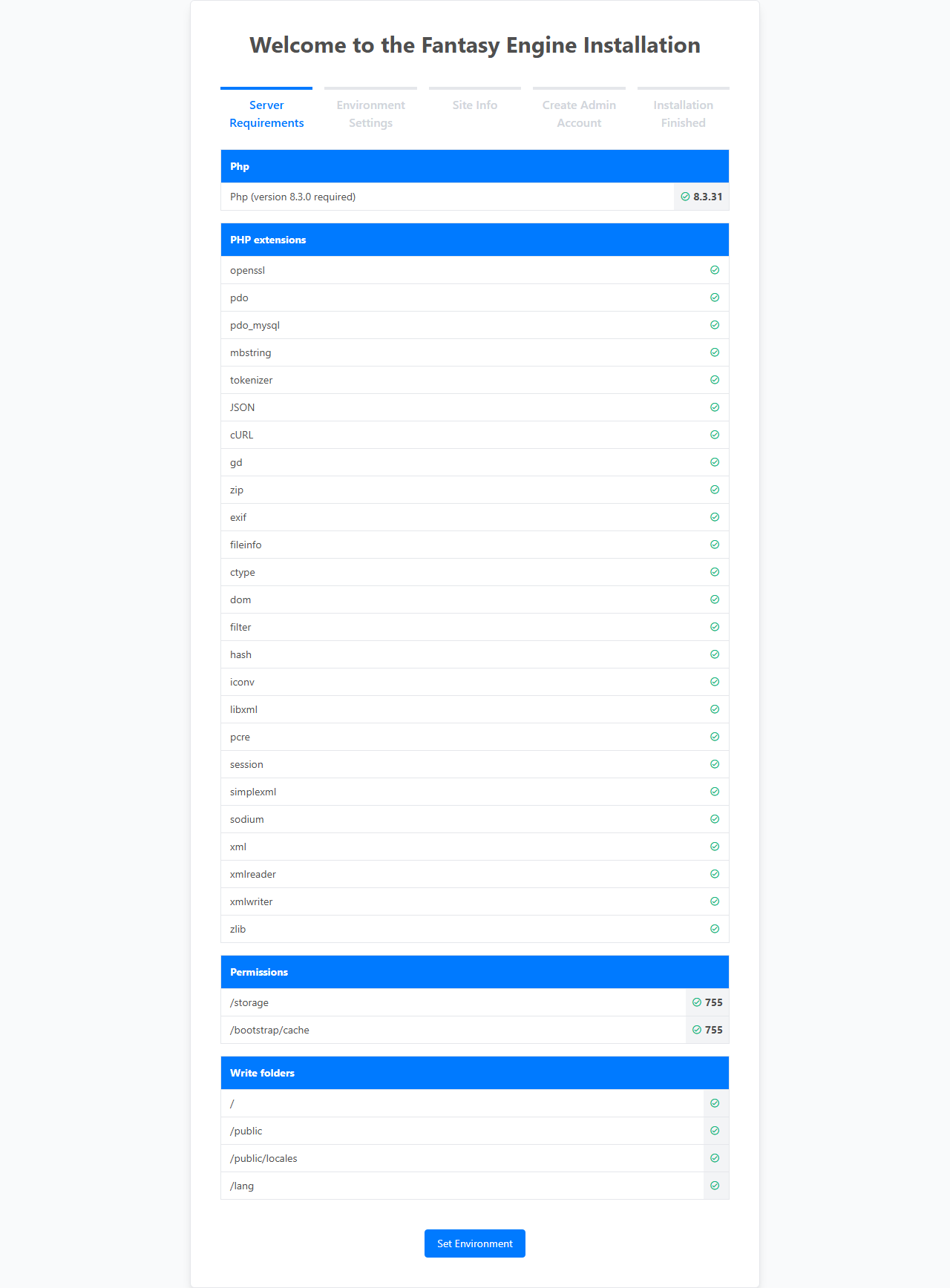
install-wizard - Step 1, Server Requirements with the full PHP extensions list (2026-10-30) - Environment Settings → Environment. Admin Prefix = the AdminCP address
(
admingives/admin). Press Setup Database (it shows Checking... while the server checks the form).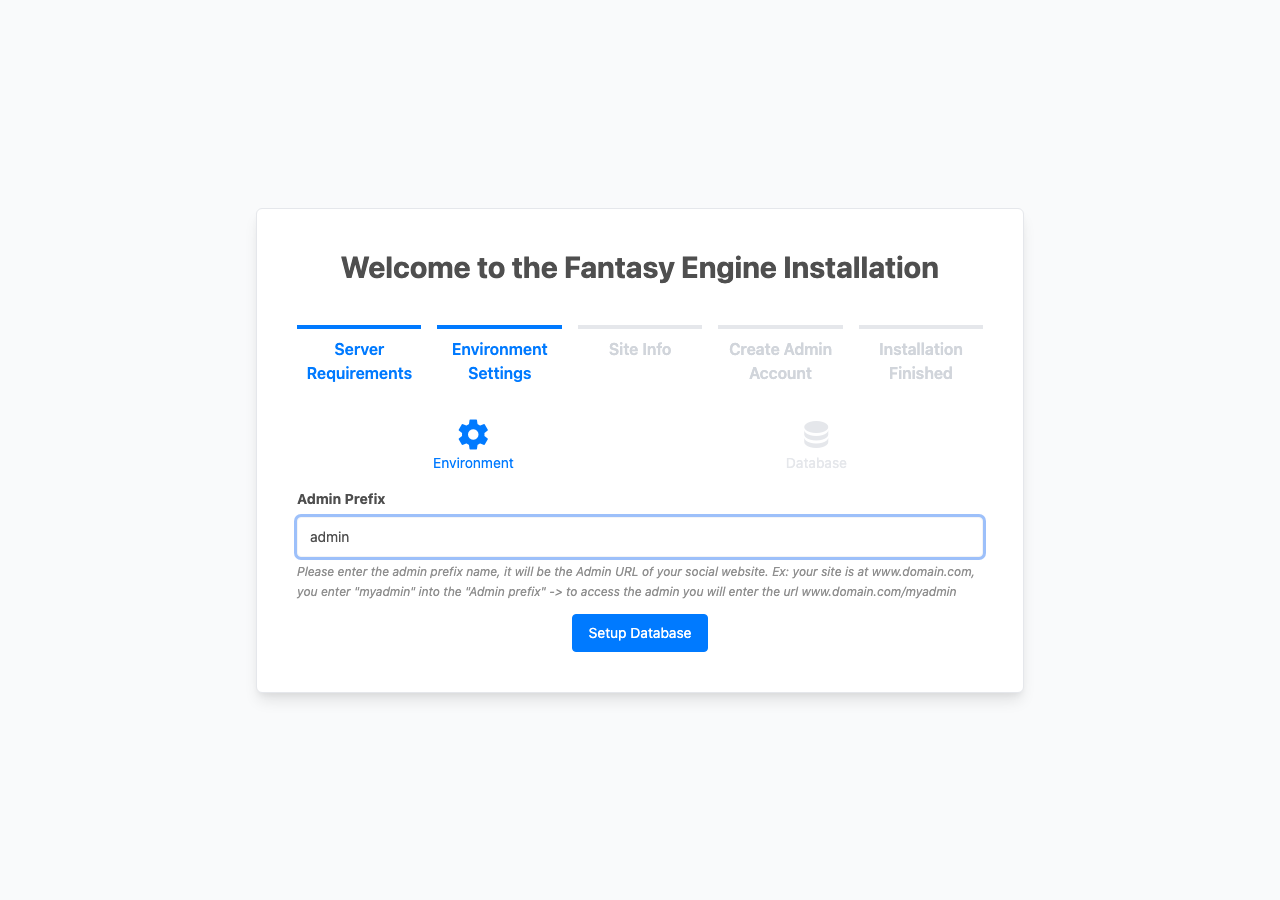
install-wizard - Step 2, Environment (2026-10-22) - Environment Settings → Database. Connection
mysql, host, port, database name, optional table prefix, user and password. Press Install. The installer checks the connection ("Could not connect to the database." when it fails), writes.env, runs every migration and seeds the data. While it works the button shows Installing... with the note "Installing the database. This can take a few minutes: do not close or reload this page."; it cannot be pressed twice, and it stays like this until the next step opens. On any error (a failed migration or data step, also a PHP error inside one) it shows the log and deletes.envagain, so that the Environment step can be saved again: fix the cause, empty the database and start over.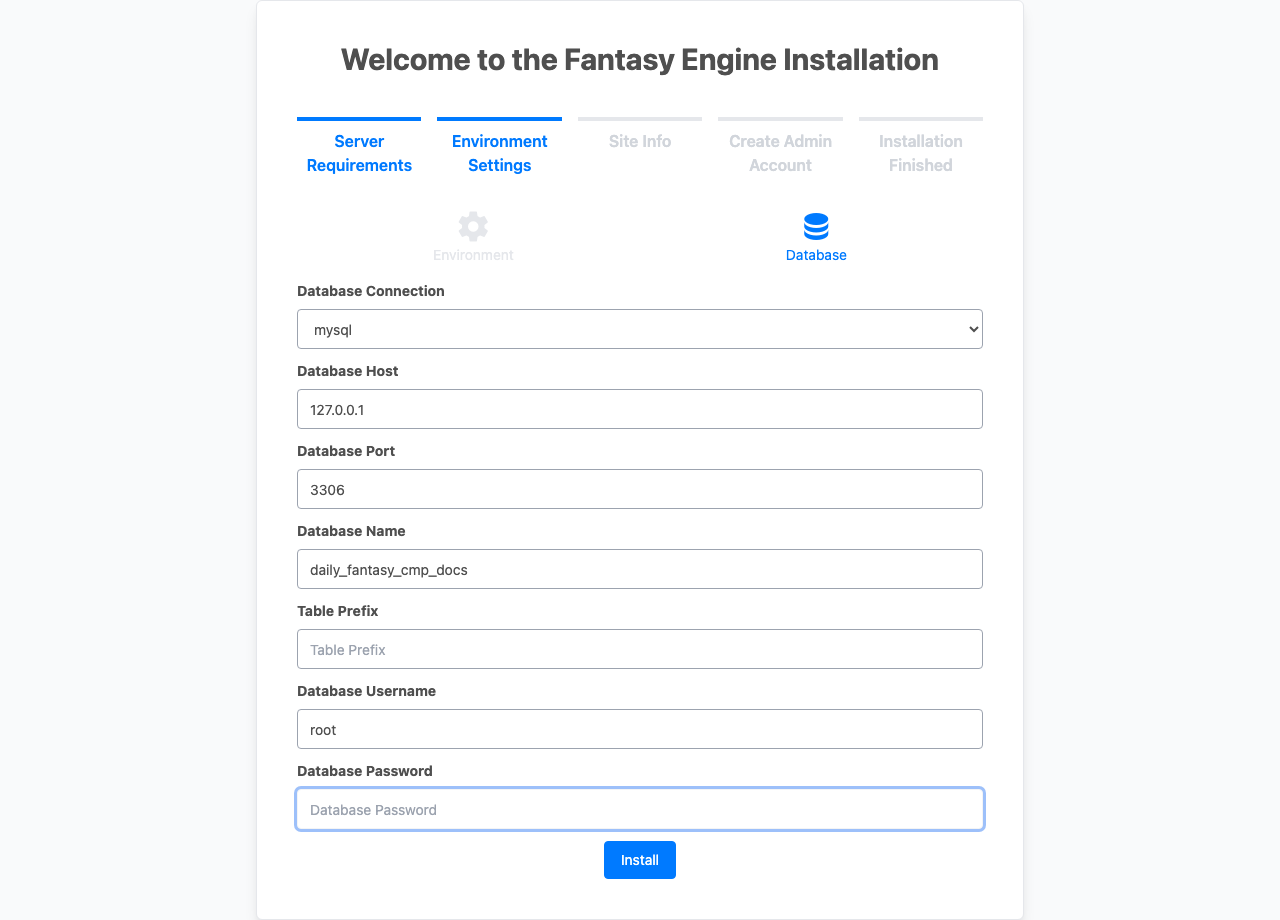
install-wizard - Step 2, Database (2026-10-22) - Site Settings. Site title, site e-mail and the default time zone (preset to London; the installer's step bar
calls this step "Site Info"; the site URL is taken from the browser address). Press Next. When that address has a path (a sub-folder install) the installer writes it into the
web app now; if
public/_expois not writable it stays on this step and says so: fix the owner and press Next again. The same package installs at a domain root or in any sub-folder, no rebuild. While it saves the button shows Saving....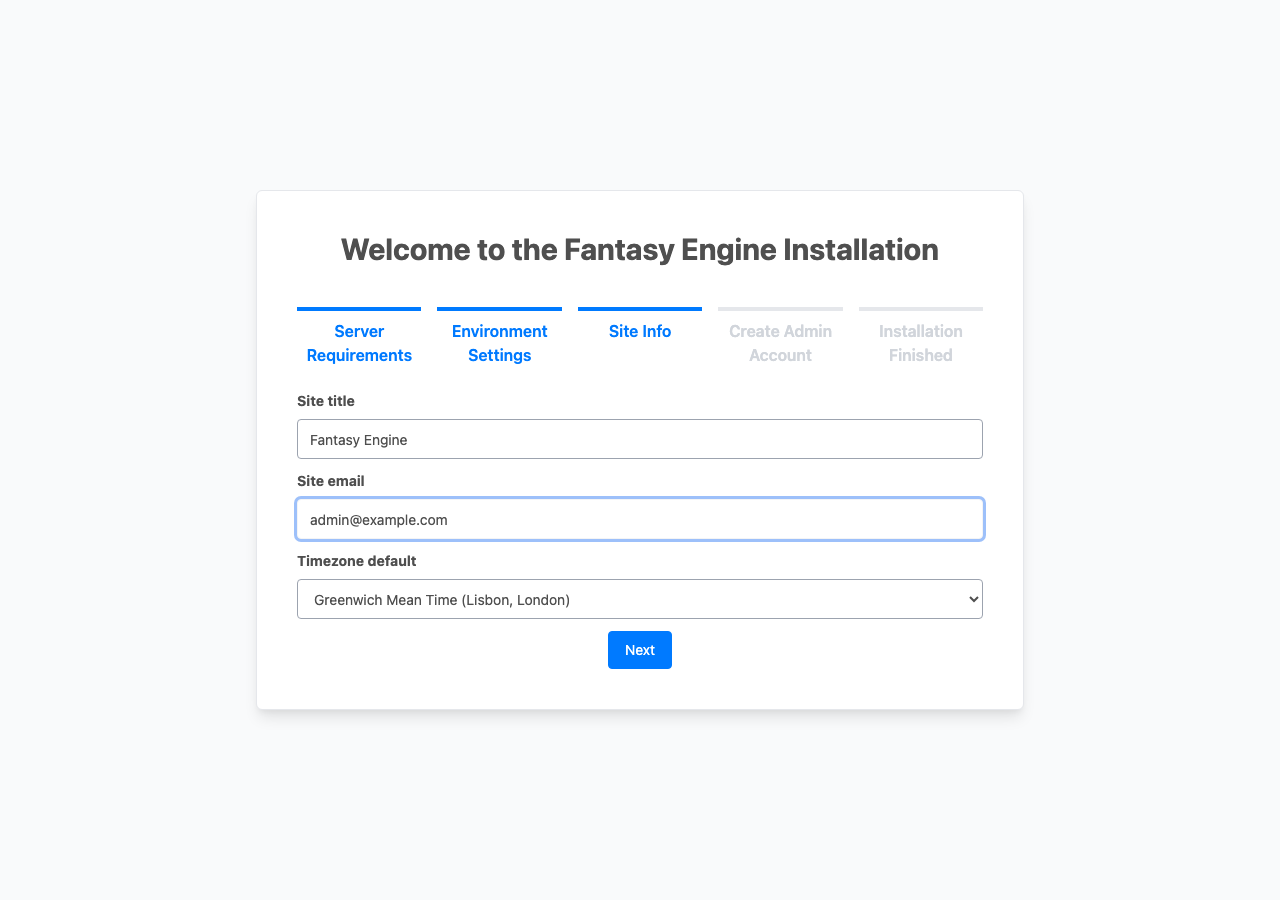
install-wizard - Step 3, Site Settings (2026-10-22) - Create Admin Account. Name, e-mail, password twice (up to 50 characters). This account has the
root role. Press Save (Saving... while it saves).
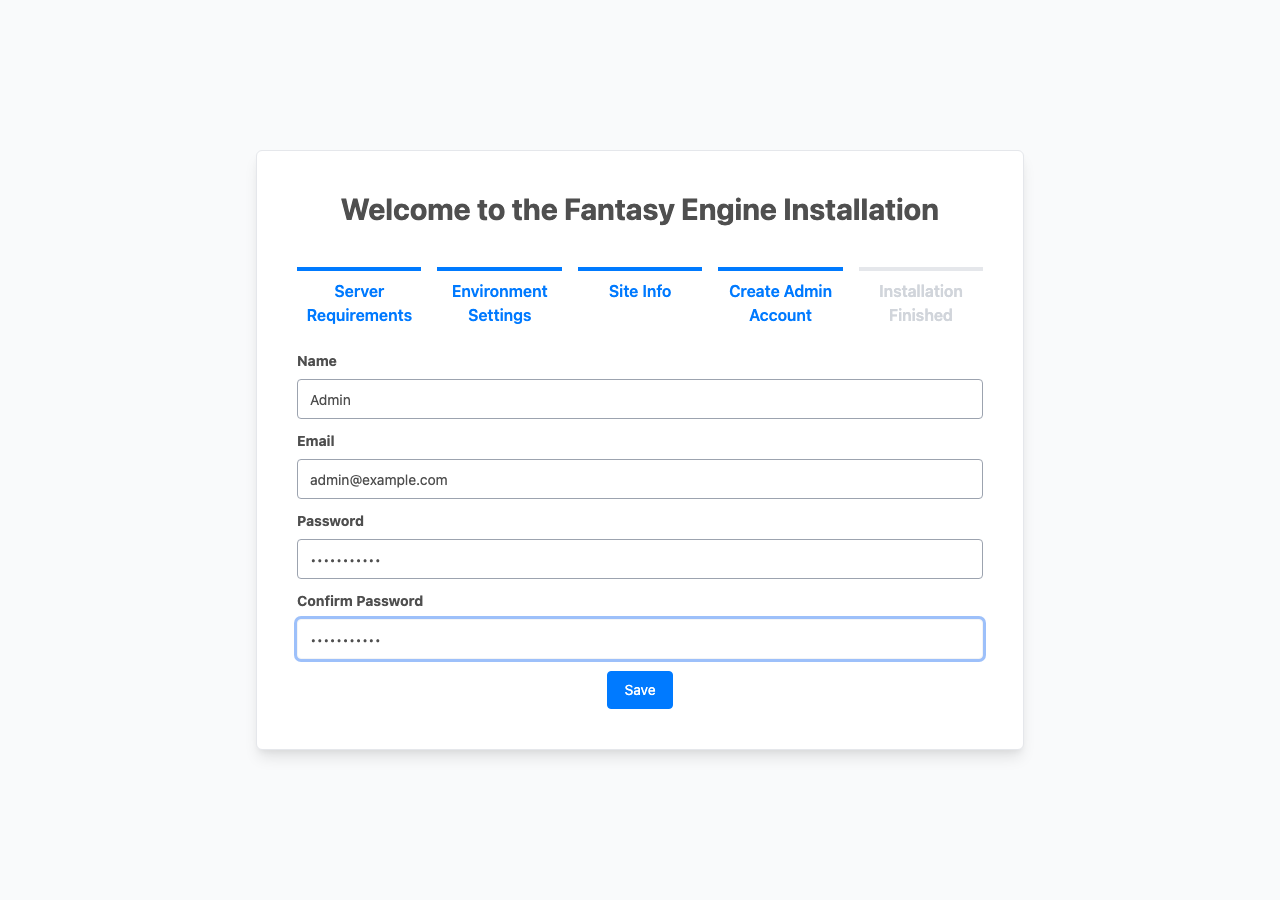
install-wizard - Step 4, Create Admin Account (2026-10-22) - Installation Finished. The last step generates a new
APP_KEY, leaves install mode, linkspublic/storage, clears the cache and creates the English language files (lang/en.json,public/locales/en.json) frominstall.json, and deletes the temporary keystorage/framework/install_key. "Application has been successfully installed." From now on/install/...answers 404. The installer also stays closed (404) on a server whose environment setsALREADY_INSTALL=true(.env keys).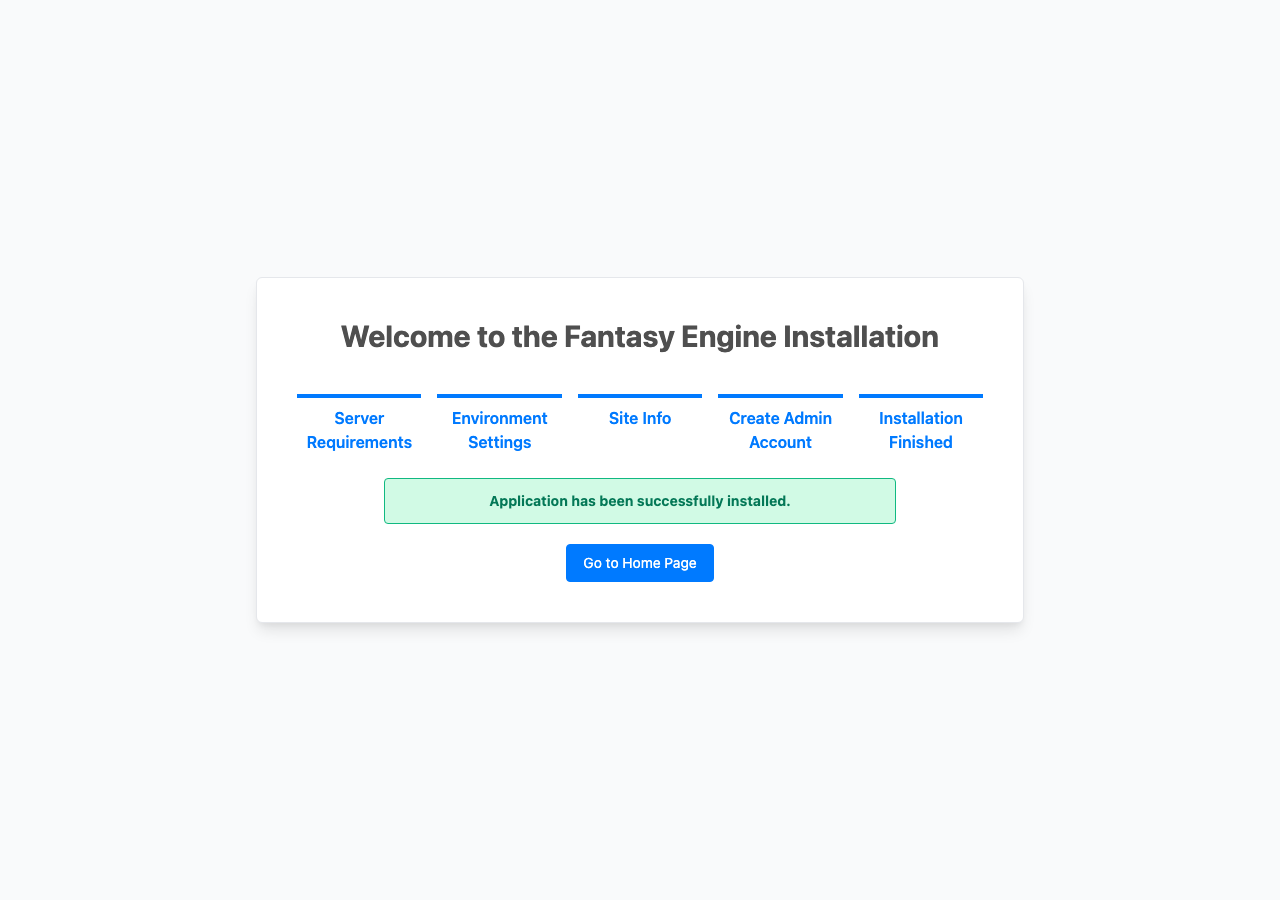
install-wizard - Installation Finished (2026-10-22)
Each step builds on the one before it. A step opened too early (a bookmarked or typed address, another tab) sends you
back to the step it needs: to Server Requirements while there is no .env, to Environment
Settings while the database is not installed yet (or cannot be reached with the values in .env), and to
Create Admin Account while there is no admin account. Continue from there.
Until the installation is finished the installer keeps its session (where you are in the steps) in files under
storage/framework/sessions, whatever .env says; from the first page after Installation
Finished the site uses the session store of .env (SESSION_DRIVER, which the installer
sets to database). Run php artisan optimize only after the installation is finished: run during
the installation, it would keep the installer's file sessions in the cached configuration (if that happened, run
php artisan optimize:clear, then php artisan optimize).
Each step button shows a busy label while its request runs and takes no second press, double click or Enter.
A form the server refuses gives the button back with its error message; a request that fails (no connection, a server
error) gives it back with "The request failed. Check the connection to the server and try
again, or reload this page." The server also runs only one
install or update at a time on a copy of the site: a second Install started meanwhile (another tab, a
reload) gets "An installation is already running on this site. Wait a few minutes for it to finish, then reload this
page." and the running install keeps its .env. The guard is a lock file in
storage/framework, freed when the request ends; on a file system that cannot lock files the install
runs without it (a warning in the log).
The .env it writes: APP_ENV=production, APP_DEBUG=false,
LOG_CHANNEL=shaun, LOG_LEVEL=warning, CACHE_DRIVER=file,
QUEUE_CONNECTION=database, SESSION_DRIVER=database, SESSION_SECURE_COOKIE=true when you ran it over https (empty over http), your database values, a random
APP_NAME and APP_KEY, and random Reverb credentials PUSHER_APP_ID / KEY / SECRET
with REVERB_SERVER_HOST=127.0.0.1, REVERB_SERVER_PORT=6060 (.env keys).
Walked end to end with a headless browser on the unpacked standard package on 2026-10-22 and again on a copy of the 9c4fba6 (no fallback key): 6/6 steps, every packages row 1.0.0, .env with its own APP_KEY and the PUSHER_APP_* lines, Reverb accepted the written key. The 1.0.0 of today installs 77 tables and 85 migrations (counted on 2026-10-28 against d2d8b13; the walks of 2026-10-22 gave 73 / 77, before the data-feed and late-correction tables).
B. Command line, step by step#
Last updated: 2026-11-25 · v1.1.0
- Create
.envfrom the sample and fill it (.env keys):cd /var/www/fantasyengine cp .env_example .env nano .env # APP_ENV, APP_DEBUG=false, APP_URL, DB_* ... (PUSHER_APP_* may stay empty) - Generate the key (the sample's
APP_KEYis empty; until it is set every page answers 500):
Expectedphp artisan key:generate --forceINFO Application key set successfully. - Run the migrations in the installer's order - framework, core, then every package:
Expected (each pass ends with DONE lines)php artisan migrate --force --path=database/migrations php artisan migrate --force --path=packages/shaunsocial/core/database/migrations php artisan migrate --force2023_02_20_074317_create_jobs_table ........................... 12.20ms DONE ... shaun_core_1_0_0_modify_table_users .......................... 263.18ms DONE ... shaun_wallet_1_0_0_modify_table_users ......................... 10.63ms DONE - Seed the data, set the site and create the root admin. Always pass all four arguments: without them the
command uses the defaults
shaunSocial,http://localhost,[email protected]/admin.
Expected (with the emptyphp artisan shaun_core:install "Fantasy Engine" https://your-site.example [email protected] 'a-strong-admin-password'PUSHER_APP_*lines of the sample; no output when.envalready holds all three; exit code 0)
It seeds every package (core and wallet first), writes site title / e-mail / URL (anGenerated PUSHER_APP_ID, PUSHER_APP_KEY, PUSHER_APP_SECRET in .env (Reverb credentials).APP_URLother thanhttp://localhostwins over the argument), sets a random API secret, creates the admin, copies the English language files, linkspublic/storage, clears the cache, deletesstorage/framework/install_keyif a visit of the web installer left one, and gives every empty or missingPUSHER_APP_ID,PUSHER_APP_KEY,PUSHER_APP_SECRETof.enva random value of 32 characters (the Reverb credentials; copy them into AdminCP → Broadcast, Realtime). Run a second time it does nothing. While the web installer, the web updater orshaun_core:updateruns on the same copy it stops with "Another install or update is running on this site: wait for it to finish, then run the install again." (exit code 1). - Check the result:
Expected for 1.1.0mysql -e "SELECT name, version FROM fantasyengine.packages; SELECT COUNT(*) FROM fantasyengine.migrations;"shaun_core 1.1.0 shaun_wallet 1.1.0 shaun_daily_fantasy 1.1.0 shaun_gateway 1.1.0 shaun_user_verify 1.1.0 122 - On a production server, cache the configuration, routes and views (.env keys: run
php artisan optimize:clearbefore any later edit of.env):
Expectedphp artisan optimizeINFO Caching framework bootstrap, configuration, and metadata. config ........................................................ 28.99ms DONE events ......................................................... 0.70ms DONE routes ........................................................ 56.27ms DONE views ........................................................ 201.75ms DONE
Versions 1.0.0 and 1.1.0 need no special mode (tested). Should a later version stop with "Base table or view not found"
before the migrations ran, prefix the commands with ALREADY_INSTALL=false (install mode for that one
command).
Run on a second unpacked copy of the standard package on 2026-10-22: migrations 3 s, install under 1 s; the admin then logged in. Run again on a copy of the 9c4fba6: .env_example with the empty key, key:generate "Application key set successfully.", the 3 migrate passes and shaun_core:install exit 0, every packages row 1.0.0, 77 migrations, /api/init and /admin/login 200; with the key emptied again /admin/login answered 500 "No application encryption key has been specified." On 2026-10-28 the expected count was raised to 85 (the 8 data-feed and late-correction migrations of 1.0.0), read from the 7b8ff49 and from the schema the command-line path builds; on 2026-10-29 to 90 (5 more 1.0.0 migrations), read from the 94fe444 and from the test database; on 2026-10-30 to 91 (the flexible lineup slot migration), read from the 5daa011 and from the test database; on 2026-11-21 to 122 (117 migration files in the packages - 86 of 1.0.0 and 31 of 1.1.0 - and 5 in database/migrations), counted in the code of b2a18572, the same count as Two ways to install. The output of shaun_core:install for empty Reverb credentials read from its code of b2a18572, not run. The removal of install_key by the CLI install was run by the team on a fresh test install of the 5daa011 (key planted before, gone after; tests/Feature/Core/Install/EnvironmentWizardTest.php covers the web wizard's last step).
Apache#
Last updated: 2026-11-21 · v1.1.0
/etc/apache2/sites-available/fantasyengine.conf<VirtualHost *:443>
ServerName your-site.example
DocumentRoot /var/www/fantasyengine/public
<Directory /var/www/fantasyengine/public>
AllowOverride All
Require all granted
</Directory>
# PHP-FPM (adjust the socket to your PHP version)
<FilesMatch "\.php$">
SetHandler "proxy:fcgi://127.0.0.1:9000"
</FilesMatch>
SSLEngine on
SSLCertificateFile /etc/ssl/your-site.example/fullchain.pem
SSLCertificateKeyFile /etc/ssl/your-site.example/privkey.pem
</VirtualHost>Enable mod_rewrite, mod_headers, mod_ssl, mod_proxy_fcgi
(Debian / Ubuntu and the official Docker php:*-apache image: a2enmod rewrite headers, then
reload Apache; the Docker image enables neither mod_headers nor mod_expires).
The shipped public/.htaccess does the rest: front controller, the Authorization header
for PHP, the browser cache lifetimes of the static files (below), and the bare /admin address (a folder
of AdminCP assets of that name exists) handed to Laravel.
Uploaded files#
Uploads (avatars, logos, menu icons, images of pages) are served under /storage. Every install and every
update writes the file storage/app/public/.htaccess for them: Apache refuses (403) every file there whose name
carries a script or page extension (php and php5 ..., phtml, phar,
pht, phps, cgi, pl, py, sh, asp,
aspx, jsp, htm, html, xhtml, shtml,
js, mjs; also inside the name, as in photo.php.jpg), and sends every other file with
X-Content-Type-Options: nosniff and a Content-Security-Policy under which no script runs (sandbox).
It uses mod_rewrite and mod_headers and the same AllowOverride as
public/.htaccess: nothing to set. It is written again at every update, so an edit of it does not last.
It also covers files uploaded before version 1.1.0. nginx does not read it: add the /storage/ block of
nginx.
curl -s -o /dev/null -w '%{http_code}\n' https://your-site.example/storage/check.php # 403Browser cache of the static files#
Apache serves these files itself (PHP never sees them); public/.htaccess gives them a lifetime by
file name:
| Files | Cache-Control (mod_headers) | With mod_expires only |
|---|---|---|
A name with a content hash: a - or . followed by 16 or more hex digits before the extension. That is the web app build: _expo/static/** (entry-<hash>.js, styles) and assets/** (fonts, images: name.<hash>.woff2). A new build gives new names, so a browser never keeps an old copy. | public, max-age=31536000, immutable (1 year) | max-age=31536000 + Expires |
Every other image, style, script or font (jpg jpeg gif png webp avif svg ico css js mjs woff2 woff eot ttf otf): images/**, the AdminCP files admin/**, uploads storage/files/**, favicon.ico. They keep their name across updates. | public, max-age=604800 (7 days) | max-age=604800 + Expires |
The service worker scripts firebase-messaging-sw.js and sw.js (whole name, at any folder level) | no-cache | max-age=0 + Expires |
The language files of the web app: a two-letter name with .json (locales/en.json, locales/vi.json). The AdminCP rewrites them, but the app asks for them with a version in the address (en.json?v=...) that the page changes whenever the file is written or the AdminCP Clear cache button is used, so an edited translation shows at the next page load. | public, max-age=604800 (7 days) | max-age=604800 + Expires |
Anything else (install.json and every other json, txt, the pages) | no rule (the pages are answered by PHP) | |
Without mod_headers the same file reads its mod_expires rules instead. Those need
Indexes in AllowOverride (All includes it): under a narrower value such as
AllowOverride FileInfo Options=Indexes,MultiViews an Apache with mod_expires and without
mod_headers answers 500 for every file; use AllowOverride FileInfo Indexes Options=Indexes,MultiViews
or enable mod_headers. With mod_headers enabled the mod_expires rules are not
read.
ENTRY=$(curl -s https://your-site.example/lobby | grep -o '_expo/static/js/web/entry-[0-9a-f]*\.js' | head -1)
curl -sI "https://your-site.example/$ENTRY" | grep -i '^cache-control'
curl -sI https://your-site.example/images/default/logo.png | grep -i '^cache-control'
curl -sI https://your-site.example/firebase-messaging-sw.js | grep -i '^cache-control'
curl -sI https://your-site.example/locales/en.json | grep -i '^cache-control'Cache-Control: public, max-age=31536000, immutable
Cache-Control: public, max-age=604800
Cache-Control: no-cache
Cache-Control: public, max-age=604800With mod_expires only: max-age=31536000, max-age=604800,
max-age=0, max-age=604800. No Cache-Control line at all means neither module is enabled
(a2enmod headers, reload Apache). A CDN in front (Cloudflare, CloudFront ...) should keep the origin's
cache headers: set its browser cache setting to respect the existing headers, or the CDN may replace the year of the
build files by its own shorter default (Cloudflare: 4 hours). Its cache key must include the query string (Cloudflare's
default does; check the cache policy of other CDNs), or it keeps an edited language file until its copy expires. Leave
the pages themselves uncached: the site sends them with Cache-Control: no-cache, private, and a cached page
would hand visitors old start data. Run the same four lines through the CDN address.
Tested behaviour: /admin answers 301 to /admin/, then 302 to the dashboard or the login;
the API received the bearer token through PHP-FPM.
Apache 2.4.56 + PHP-FPM 8.4.10 on 2026-10-22, docroot public/ and docroot project root. Cache lifetimes, file patterns and the mod_expires fallback read from public/.htaccess on 2026-11-19; the product's own test (tests/Feature/Core/App/RootHtaccessTest.php) runs them on Apache 2.4 with public/ and the project folder as document root, mod_headers, mod_expires and both, and the 500 of mod_expires under FileInfo Options=Indexes,MultiViews against 200 with Indexes. The language-file rule read from public/.htaccess of 8ba2699 on 2026-11-20 (both module blocks); the same test checks locales/en.json and locales/vi.json at 7 days and locales/install.json, manifest.webmanifest, metadata.json and _expo/web-base.json without a rule, in both layouts. The upload folder file (Uploaded files) read from the code of b2a18572 (the file the install and the update write and the call that writes it); the 403 check was not run. The rest of the section is unchanged since 8ba2699.
Project folder as document root (root .htaccess)#
Last updated: 2026-11-25 · v1.1.0
Point the document root at public/ whenever the host allows it: the .htaccess of the
project folder is then not used. It exists for two cases only: a host whose document root is fixed to the project
folder, and a site in a sub-folder of another site (https://host/sub-folder, a real folder under
the host's document root). In both cases it serves nothing that lives outside public/:
| Request | Answer |
|---|---|
A path with a hidden part: /.env, /.env_example, /.git/config, /.htaccess | 403. Inside public/ (/public/.htaccess) 404. .well-known is the one exception. |
An address with a file extension: /version.txt, /manifest.json, /firebase-messaging-sw.js, /_expo/..., /storage/<upload>, /install/css/main.css | The file of public/ with that path, with the cache headers of public/.htaccess. When public/ has no such file, the site answers itself: 404 for a web asset (/composer.json), the web app with its "not found" page for any other extension (/storage/logs/laravel.log, /vendor/autoload.php, /bootstrap/app.php). None of them reaches the file of that name, and no PHP file outside public/ is run. |
Any other address: /, /admin, /admin/login, /api/..., /install | The site, through server.php, which keeps the sub-folder as the base address. The Authorization header is passed to PHP. |
/.well-known/acme-challenge/<token>, /.well-known/pki-validation/<file> | The token file in the project folder when it exists (Let's Encrypt, cPanel AutoSSL write it there); otherwise the one in public/.well-known. |
Any address on an Apache without mod_rewrite | 404. The site cannot run without mod_rewrite; this way the files are not handed out while you enable it. |
Needs mod_rewrite and mod_alias (both standard), and
AllowOverride All on the folder, or AllowOverride FileInfo Options=Indexes,MultiViews when
mod_headers is enabled. On an Apache with mod_expires but without mod_headers it
must be AllowOverride FileInfo Indexes Options=Indexes,MultiViews: the cache rules of
public/.htaccess use mod_expires there, its directives need Indexes, and without
it every file answers 500 (Apache, browser cache). The file has no
Require line, so AuthConfig is not needed.
curl -s -o /dev/null -w '%{http_code}\n' https://your-site.example/.env            # 403
curl -s -o /dev/null -w '%{http_code}\n' https://your-site.example/composer.json   # 404
curl -s -o /dev/null -w '%{http_code}\n' https://your-site.example/version.txt     # 200
curl -sL https://your-site.example/storage/logs/ | head -c 300       # 404 or the HTML of the web app, never a folder list ("Index of")
curl -sL https://your-site.example/vendor/autoload.php | head -c 300 # 404 or the HTML of the web app, never PHP source ("<?php")
Neither address is a file of public/, so the site answers with its own page: an address without a
file extension (/storage/logs/), or one whose extension is not a web asset (.php,
.log), gets the HTML of the web app with status 200, and in a browser the app shows its "not found" page
("Oops! This Page Missed the Draft…"); a missing web asset (.json, .js, .css,
images ...) answers 404. A log file name such as /storage/logs/laravel.log must answer the same way, and
none of these addresses may show file contents or a folder list. If one does, the web server is not reading the
.htaccess of the project folder (check AllowOverride and that mod_rewrite is
enabled), or the document root should be set to public/.
A folder reached through an Apache Alias outside the document root (it needs a
RewriteBase; not supported). Any extra .htaccess you add inside a sub-folder of the project
replaces these rules for that sub-folder: do not add one.
Apache 2.4.58 + php-cgi 8.3 over FastCGI on 2026-11-03, project folder as document root and as the sub-folder /sub/: 17 paths outside public/ refused, 9 public files served byte-equal (the upload under storage and the ACME token included), 8 pages reached the site through server.php (the bearer header arrived, the installer and its assets worked in both layouts). The same with AllowOverride FileInfo Options=Indexes,MultiViews. Without mod_rewrite every address answered 404 (the earlier file served .env as is there). A public/ document root behaves as before.
nginx#
Last updated: 2026-11-21 · v1.1.0
/etc/nginx/sites-available/fantasyengineserver {
listen 443 ssl http2;
server_name your-site.example;
root /var/www/fantasyengine/public;
index index.php;
client_max_body_size 64m;
ssl_certificate /etc/ssl/your-site.example/fullchain.pem;
ssl_certificate_key /etc/ssl/your-site.example/privkey.pem;
# public/admin is the AdminCP assets folder: the bare /admin address must reach Laravel,
# otherwise "try_files $uri/" finds the folder and nginx answers 403.
location = /admin {
rewrite ^ /index.php last;
}
location / {
try_files $uri $uri/ /index.php?$query_string;
}
# Uploads (/storage): never run as a script or opened as a page of the site, the same rules as the
# storage/app/public/.htaccess Apache reads. Keep it before the PHP block: "^~" stops nginx from
# handing a .php under /storage/ to PHP-FPM. "^~" also skips the dot-file block below, so the
# storage block refuses dot files (.htaccess ...) itself.
location ^~ /storage/ {
location ~ /\. {
deny all;
}
location ~* "\.(php[0-9]?|phtml|phar|pht|phps|cgi|pl|py|sh|asp|aspx|jsp|html?|xhtml|shtml|js|mjs)(\.|$)" {
deny all;
}
# images and fonts: 7 days, as the cache blocks below (an add_header here replaces those of the block)
location ~* "\.(jpg|jpeg|gif|png|webp|avif|svg|ico|css|woff2|woff|eot|ttf|otf)$" {
add_header Cache-Control "public, max-age=604800";
add_header X-Content-Type-Options "nosniff" always;
add_header Content-Security-Policy "default-src 'none'; img-src 'self' data:; media-src 'self'; style-src 'unsafe-inline'; sandbox" always;
}
add_header X-Content-Type-Options "nosniff" always;
add_header Content-Security-Policy "default-src 'none'; img-src 'self' data:; media-src 'self'; style-src 'unsafe-inline'; sandbox" always;
}
location ~ \.php$ {
include fastcgi_params;
fastcgi_param SCRIPT_FILENAME $realpath_root$fastcgi_script_name;
fastcgi_pass unix:/run/php/php8.3-fpm.sock;
fastcgi_read_timeout 120;
}
location ~ /\.(?!well-known) {
deny all;
}
# Browser cache, the same lifetimes as public/.htaccess (keep these blocks after the deny block above:
# nginx takes the first regex location that matches). A name with a content hash: a year.
location ~* "[.-][0-9a-f]{16,}\.(jpg|jpeg|gif|png|webp|avif|svg|ico|css|js|mjs|woff2|woff|eot|ttf|otf)$" {
add_header Cache-Control "public, max-age=31536000, immutable";
try_files $uri /index.php?$query_string;
}
# The service workers: never kept without asking.
location ~ "(^|/)(firebase-messaging-sw|sw)\.js$" {
add_header Cache-Control "no-cache";
try_files $uri /index.php?$query_string;
}
# The language files of the web app (locales/en.json ...): 7 days; the app asks with a version in the address.
location ~ "(^|/)[A-Za-z]{2}\.json$" {
add_header Cache-Control "public, max-age=604800";
try_files $uri /index.php?$query_string;
}
# Every other image, style, script or font: 7 days.
location ~* "\.(jpg|jpeg|gif|png|webp|avif|svg|ico|css|js|mjs|woff2|woff|eot|ttf|otf)$" {
add_header Cache-Control "public, max-age=604800";
try_files $uri /index.php?$query_string;
}
}
server {
listen 80;
server_name your-site.example;
return 301 https://$host$request_uri;
}- With a custom
APP_ADMIN_PREFIXthelocation = /adminblock is not needed (no folder has that name); keep it anyway, it does no harm. - nginx passes every request header to PHP-FPM,
Authorizationincluded. Check it with the curl test of the Verification checklist. - Reverb behind nginx: Realtime → Reverb behind the web server.
- The
/storage/block does for nginx what the filestorage/app/public/.htaccessdoes for Apache (Apache, Uploaded files): it refuses (403) an upload whose name carries a script or page extension and every dot file under/storage/(such as.htaccess; the server-level dot-file block does not reach into it), and sends the others withnosniffand a policy under which no script runs. Without it a file uploaded before version 1.1.0 (the update does not check menu icons or GIF avatars stored before again) is served as it was stored: add the block before you update. Check it:curl -s -o /dev/null -w '%{http_code}\n' https://your-site.example/storage/check.phpanswers403, and so doeshttps://your-site.example/storage/.htaccess. - nginx ignores
.htaccess: without the four cache blocks it sends noCache-Controlfor the static files. Check them with the curl lines of Apache, browser cache (expected: themod_headersvalues).
Written from the Laravel front-controller rules and the /admin case (the AdminCP assets folder of that name); nginx is not installed on the test machine, so this block was not run. The cache blocks (2026-11-19, the language-file block 2026-11-20 from 8ba2699) are written from the patterns and lifetimes of public/.htaccess and were not run either. The /storage/ block (2026-11-21, b2a18572) is written from the file the install writes into storage/app/public for Apache (the same extensions and headers), with its own dot-file block (2026-11-21, bad8042c); not run.
HTTPS and a proxy in front#
Last updated: 2026-11-25 · v1.1.0
- Set the AdminCP Site url to the
https://address. Every asset of the page shell (/_expo/static/...) and every link in mails and pushes is built from it: a wrong value breaks CSS / JS loading. - When TLS ends at a load balancer or CDN, add
FORCE_HTTPS=trueto.env. - A site reached over https only keeps its AdminCP session cookie off plain http with
SESSION_SECURE_COOKIE=true(the web installer writes it when it ran over https) orFORCE_HTTPS=true(.env keys). - Every page and answer the site builds itself (the AdminCP, the installer, the page of the web app, the API)
carries
X-Content-Type-Options: nosniffandReferrer-Policy: strict-origin-when-cross-origin(an answer that names its own keeps it). Files the web server sends straight from disk (the scripts and styles of the built web app, the AdminCP assets, the uploads) carry only the headers the web server adds; the uploads getnosnifffrom the storage rules of Apache / nginx. A proxy or web server that adds these headers itself should send the same values, never a second, different one. - Run the cron and queue commands on one server only (their locks are in the file cache of that server).
The cron line#
Last updated: 2026-11-25 · v1.1.0
Everything that happens by itself - contests going live, completing and paying out, mails of the queue, clean-up - runs from Laravel's scheduler. Add one cron entry for the web server user:
crontab -u www-data -e* * * * * cd /var/www/fantasyengine && php artisan schedule:run >> /dev/null 2>&1/usr/local/bin/php /home/your-user/fantasyengine/artisan schedule:run >/dev/null 2>&1AdminCP → System Setting → Tasks prints these two lines with your real path and shows whether the
scheduler runs: Succeeded: last on 2 minutes ago once shaun_core:task_check (every five
minutes) has run, No, cron job configuration is not correct. before. Below it the page lists every scheduled
command with its cron expression.
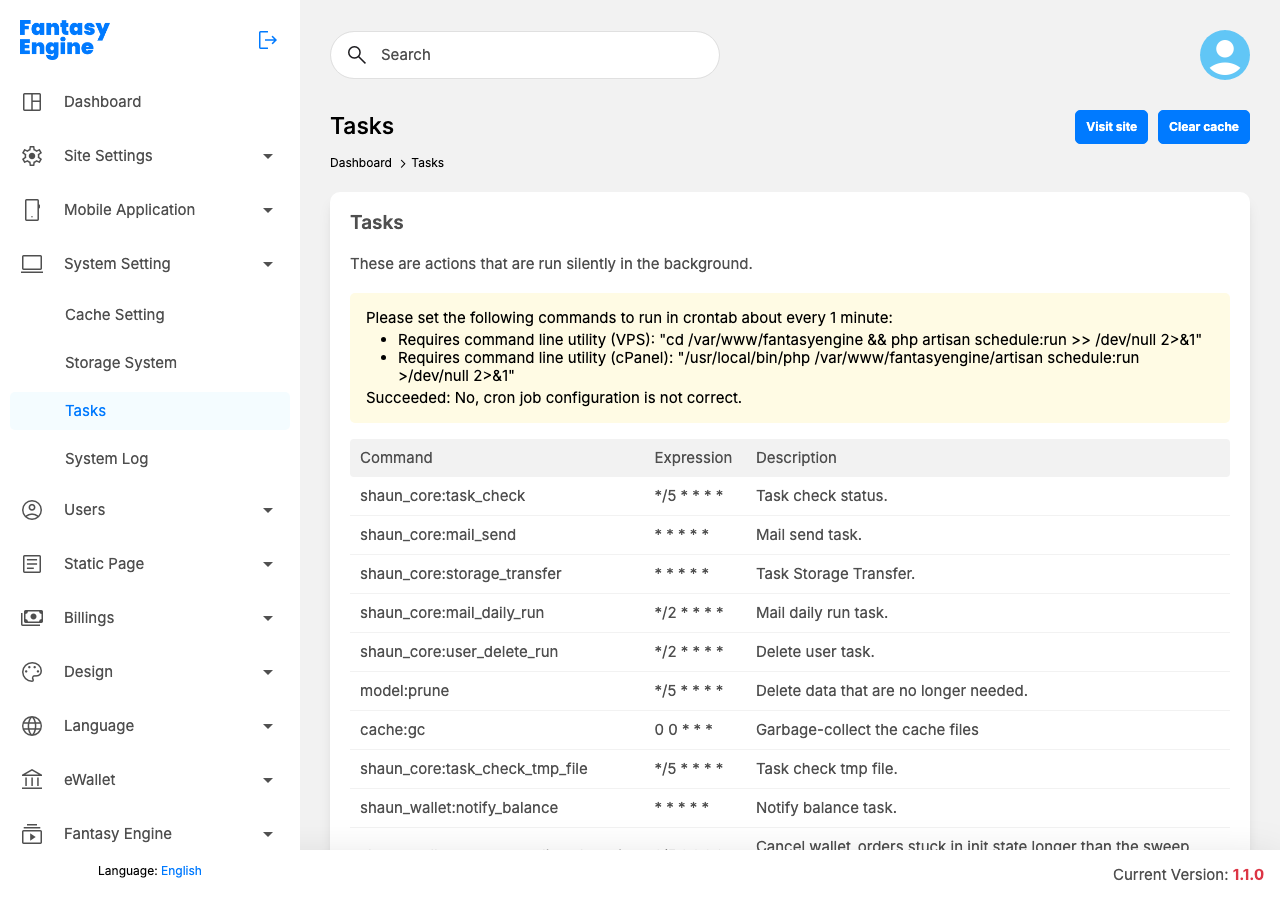
/var/www/fantasyengine of this guide where your page shows your site's own folder (2026-11-16)php artisan schedule:list */5 * * * * php artisan shaun_core:task_check ........ Next Due: 1 minute from now
* * * * * php artisan shaun_core:mail_send ......... Next Due: 1 second from now
...
0 0 * * * php artisan queue:prune-failed --hours=720
...
20 2 * * * php artisan shaun_daily_fantasy:crawl_schedule
50 * * * * php artisan shaun_daily_fantasy:crawl_schedule --due
...
* * * * * php artisan queue:work --stop-when-empty --max-time=59schedule:list and one schedule:run on the test install on 2026-10-22: every due task ended DONE. schedule:list on the 7b8ff49 on 2026-10-28: 19 entries (the data-feed log clean-up feed_prune is new). schedule:list on the 94fe444 on 2026-10-29: 20 entries (the hourly crawl_schedule --due is new). schedule:list on the db92b46 on 2026-11-16: the same 20 entries. schedule:list on the b2a18572 on 2026-11-21: 21 entries (the daily queue:prune-failed --hours=720 is new).
What each scheduled command does#
Last updated: 2026-11-25 · v1.1.0
Times are UTC (the application clock).
| Command | When | Does |
|---|---|---|
shaun_daily_fantasy:check_live | every minute (overlap lock 10 min) | starts contests at their start time (a contest nobody entered goes straight to cancelled), cancels and refunds those short of entries, completes finished events and contests and pays the prizes in time-boxed batches. A contest of a league with the data feed completes only once the league's Settle delay (default 120 minutes) has passed after its last fixture finished; it also pays the re-settle top-ups an admin confirmed. For a Survivor contest it closes the round whose results are in, opens the next round (or waits for it) and sends the round notices |
shaun_daily_fantasy:auto_contest | 01:30 and 13:30 (overlap lock 60 min) | creates the contests of the auto-contest templates for active, new events starting within the set number of days, on fixtures with a known kick-off time; a game type the league does not offer is skipped (one warning per template and type in the log) |
shaun_daily_fantasy:crawl_team / crawl_player / crawl_schedule | 01:00 / 01:10 / 02:20 | data feed: teams (and then the players of the league in one request, with each player's injury status), players of a league without teams, fixtures of the next 14 days. Run only while a league is fed by the data feed |
shaun_daily_fantasy:crawl_schedule --due | every hour at :50 (overlap lock 30 min) | data feed: reads the fixtures again for a league whose last schedule read failed or never ran (so a failed nightly read is retried every hour, not the next night) and for a league with a fed fixture kicking off today, once its last read is about 6 hours old (config schedule_refresh). One request per league; at most 3 extra reads a league on a match day |
shaun_daily_fantasy:crawl_stats | every minute (overlap lock 10 min) | data feed: live scores and player stats. Each minute it decides what is due: a fixture a contest is played on is read every 3 minutes while in play, a league scoreboard every 3 minutes while a fixture waits for its kick-off, a finished fixture every 10 minutes during the settle delay; after the play window a fixture still not closed is read every 30 minutes, and given up 48 hours after kick-off (MLB 96, PGA 120, F1 72; listed on the Data Feed screen) - then only every 6 hours while a live contest is played on it. A started fixture no contest is played on is only followed on its league scoreboard every 30 minutes and its stats are read once, when it closes. A turn sends nothing new after 45 seconds (the rest is read first in the next minute); stats and scoreboard reads time out after 10 s. Only with a league fed by the data feed |
shaun_daily_fantasy:feed_prune | 03:40 | deletes the data-feed request log (Data Feed screen, Last requests) older than 14 days |
queue:work --stop-when-empty --max-time=59 | every minute (overlap lock 5 min) | runs the jobs waiting in the default queue (contest start / cancel, feed crawls, auto contests) when QUEUE_CONNECTION=database |
shaun_core:mail_send | every minute | sends queued mails, Mail count per run (only when Email queue is on) |
shaun_core:mail_daily_run | every 2 minutes | the daily digest e-mails of unread notifications |
shaun_core:user_delete_run | every 2 minutes | removes accounts whose deletion was requested |
shaun_core:storage_transfer | every minute | moves files to another storage after a transfer was started in Storage System |
shaun_core:task_check | every 5 minutes | records the run time shown on the Tasks page |
shaun_core:task_check_tmp_file | every 5 minutes | deletes abandoned temporary uploads |
model:prune | every 5 minutes (overlap lock 60 min) | deletes data no longer needed: orphan files, expired tokens, old notifications, old verification codes, identity documents uploaded but never submitted; at most 500 rows of each kind per run (core config shaun_core.core.prune_limit; before 2026-11-02 the page-size setting Item per page, every minute) |
cache:gc | 00:00 | removes expired file-cache entries |
queue:prune-failed --hours=720 | 00:00 | deletes the failed queue jobs older than QUEUE_FAILED_PRUNE_HOURS (720 hours = 30 days; a failed job keeps the data it was given, e-mail addresses included) |
shaun_wallet:notify_balance | every minute | wallet balance notices |
shaun_wallet:sweep_pending_deposits | every 5 minutes | cancels deposits left at the payment gateway |
shaun_wallet:fail_stuck_processing | 02:15 | fails deposits stuck "in process" for more than 14 days |
Every overlap lock above expires after the minutes shown, and so do the per-item job locks: a contest's start / completion / cancel job (10 minutes), a fixture's stats read (5 minutes), a league's crawl job (15 minutes). A server restart or a killed worker therefore holds one contest or fixture back for at most those minutes; a second run after the expiry changes nothing that the first already did. Before 2026-10-29 a dead holder could stop a contest or a fixture read for 24 hours.
The
overlap locks are kept in a cache store: cache.schedule_store (or the SCHEDULE_CACHE_DRIVER /
SCHEDULE_CACHE_STORE key of .env) when set, else the site's cache store (CACHE_DRIVER
or AdminCP → Cache Setting), else the file cache. With APP_DEBUG=true the site runs without a cache, and
before 2026-11-02 the locks then guarded nothing: a slow run got a second copy beside it every minute. Nothing to set.
A site that changed config/cache.php itself: a schedule_store entry there wins; the store it
names must be one every server running cron reaches (file on one server, Redis / database / Memcached on several). The same store also keeps the job locks (a contest's start / completion / cancel, the feed crawls, the push notices: one queued copy at a time) and the wallet's per-member lock, so they hold with APP_DEBUG=true too; a site that sets a schedule_store must give it a store every server running cron or a queue worker reaches.
Read from the schedule definitions; the main list confirmed by schedule:list on the 94fe444 (2026-10-29, 20 entries). 2026-11-02 on c4a5100: schedule:list shows */5 * * * * php artisan model:prune ... (20 entries); 2026-11-21 on b2a18572: 0 0 * * * php artisan queue:prune-failed --hours=720 (21 entries); on the dev site (APP_DEBUG=true, no cache store) every entry's lock is on the file store and a second lock of the same entry is refused (tests/Feature/Core/Console/ScheduleMutexTest.php).
Database limits of the scheduled commands#
Last updated: 2026-11-25 · v1.1.0
schedule:run runs most entries one after another in the foreground. When cron (through schedule:run) or you on the command line start one of the scheduled commands, its database connection gets limits, so a database that hangs ends the command with an error in the log instead of keeping it, and every entry after it, waiting for ever. schedule:run itself gets a read and a connection limit (row scheduler): before it starts an entry it checks whether the entry should run (for the data-feed crawls: is a league fed?), and that check reads the database. Nothing to set: the defaults are in the package config shaun_daily_fantasy.command_db.
Config shaun_daily_fantasy.command_db | Default | What it bounds |
|---|---|---|
commands | shaun_daily_fantasy: (every command of the package), shaun_core:task_check, mail_send, storage_transfer, mail_daily_run, user_delete_run, queue:prune-failed, task_check_tmp_file, model:prune, shaun_wallet:notify_balance, sweep_pending_deposits, fail_stuck_processing | the commands that get the three limits below - every scheduled command but cache:gc (file cache only) and the queue worker |
statement_seconds | 30 | a wait for a row lock or a table / metadata lock (also a backup's global read lock), and on MariaDB any statement: innodb_lock_wait_timeout, lock_wait_timeout, max_statement_time of the session. On MySQL a slow statement that waits on no lock is not ended. |
read_seconds | 45 | a database server that does not answer at all (host or network down): mysqlnd.net_read_timeout. It ends the client side only. |
connect_seconds | 10 | a connection attempt (PDO::ATTR_TIMEOUT). |
worker | lock_seconds 30, read_seconds 90, connect_seconds 10 | the scheduled queue:work --stop-when-empty: lock waits end after 30 s, but its jobs' statements have no time limit (a job of any package may need longer); the read limit is above the worker's own 60-second job timeout, so it only ends a wait on a server that does not answer (the worker's read of the queue has no timeout of its own). |
scheduler | read_seconds 30, connect_seconds 10 | schedule:run itself: a read of a server that does not answer ends after 30 s, a connection attempt after 10 s; no lock or statement limit (its reads take milliseconds). The limit is per read, and every entry it starts is a process of its own, so a long entry is not cut by it. Without it a hung database kept every schedule:run waiting (up to a day) and cron started one more each minute. |
What it protects against: while the database hangs, every expired overlap lock lets cron start one more process of the same command (and model:prune and task_check have none: one more every minute / five minutes), and before these limits each of them waited until the database came back and then all ran at once, while the foreground ones held schedule:run for the length of the hang. Now each run ends within its own time box plus a minute or two and logs its error. check_live and crawl_stats stay in the foreground before the queue worker (the last entry), so with QUEUE_CONNECTION=database the worker runs the jobs they dispatched in the same minute; a run of theirs that waits on the database holds the entries after it for its time box plus about 30-90 seconds.
Set a value to 0 to switch that limit off (a site with a statement of these commands above 30 s - none is known - raises statement_seconds). Not covered: web requests, Artisan::call() in any form (the installer, tools run in-process), migrate, shaun_core:install / update and a queue worker of your own (Supervisor, without --stop-when-empty); schedule:run gets the read and connection limits only (row scheduler); a site that set its own PDO init command keeps it (then no session limits).
Real artisan processes on the test database, 2026-11-02: model:prune --pretend and shaun_daily_fantasy:feed_prune ran with lock waits 30 / 30, statement limit 30, read 45; queue:work --stop-when-empty with 30 / 30, no statement limit, read 90; queue:work --once (a worker of your own) with the server defaults. schedule:run (since the review fixes of 2026-11-02): read 30, connect 10, lock waits and statements unchanged (CommandDbLimitsTest).
Queue worker - when you need one#
Last updated: 2026-11-25 · v1.1.0
| QUEUE_CONNECTION | Behaviour | Worker needed |
|---|---|---|
database (web installer default) | jobs wait in the jobs table; the scheduled queue:work picks them up within a minute (its overlap lock expires after 5 minutes, so a killed run is replaced at the latest then). AdminCP → Fantasy Engine → Data Feed, row Queue, shows the feed crawl jobs waiting and failed | no - a worker only makes it faster |
sync | each job runs at once inside the request or the cron command that made it | no |
Mails and push notifications are not queued jobs by default: they are sent at once (or through the mail outbox, see Mail). For a faster queue add a worker under Supervisor:
The mail with a Forgot password code is handed to the mail server only after the answer has gone to the
member, so a registered address is not answered later than an unknown one (Sign-in security).
That works where the web server can finish the answer before PHP is done: PHP-FPM (and LiteSpeed). Under Apache with
mod_php (or php artisan serve) the browser still waits for the mail server. Run PHP as
PHP-FPM, or switch on the mail outbox (AdminCP → Site Settings → General Configuration → E-mail Settings → Email queue,
Send at once or queue), which takes every mail out of the request.
The member login, the AdminCP login and the three password-reset requests always take at least 250 ms: each one
holds a PHP-FPM worker for that time while it waits, without using the processor. Count it when you size
pm.max_children: 40 such requests a second keep about 10 workers waiting, on top of the workers the
pages and the API need. The per-visitor limits of these requests (Sign-in security)
keep one visitor from holding many workers.
[program:fantasyengine-worker]
command=php /var/www/fantasyengine/artisan queue:work --queue=default --sleep=3 --tries=1 --max-time=3600
user=www-data
numprocs=1
autostart=true
autorestart=true
stdout_logfile=/var/www/fantasyengine/storage/logs/worker.logWith SHAUN_QUEUE=true mails and notifications go to the queues notification,
mail_normal and mail_many, which the scheduled worker does not read. Then run
queue:work --queue=default,notification,mail_normal,mail_many permanently. The product is tested
with SHAUN_QUEUE unset.
After every update: php artisan queue:restart (a running worker keeps the old code).
queue:work --queue=default,notification,mail_normal,mail_many --stop-when-empty ran on the test install on 2026-10-22 ("Worker STOPPED Queue empty"). Re-read on 2026-11-20 against 75f021e0: the scheduled worker (overlap lock 5 minutes), the queues of SHAUN_QUEUE, the mail sent after the answer (only the password-reset code mail; not with a worker queue or the outbox) and the 250 ms floor of the sign-in routes, read from the code, not run.
First login#
Last updated: 2026-11-25 · v1.1.0
- Open
https://your-site.example/admin(or your prefix). It redirects to the login form; sign in with the admin account of the install. - The dashboard shows users, contests, events and, at the bottom right, Current Version. The buttons Visit site and Clear cache are on every page.
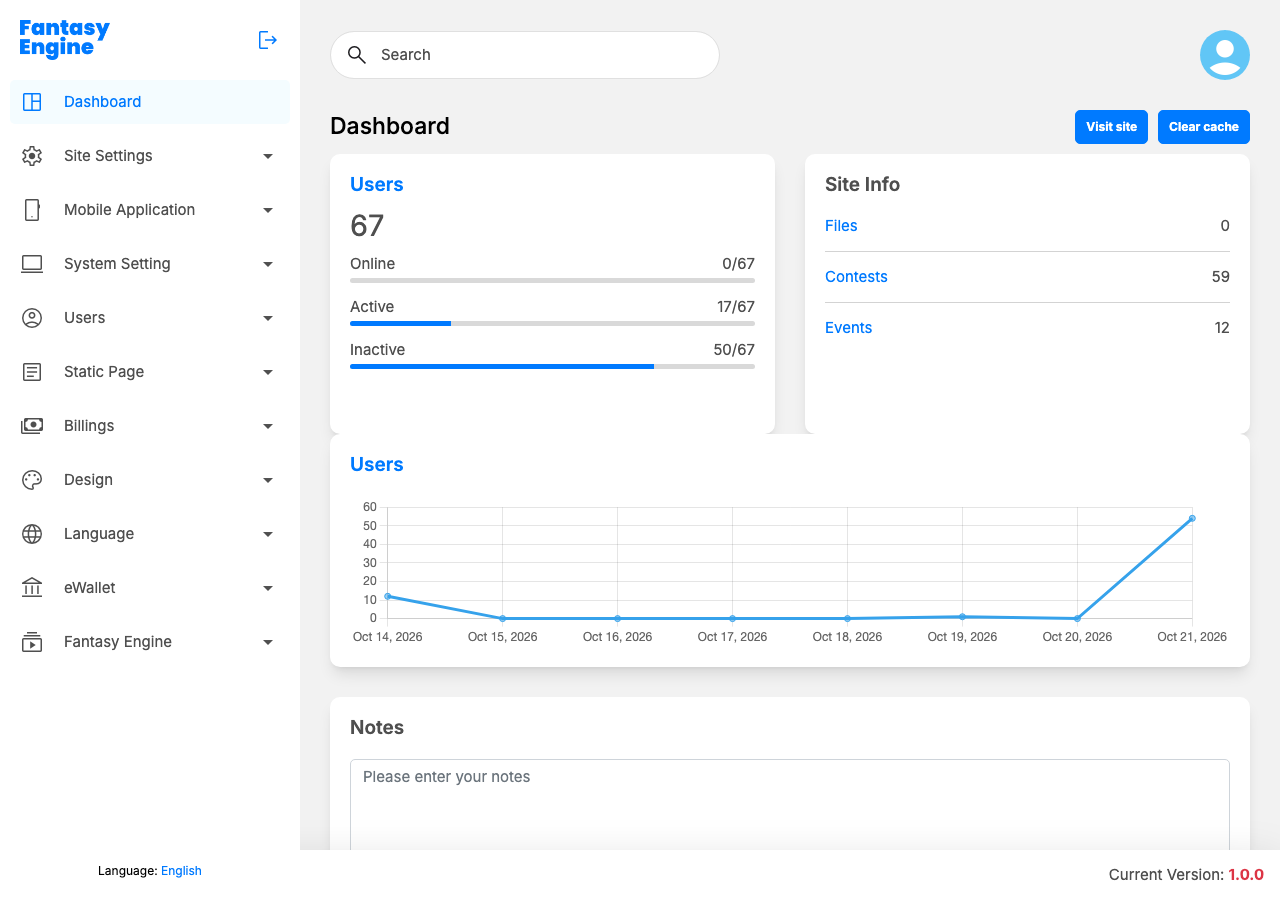
The first settings to fill#
Last updated: 2026-11-25 · v1.1.0
Settings save themselves as you leave a field.
| Where (AdminCP menu) | Settings | Notes |
|---|---|---|
| Site Settings → Site Information → Website Settings | Site title, Site email, Site url, Timezone default, Maintenance mode | Site url = the https address; saving it also rewrites APP_URL in .env |
| Site Settings → Site Information → Android & IOS Apps | store links shown on the website | once the apps are published |
| Site Settings → General Configuration → E-mail Settings | sender, SMTP server, queue | Mail; test with Test send mail |
| Site Settings → General Configuration → Broadcast | realtime server | Realtime |
| Site Settings → General Configuration → Progressive Web App | web push | Firebase & push |
| Site Settings → General Configuration → Fantasy Engine | date formats, site profit %, entry fees, prize split, contest page size, auto-contest days, Money features in the mobile app, data feed Api url, Members can create contests (on), Max open contests per member (10), Max contests a member can create per day (5), Max entries per member in a multi-entry contest (10) | leave Api url at https://data.fantasyengine.net/api unless told otherwise; money-off mode: Build the apps; the four member settings (keys shaun_daily_fantasy.member_create_contest, member_open_contest_max, member_daily_contest_max, member_entry_max; 0 = no limit) are explained in the user guide |
| Users → Manage User Roles → Permissions (super admin) | Send funds (card eWallet) | member-to-member sending is off for every role on a new installation; tick Send funds for the role Member only if members should send credits to each other. Withdrawals have their own permission, Transfer funds (on for members). User guide, Members and their money |
| Fantasy Engine → Data Feed | Api key (the key that comes with your licence), Verify the TLS certificate of the data feed, Sync data | only with the data feed. The key is typed here, not on the settings page: a password field (empty = keep the stored key, Remove key clears it); afterwards the screen shows only •••• <last 4>. Leave the TLS check on (Yes); the Status row should then say "Working: last answer on ...". Then press Sync data (Overview tab, card Purchased leagues) to create the leagues of your licence with their positions and scoring categories (the Draft player game needs them); each fed league has its own Settle delay (Sports → league → Edit, default 120 minutes). The user guide explains the screen. |
| Mobile Application → General Configuration | App scheme (fantasyengine://) | deep link back into the app after a social login; must match the app build. It is the only setting on that card. |
| Billings → Manage Payment Gateways | PayPal, Stripe | the two gateways of deposits on the website; turn on and fill the one(s) you use (Billings → Manage Currencies for the currency). Without an active gateway members cannot add credits |
| System Setting → Tasks | - | confirm the cron line works |
| System Setting → Cache Setting | file (default), Redis, Memcached | used only while APP_DEBUG=false |
| System Setting → Storage System | local disk or cloud storage | uploads |
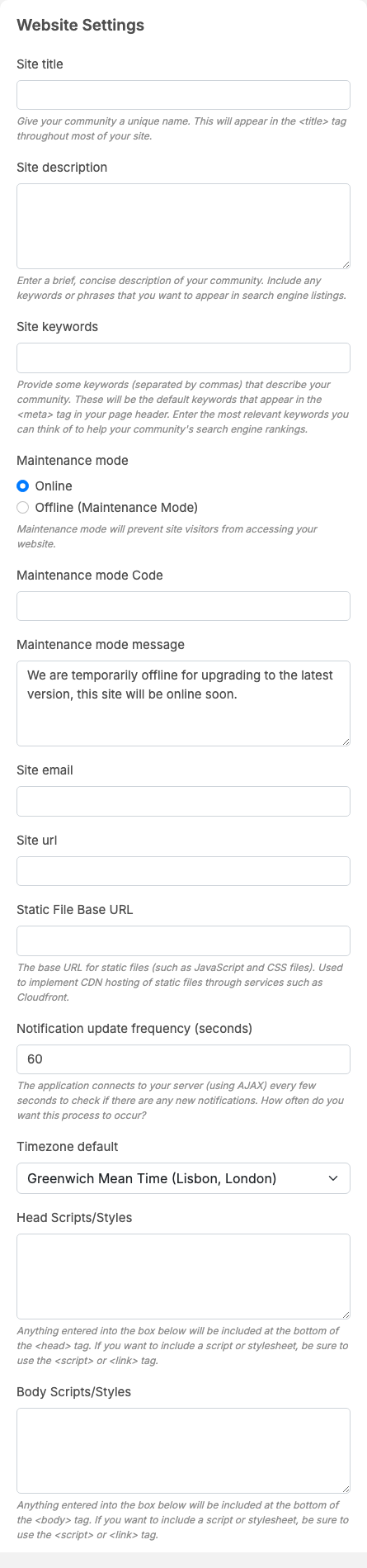
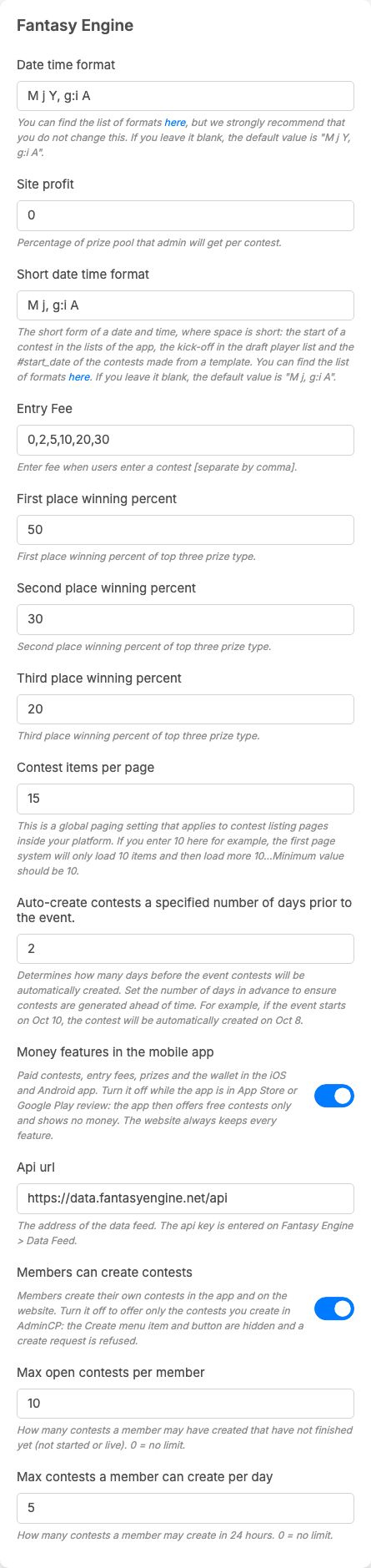
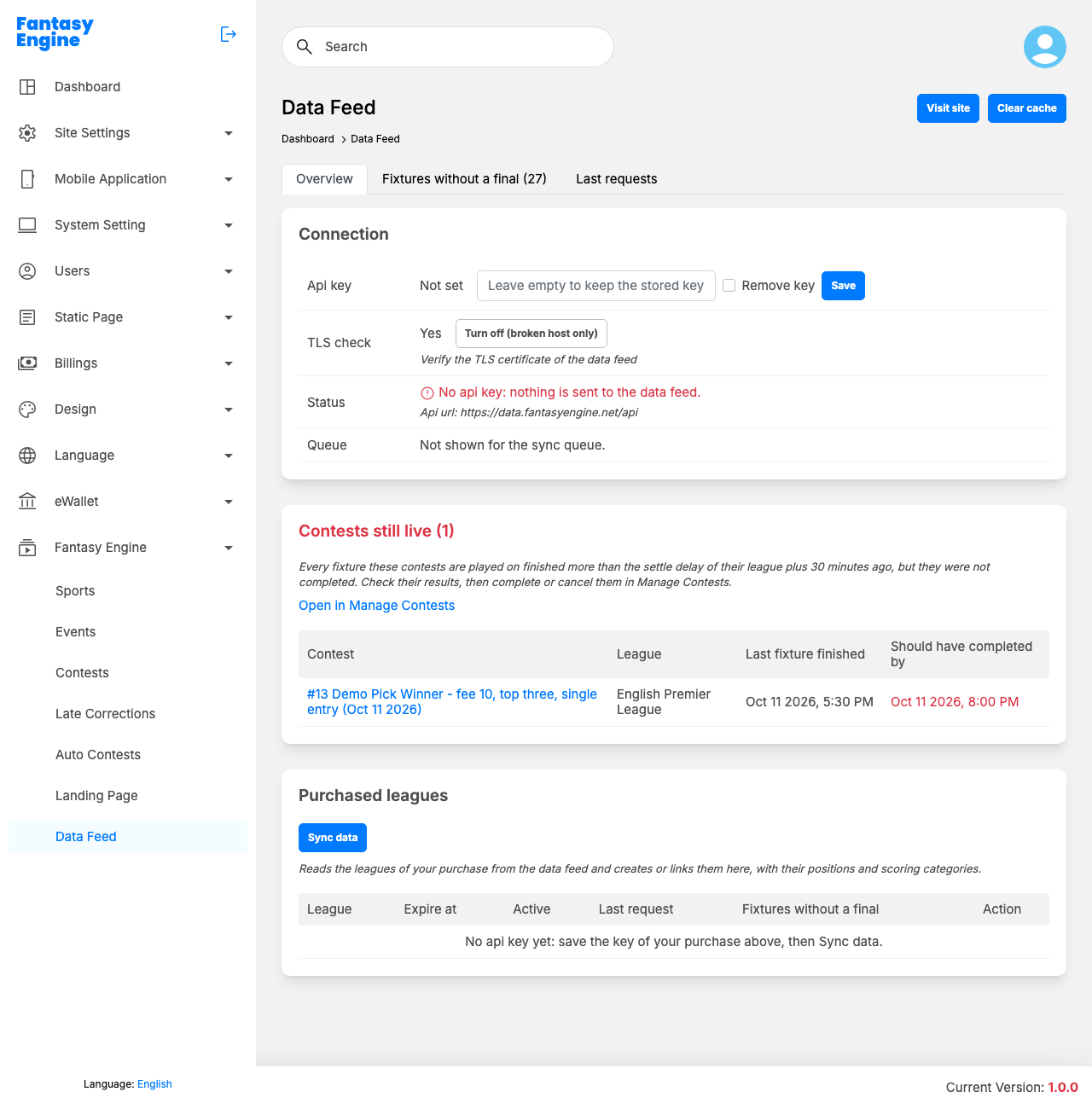
Sports, leagues, teams, players, events and contests are set up from the Fantasy Engine menu: that is the business side, covered by the user guide, not by this document.
Verification checklist#
Last updated: 2026-11-25 · v1.1.0
- API answers.
Expectedcurl -s -o /dev/null -w "%{http_code}\n" https://your-site.example/api/init curl -s https://your-site.example/api/init | head -c 120200 {"data":{"config":{"siteName":"Fantasy Engine",... - The Authorization header reaches PHP. Log in through the API with the admin account and ask
who you are:
Expected: id 1 (id 0 = the header was dropped on the way)TOKEN=$(curl -s -X POST -H 'Content-Type: application/json' -H 'Accept: application/json' \ -d '{"email":"[email protected]","password":"a-strong-admin-password"}' \ https://your-site.example/api/auth/login | php -r 'echo json_decode(stream_get_contents(STDIN))->data->token;') curl -s -H "Authorization: Bearer $TOKEN" -H 'Accept: application/json' https://your-site.example/api/user/me | head -c 60{"data":{"id":1,... - AdminCP.
https://your-site.example/admin→ login → dashboard; the footer shows Current Version: 1.1.0. - Web app.
https://your-site.example/shows the app (never "The web app has not been built"); sign up a test member and log in. - Installer closed.
https://your-site.example/install/requirementsanswers 404. - Scheduler. Within five minutes of adding cron, AdminCP → Tasks shows Succeeded: last on ....
- Environment.
Expectedphp artisan about --only=environmentEnvironment ..................... production Debug Mode ............................ OFF URL ............................ your-site.example - Versions.
SELECT name, version FROM packages;shows the content ofpublic/version.txton every row.
Every step run against the two test installs on 2026-10-22 (artisan serve and Apache): /api/init 200, me id 1 with the header and 0 without, /admin 302, dashboard 200, /install/requirements 404.
Troubleshooting#
Last updated: 2026-11-25 · v1.1.0
| Symptom | Cause and fix |
|---|---|
| The installer's requirement page shows a red mark beside a PHP extension and no Set Environment button | that extension is not loaded by PHP: install it (for example apt install php8.3-xml php8.3-mbstring php8.3-zip php8.3-gd php8.3-curl php8.3-mysql), restart PHP-FPM and reload the page. The list is the set the shipped vendor/ needs (PHP), so a site that passes it does not fail later for a missing extension. |
| HTTP 500 on every page right after unpacking | PHP below 8.3, a missing extension, or storage/ / bootstrap/cache/ not writable. Read storage/logs/ and the PHP-FPM log. |
| "Unable to save the .env file. Please create it manually." | the project root is not writable by PHP during the web install: fix the owner, or use the command-line install. |
| The installer shows an error after Install | the migration log is on the page and .env was removed. Fix the cause, drop and recreate the database (a half-migrated schema cannot be resumed) and start again. |
| An installer address opens another step than the one in the address | that step needs an earlier one first (The steps open in order): continue from the step shown. It goes back to Environment Settings also when the database values in .env no longer reach the database. |
| The first visit of a new copy answers 404 instead of the installer | a .env file is already there (copied from another site or created by hand), or the server's environment sets ALREADY_INSTALL=true: remove that file or that variable and open the site again. |
| Web or app login: "Something went wrong!" | the Authorization header does not reach PHP (custom proxy / FastCGI). Run the curl test of the Verification checklist. |
/admin answers 403 on nginx | add the location = /admin block (nginx). |
| The AdminCP address answers 404 | check APP_ADMIN_PREFIX; an unknown address under the prefix is a 404 on purpose. |
HTTP 500 on every address after enabling mod_expires (or on an Apache without mod_headers); the Apache error log says "ExpiresActive not allowed here" | the mod_expires rules of public/.htaccess need Indexes in AllowOverride: use AllowOverride All or AllowOverride FileInfo Indexes Options=Indexes,MultiViews, or enable mod_headers (Apache, browser cache). |
| The site loads without styles / scripts | the AdminCP Site url does not match the address (assets are built from it), or the web build is missing from public/_expo. |
| A site in a sub-folder stays on the logo, or its links lead to the domain root | the web app still holds another base path (an edited .env / database, a moved folder): open any page once (the site repairs it itself when public/_expo is writable) or run php artisan shaun_core:web_base; read storage/logs/ for "Web base path not written". |
| "The web app has not been built" | public/_expo/static/js/web holds no entry bundle (entry-<hash>.js; the page loads only the start bundles, the other files there are screens the app loads on demand): the standard package carries the build; from the git source run build_web.sh (Build the apps). |
The admin login is [email protected] / admin | shaun_core:install ran without its arguments: change the e-mail and password in AdminCP → Users at once. |
| Contests never go live or complete | no cron (AdminCP → Tasks says "No, cron job configuration is not correct."). A contest of a fed league that shows "Results pending review" is waiting for its league's settle delay: that is normal. |
| A fed league gets no fixtures or results | open Fantasy Engine → Data Feed: a red notice "The data feed refused the api key (HTTP 401/403) ..." = save a valid key (requests pause 10 minutes after a refusal, saving a key ends the pause); "The api url ... is not an https address" = fix Api url; "The TLS certificate ... is not verified" = the check was switched off; "The last n requests ... failed" with timeout = the server cannot reach the feed (outgoing HTTPS, CA bundle). the tab Last requests lists each call with its HTTP status (filter by outcome). A failed schedule read is retried every hour at :50; the teams and players crawls run again the next night. |
| Data Feed → Overview shows a red card "Contests still live (n)", or Manage Contests a red notice | live contests of fed leagues whose games all finished more than the settle delay + 30 minutes ago: the scheduler is not running (check cron and the Tasks page) or a result is stuck. Check their results, then complete or cancel them in Manage Contests (Show them). |
| Sync data answers "Not synced: <league> (the error is in the log of the site)." | that league could not be prepared (the others were synced): read storage/logs/ and send the error to support. |
| Members get "Creating contests is turned off on this site." or a limit message | the member contest settings (General Configuration → Fantasy Engine): switch Members can create contests on or raise / zero the two limits. |
| No e-mail arrives | Mail → Troubleshooting. |
| HTTP 500 on every page after a command-line install, log "No application encryption key has been specified." | APP_KEY is empty: run php artisan key:generate --force. |
| Where are the logs? | storage/logs/shaun-error-YYYY-MM.log (the site log: warnings and errors with LOG_LEVEL=warning), shaun-mail-YYYY-MM.log (mail), laravel.log; also AdminCP → System Setting → System Log. One file a month; the site log keeps 12 months (LOG_MONTHS), the mail log 2, older files are deleted (.env keys). A site updated from 1.0.x keeps its older month files until they are that old. |
Local development addresses#
Last updated: 2026-11-25 · v1.1.0
The developers run the product on http://127.0.0.1:8090 (Reverb 6060, Metro 8081), with
php artisan serve. These ports are local only; a server uses 443 for the site.
Change log#
Last updated: 2026-11-25 · v1.1.0
| Date (GMT+7) | Section | What changed |
|---|---|---|
| 2026-10-22 | all | First version, checked against daily-fantasy c68e20c; the install paths verified on test installs. |
| 2026-10-22 | env-keys, install-wizard, install-cli, troubleshooting | .env_example ships an empty APP_KEY and config/app.php has no fallback key (the installer pages use a temporary per-copy key until .env exists); the web installer writes PUSHER_APP_* for Reverb: the "add the Reverb keys" warning removed; the mail TLS remark removed; both install paths re-run on the 9c4fba6. |
| 2026-10-23 | permissions, install-wizard, troubleshooting | One package installs at a domain root or in any sub-folder (the site writes its base path into public/_expo: install, Site url change, update, shaun_core:web_base); public/_expo writable for a sub-folder site; root-level zip layout; a troubleshooting row. Verified with a full zip under Apache 2.4.58 in a sub-folder and at a root. |
| 2026-10-23 | what-you-install, unpack | The Fantasy Engine zips hold the files at the archive root (no fantasyengine-<version>/ top folder): new unpack command; build_release.ps1 (Windows) beside build_release.sh, both checked to give the same entries; sizes re-measured. |
| 2026-10-28 | overview-ways, install-cli | 77 tables and 85 migrations for 1.0.0 (the data-feed request log and the late-correction / re-settle tables are part of 1.0.0). |
| 2026-10-28 | overview-parts, req-web | The data feed as an optional part; outgoing HTTPS with a CA bundle (the site verifies the feed's certificate and sends nothing to an http address). |
| 2026-10-28 | cron, cron-tasks | 19 scheduled entries: feed_prune (03:40) added; the new stats cadence of crawl_stats; settle delay and re-settle top-ups in check_live; Tasks page re-shot. |
| 2026-10-28 | first-settings, troubleshooting | The api key moved from the settings card to Fantasy Engine → Data Feed (masked, TLS switch); settle delay per league; Fantasy Engine card re-shot, Data Feed shot added; a row for a fed league without results. |
| 2026-10-28 | overview-packages, unpack, permissions, install-wizard | Re-checked against daily-fantasy 35188bf; the dates of unpack and permissions unchanged. |
| 2026-10-28 | install-wizard, overview-packages | The wizard note gives today's 77 tables / 85 migrations; package sizes of the 7b8ff49 build (the same as build-apps). |
| 2026-10-28 | cron-tasks | Crawl_stats - every 30 minutes after the play window, given up at 48 h (MLB 96 ...), then only every 6 hours for a live contest. |
| 2026-10-28 | first-settings, first-login | The Data Feed shot re-taken at d2d8b13 (no Active / Inactive buttons); shots named after their section: first-login__dashboard, first-settings__fantasy-engine-settings (shared with build-apps and the user guide); the Data Feed shot keeps the user-guide name data-feed__feed-screen (shared). |
| 2026-10-28 | install-wizard | Site Settings ("Site Info" in the step bar): the time zone field is preset to London (checked by an install from the 1.0.0 sale zip through the wizard). |
| 2026-10-29 | overview-ways, install-cli | 90 migrations (five more 1.0.0 migrations), 77 tables, checked against the 94fe444. |
| 2026-10-29 | cron, cron-tasks, queue | schedule:list has 20 entries (new hourly crawl_schedule --due); overlap lock minutes per command and the expiring job locks (what a killed process costs); lighter stats polling (fixtures nobody plays, 45-second turns, 10-second timeouts); auto contests skip inactive events and game types a league does not offer; queue row of the Data Feed screen. Tasks page re-shot. |
| 2026-10-29 | first-settings, troubleshooting | Three member contest settings; the Data Feed screen in tabs (Overview shot replaces data-feed__feed-screen, settings card re-shot); rows for "Contests still live", "Not synced: ..." and the member contest refusals; failed schedule reads retried hourly. |
| 2026-10-29 | first-settings | Row for the optional Fantasy Engine → Landing Page backgrounds (7b13a85); the Data Feed overview shot re-taken with the whole AdminCP shell. |
| 2026-10-29 | first-settings | The Fantasy Engine → Landing Page row is gone: the landing background upload was removed (the landing page has one look and nothing to set). |
| 2026-10-29 | troubleshooting | The wizard message quoted as the installer now prints it: "Unable to save the .env file. Please create it manually." |
| 2026-10-30 | req-php, install-wizard, troubleshooting | The installer's requirement page checks every PHP extension the shipped vendor/ needs (25, pdo_mysql included, under "PHP extensions"): the Extensions text and a troubleshooting row for a red mark; Step 1 re-shot (install-wizard__requirements, 2026-10-30, from a test copy of 5daa011). |
| 2026-10-30 | install-wizard, install-cli | The last step of the web installer and shaun_core:install delete storage/framework/install_key. |
| 2026-10-30 | overview-ways, install-cli | 91 migrations (the flexible lineup slot migration of 2026-10-29), checked against the test database and the dev site. |
| 2026-10-30 | env-keys | New row FIREBASE_CREDENTIALS: the site pushes with the key file it names (default firebase.json); no other key was added since 9c4fba6. |
| 2026-10-30 | first-settings, troubleshooting | Re-checked against daily-fantasy 5daa011, which holds the changes of 2026-10-29; no change of content besides the new row. |
| 2026-11-02 | cron-tasks, cron-db | model:prune every 5 minutes with a 60-minute overlap lock and at most 500 rows of each kind per run; the overlap locks of every entry hold with APP_DEBUG=true too (callout, what a site with its own config/cache.php should know); schedule:run itself gets a 30 s read and 10 s connection limit (row scheduler). |
| 2026-11-02 | cron-db (new) | Database limits of the scheduled commands: every scheduled command (the package's, core's and the wallet's; config command_db) 30 s lock waits and MariaDB statements, 45 s read, 10 s connect; the scheduled queue worker 30 s lock waits and 90 s read; check_live and crawl_stats in the foreground before the worker. Nothing to set. |
| 2026-11-03 | web-server-project-root (new), unpack | The root .htaccess (project folder or sub-folder as the document root) now serves only the files of public/: hidden paths 403, files outside public/ never served or run, every page through server.php, ACME tokens kept, 404 for everything without mod_rewrite. New section with the request table and a curl check; the unpack callout points to it. Checked on Apache 2.4.58 against daily-fantasy 49878b6 (the root .htaccess). |
| 2026-11-04 | permissions, web-server-project-root, change log | Example sub-folder path written as https://host/sub-folder; no other change (sections not re-checked, dates kept). |
| 2026-11-05 | env-keys, first-settings, overview-ways | The in-app purchase store credentials are AdminCP settings, never .env keys or a key file (new "not used" row); first settings: Billings → Manage Payment Gateways with the two gateways PayPal and Stripe (the other seven were removed), and the in-app purchase fields of Mobile Application → General Configuration stay empty (switched off in 1.0.0). Counts re-checked on 5e767e8 (overview-ways): 91 migration files (the unique index of wallet_orders sits in its 1.0.0 migration), 20 entries of schedule:list: unchanged. |
| 2026-11-09 | env-keys, first-settings | In-app purchase is not part of the product: the APPLE_* / server.json row says nothing reads them; the Mobile Application card has App scheme only (the Android package name, Apple bundle id and In-App Purchase fields are gone since 1.1.0). |
| 2026-11-09 | change-log | The name of an internal review file is taken out of an older row; only those words changed. |
| 2026-11-09 | env-keys | New row TRUSTED_PROXIES for a site behind a CDN, load balancer or reverse proxy (otherwise all visitors share the guest read limit of the lobby). |
| 2026-11-10 | overview-packages, overview-ways, unpack, install-cli, verify-checklist, change-log | Version 1.1.0: the full package also carries a sample eas.json; the header, the meta description and the version examples (version.txt, the zip name, the expected packages rows 1.1.0 and 111 migrations of a fresh install, Current Version: 1.1.0) name version 1.1.0, read from the 1.1.0 test install. These sections are re-dated (checked against daily-fantasy 9a1fa0f). In-app purchase: nothing left to remove (the settings table already says it is not part of the product). A tool name taken out of the page source and the name of the test database out of "checked" lines. In older rows and in "checked" lines of other sections, internal review labels and the wording of the test sites taken out; content unchanged, those sections keep their Last updated line. |
| 2026-11-10 | overview-ways, env-keys, cron-tasks, change-log | Checked against 7a7a0c9: a fresh 1.1.0 install holds 79 tables and 111 migrations (was 77 / 91, the 1.0.0 figures). TRUSTED_PROXIES: the refusal quoted in full ("Too many requests in 1 minute. Try again later.", HTTP 429), and only php artisan config:clear after a change (the configuration is never cached). check_live also closes and opens the rounds of Survivor contests and sends their round notices. |
| 2026-11-13 | env-keys, install-cli, change-log | Checked against 6ab7daa with the fixes of 2026-11-13: php artisan optimize is now recommended on a production server after the install and every update (every .env value is read through the configuration, so a cached site keeps them); php artisan optimize:clear before editing .env; new step 6 of the command-line install with its expected output (was: "do not cache the configuration"). |
| 2026-11-13 | overview-ways, install-cli, change-log | A fresh 1.1.0 install holds 79 tables and 114 migrations (was 111): the two migrations of the game type Margin pick'em (the stored contest type list, the margin band of a pick) and the one that keeps the games a contest left out when the data feed moves a game weeks away. Counted on a test database built from the code on 2026-11-13. |
| 2026-11-16 | cron, change-log | The Tasks screenshot re-taken: the two cron lines show the example path of this guide instead of the folder of the machine it was taken on (cron__tasks__admin-1280__2026-11-16.png, the 2026-10-29 shot deleted); schedule:list still lists 20 entries. Checked against db92b46. |
| 2026-11-17 | env-keys, change-log | TRUSTED_PROXIES: the guest limit it protects counts lobby searches only (a word or a filter, 120 a minute per visitor address), not every lobby or contest page. Checked against 9ab76d13. |
| 2026-11-18 | env-keys, change-log | Checked against c2d8799. TRUSTED_PROXIES: only a listed proxy may name the visitor's address, through one header; every per-visitor limit (member and AdminCP login, password-reset mails and codes, contact form, guest lobby searches) counts on it; behind Cloudflare its IP ranges with TRUSTED_PROXY_HEADER=cf-connecting-ip; * lets any caller that reaches the server directly name its own address. New row TRUSTED_PROXY_HEADER (x-forwarded-for default, cf-connecting-ip, x-real-ip). APP_KEY: the PayPal / Stripe payments carry a mark made from it, so sites sharing a gateway account need different keys; changing it leaves open payments uncredited. |
| 2026-11-18 | install-wizard, install-cli, change-log | Web installer: every step button shows a busy label (Checking..., Installing... with a do-not-close note, Saving...) and cannot be pressed twice; a failed request gives the button back with "The request failed. ..."; one install at a time per copy of the site ("An installation is already running on this site. ...", the running install keeps its .env). shaun_core:install stops with exit 1 while another install or update runs. |
| 2026-11-18 | env-keys, change-log | Checked against ff48418. TRUSTED_PROXIES: also the guest forms of the web pages (300 a minute per address, error page "429 Too Many Attempts.", pages never counted), the social sign-in address (60 a minute), the PayPal / Stripe webhooks (120 a minute per sender), the API limit of visitors not signed in, IPv6 lobby searches per /64; what a site behind a proxy shares without the key; a proxy on a private or local address is recognised (web forms and social sign-in not counted, hourly System Log warning "set TRUSTED_PROXIES"), a CDN on public addresses is not. CDN_CLOUD_URL / ASSET_URL: a host that serves only this site. New rows CSP_MODE, CSP_*_SRC, CSP_FORM_ACTION / CSP_FRAME_ANCESTORS, CSP_REPORT_ONLY_DIRECTIVES, CSP_REPORT_URI and a box on the Content-Security-Policy (the services allowed, head / body scripts, open by design, what no longer runs, proxies that add scripts start in report mode). |
| 2026-11-18 | first-settings, change-log | Checked against edb45f3. Fantasy Engine: the setting Max entries per member in a multi-entry contest (10, key member_entry_max). New row Manage User Roles: Send funds is off for every role on a new installation; withdrawals keep Transfer funds. |
| 2026-11-19 | web-server-project-root, change-log | Checked against 8e7fefb (the root .htaccess unchanged since 49878b6). Check after the upload: two more lines, /storage/logs/ and /vendor/autoload.php, read with curl -sL and judged by the body: 404 or the HTML of the web app, never a folder list or a file's contents; what the site answers for an address that is not a file of public/ (404 for a web asset, otherwise the web app with its "not found" page and status 200), also in the request table; public/ stays the first recommendation. |
| 2026-11-19 | env-keys, overview-ways, install-cli, change-log | Checked against 3a23da0. TRUSTED_PROXY_HEADER: with cf-connecting-ip or x-real-ip the visitor's address comes from that header only (no valid address = the proxy's), the visitor's own X-Forwarded-For is dropped, and the proxy's X-Forwarded-Proto / -Host / -Port still apply, so links and redirects stay https behind TLS; the proxy or web server should overwrite or remove X-Forwarded-Host and X-Forwarded-Port (Apache example). TRUSTED_PROXIES: the AdminCP IP address ban judges the visitor address too ("You are not allowed to access this site.", HTTP 405, IPv4 entries only, AdminCP never banned). A fresh 1.1.0 install holds 79 tables and 120 migrations (was 114; the count had not been raised for the 1.1.0 migrations added since 2026-11-13, the latest keys the data-feed players by league). |
| 2026-11-19 | req-php, req-web, web-server-apache, web-server-project-root, web-server-nginx, troubleshooting, change-log | Checked against 6abd75c. PHP settings: OPcache rows (opcache.enable=1 required, memory_consumption 256, max_accelerated_files 32531 for about 22,600 PHP files, validate_timestamps, realpath_cache_size 4096K) and a box on why (the page shell about 8 ms with OPcache, 90-100 ms without on a fast machine), the Docker image and the check. Web server: mod_headers recommended or at least mod_expires; with mod_expires and without mod_headers a narrow AllowOverride must include Indexes (FileInfo Indexes Options=Indexes,MultiViews), else every file answers 500; the same correction in the project-folder section (it named FileInfo Options=Indexes,MultiViews as enough). Apache: the cache lifetimes are no longer one year for every file: hashed build files 1 year immutable, other images / styles / scripts / fonts 7 days, service workers no-cache (table, curl check, a CDN should keep the origin's headers). nginx: three matching cache blocks (not run). Troubleshooting: "The web app has not been built" means no entry-*.js; a row for the 500 of mod_expires. |
| 2026-11-19 | all | Moved to the documentation site: this page holds the sections overview-packages, overview-ways, overview-parts, req-php, req-db, req-web, unpack, permissions, env-keys, install-wizard, install-cli, web-server-apache, web-server-project-root, web-server-nginx, web-server-https, cron, cron-tasks, cron-db, queue, first-login, first-settings, verify-checklist, troubleshooting, local-ports of the former Install document. Page frame, headings and links between the pages updated; the text of the sections is unchanged. |
| 2026-11-19 | install-snake, cron-tasks, local-ports | This guide describes Fantasy Engine only: the section install-snake removed; the snake draft notes taken out of cron-tasks, local-ports (the snake draft product has its own documents). |
| 2026-11-19 | env-keys, install-cli, install-wizard, overview-parts, overview-ways, req-php, req-web, troubleshooting, unpack, web-server-nginx | References to the tabs of the former single-page document replaced by links to the sections they meant; wording only. |
| 2026-11-20 | env-keys, overview-ways, change-log | Checked against 8ba2699. TRUSTED_PROXIES: the lobby search refusal quoted with its wait ("Too many requests. Please try again in n seconds.", Retry-After). A fresh 1.1.0 install holds 79 tables and 121 migrations (was 120: the new players key). The whole .env keys section re-checked against the code of 8ba2699: nothing else in it changed. |
| 2026-11-20 | web-server-apache, web-server-nginx, change-log | Checked against 8ba2699 (the first-load changes). Apache: a row for the language files of the web app (locales/<code>.json, 7 days, asked for with a version that changes whenever the file is written or the cache is cleared; install.json and the other .json files keep no rule), a fourth curl line, a CDN must keep the query string in its cache key and must not cache the pages. nginx: a matching fourth cache block (not run); the note at the end of the section reworded. |
| 2026-11-20 | env-keys, queue, change-log | Checked against 75f021e0. TRUSTED_PROXIES: behind a proxy on a private or local address that is not listed, only the web forms and the social sign-in are left uncounted; the PayPal / Stripe webhooks keep one count of 120 a minute shared by all senders (a refused delivery is sent again by the gateway). The clause of the earlier row of this date that said the webhooks were left uncounted too is taken out. The IP address ban takes IPv4 and IPv6 entries. Queue worker: PHP-FPM recommended, so that the password-reset code mail leaves after the answer (or the mail outbox under Apache with mod_php); a box for the server administrator on PHP-FPM workers and the 250 ms floor of the sign-in requests. Both sections re-checked against 75f021e0: nothing else in them changed. |
| 2026-11-20 | env-keys, queue, change-log | Checked against fd836817: nothing in these sections changed. |
| 2026-11-20 | env-keys, change-log | Checked against 02120339. TRUSTED_PROXIES: behind an unlisted proxy on a private or local address the requests of visitors who are not signed in to the app's API keep one shared count of 300 a minute (nothing is switched off for them or for the webhooks), and the hourly System Log warning is also written by these requests and by the PayPal / Stripe webhooks; the warning text quoted to its end. Read from the code, not run behind a proxy. |
| 2026-11-20 | overview-ways, change-log | Checked against 02120339: a fresh 1.1.0 install holds 79 tables and 122 migrations (was 121): the migration that indexes the status of the fixtures. Counted in the code and on the test database. |
| 2026-11-21 | env-keys, install-wizard, web-server-https, change-log | Checked against b2a18572. New .env rows SESSION_SECURE_COOKIE (the web installer writes true when it ran over https; empty or missing, FORCE_HTTPS decides), LOG_MONTHS (12 month files of the site log, the other logs 2 or 3; LOG_LEVEL decides what the site log keeps), PUSHER_TIMEOUT / PUSHER_CONNECT_TIMEOUT (5 / 3 s), FIREBASE_HTTP_CLIENT_TIMEOUT / FIREBASE_HTTP_CLIENT_CONNECT_TIMEOUT (10 / 3 s) and QUEUE_FAILED_PRUNE_HOURS (720); PUSHER_APP_* are empty in .env_example and filled by the install command; the sign-up limit (20 an hour per address, 10 per e-mail address) in the list of per-visitor limits. HTTPS: the secure session cookie and the headers X-Content-Type-Options / Referrer-Policy every answer carries. |
| 2026-11-21 | install-cli, change-log | The expected migration count of a command-line install is 122 (it said 120; 117 files in the packages and 5 in database/migrations, as in Two ways to install). shaun_core:install fills empty Reverb credentials and prints "Generated PUSHER_APP_ID, PUSHER_APP_KEY, PUSHER_APP_SECRET in .env (Reverb credentials)." (was: no output). Checked against b2a18572. |
| 2026-11-21 | web-server-apache, web-server-nginx, change-log | Checked against b2a18572. Apache: new part Uploaded files - every install and update writes storage/app/public/.htaccess, which refuses uploads named with a script or page extension (403) and sends the others with nosniff and a sandbox policy, also for files uploaded before 1.1.0; a curl check. nginx: the matching location ^~ /storage/ block before the PHP block (with the 7-day cache of images and fonts), a note on files uploaded before 1.1.0 and the same check; not run. |
| 2026-11-21 | cron, cron-tasks, cron-db, troubleshooting, change-log | Checked against b2a18572. schedule:list lists 21 entries: the daily queue:prune-failed --hours=720 (00:00) deletes failed queue jobs older than 30 days (QUEUE_FAILED_PRUNE_HOURS). Troubleshooting: the log files are kept by month (12 months for the site log, 2 for the mail log). |
| 2026-11-21 | web-server-nginx, web-server-https, cron-db, change-log | Read against bad8042c for these changes only. Database limits: queue:prune-failed is one of the commands that get the database limits (the only scheduled commands without them are cache:gc and the queue worker); the earlier row of this date that said it was not is corrected. nginx: the /storage/ block refuses dot files under /storage/ itself (the server-level dot-file block does not reach into it), with a second curl check. HTTPS: the two headers are on the pages and answers the site builds; files the web server sends straight from disk carry only its own headers. |
| 2026-11-25 | all | Re-checked against e94aef78, the code of the 1.1.0 release: every section compared with the code changes since it was last checked; the sections whose code changed since then carry today's date. |
| 2026-11-25 | install-wizard, env-keys, troubleshooting | The steps of the web installer open in order (a step opened too early goes back to the step it needs); until it finishes the installer keeps its session in files, so php artisan optimize is run after it; the database step removes .env again on any error; ALREADY_INSTALL=true keeps the installer closed (new row in .env keys, two troubleshooting rows). |