Fantasy Engine mobile app guide 1.0.0 / Your app
Push notifications
For the developer / QC team that sets up push: the Firebase project, the backend key, the app files, testing and troubleshooting. Web push for the website is in the user guide.
The steps in the Google Play Console, App Store Connect, the Apple Developer website, Xcode and the Firebase console are described in text and were not run for this guide; those tools rename their menus from time to time, so look for the same words if a menu is named a little differently. The note at the end of each section says what was run and what was read from the code.
How push works here#
Last updated: 2026-11-16 · v1.0.0
All push goes through one Firebase project (Firebase Cloud Messaging, FCM):
| Who | Needs | Gets |
|---|---|---|
| Backend (sends) | a service-account key saved as firebase.json in the project root (or at the path of FIREBASE_CREDENTIALS) | sends every member notice to that member's devices, and the AdminCP Broadcast Message to every phone with a signed-in member |
| Android / iOS app (receives) | google-services.json / GoogleService-Info.plist compiled into the build; for iOS an APNs key in Firebase | notices in the system tray (app closed or in the background) and as a banner inside the app (foreground) |
| Web app (receives) | AdminCP → Progressive Web App: the Firebase web-app config and the VAPID key; HTTPS | browser notifications, a toast while the tab is open |
- A member signs in; the app asks for notification permission and stores its device token through
POST /api/utility/store_fcm_token(typesandroid,ios,web). Native apps also subscribe to the topicglobal(and leave it at logout). - Something happens to the member (entry fee taken, contest won or completed or cancelled ...): the notice is written to the bell list and pushed to every token of the member at once (no queue by default).
- FCM delivers it. A token FCM reports as invalid is deleted; a member's tokens are deleted at logout.
A push shows the picture of the member it comes from (the large picture on Android, the image of a web notification). A notice nobody else caused - an entry fee, a result, a contest the site cancelled - carries no picture, so the device shows the app's own notice look and never the member's own picture.
The backend pushes as soon as its key exists (firebase.json, or the file FIREBASE_CREDENTIALS
names: Backend credential); without it every send is skipped silently.
Web push additionally needs the Progressive Web App switch.
While Money features in the mobile app is off (store review), notices about money are not pushed to Android / iOS devices; they still reach the web.
The Fantasy Engine notices and where a tap leads#
| Type | Text the member reads | A tap opens | Money notice |
|---|---|---|---|
df_entry_fee | You paid 10.00 Credit to enter contest "...". | the entry's standings (else My contests → Upcoming) | yes |
df_win_contest | You finished 1st in contest "..." and won 20.00 Credit. | the entry's standings (else History) | yes |
df_resettle_contest (new) | You received an extra prize of 5.00 Credit after a stat correction. | the entry's standings (else History) | yes |
df_complete_contest | You finished 2nd in contest "...". (no prize) / You took part in contest "...", which is now complete. (no place known) | the entry's standings (else History) | when the contest was paid |
df_cancel_contest | Contest "..." was cancelled: your fee was refunded. (a free contest, or an entry made by auto join: Contest "..." was cancelled.) - sent by the site when it cancels a contest, with no member name or picture; a notice stored before 2026-11-16 keeps its older text "... cancelled contest "...".". | the lobby | when the contest was paid |
df_leave_contest | You left contest "...". | the lobby | when the contest was paid |
wallet_* | wallet notices (deposit, withdrawal, payment received / sent ...) | the wallet | yes |
wallet_withdraw_send, user_verify_request_send | to the admins: a member sent a withdrawal request / a profile verification request | the request list in the AdminCP (Transfer Fund Requests, User Verification), never the admin's own wallet | - |
A notice written before an update keeps the text it was written with (the older "You paid 10.00 Credit to enter a
contest.", "You won a contest.", "You completed a contest."). While money is hidden in the app, a tap on a money notice of a contest opens the lobby and a wallet notice opens
nothing. df_resettle_contest is sent when an admin confirms a re-settle and an entry's corrected prize is
higher than what it was paid (the difference is added to the balance): it is a new type, nothing has to be set up for
it - an app build from 2026-10-27 on routes it; an older build shows it in the bell list and opens nothing.
Create the Firebase project and its apps#
Last updated: 2026-11-19 · v1.0.0
In the Firebase console (signed in with the account that will own the project):
- Add project. Google Analytics is not needed.
- Add an Android app with the package name of your build (
android.packageinresources/expo/app.json,com.dailyfantasy.appunless you changed it). Downloadgoogle-services.json. - Add an iOS app with the bundle ID of your build (
ios.bundleIdentifier, same value by default). DownloadGoogleService-Info.plist. - Add a Web app (no Firebase Hosting needed). Copy the
firebaseConfigobject it shows (apiKey,authDomain,projectId,storageBucket,messagingSenderId,appId,measurementId). - Project settings → Cloud Messaging: check that the Firebase Cloud Messaging API (V1) is enabled.
- Same page, Web configuration → Web Push certificates → Generate key pair. Copy the public key
(the VAPID key, a long string starting with
B). - Same page, Apple app configuration → APNs Authentication Key → Upload: the
.p8key from the Apple Developer account (Certificates, Identifiers & Profiles → Keys, with Apple Push Notifications service), its Key ID and your Team ID. Without it iOS devices never receive a push. - Project settings → Service accounts → Generate new private key. This JSON file is the backend's credential (The backend key). Keep it secret.
The package name and bundle ID are fixed in the store once an app is published: decide them before you create the Firebase apps (Build the apps → identifiers).
Console steps described in text (no third-party console screenshots); the app-side identifiers read from app.json.
The backend key: firebase.json#
Last updated: 2026-10-30 · v1.0.0
- Upload the service-account JSON to the server as
firebase.jsonin the project root (next toartisanand.env, not inpublic/):scp your-project-firebase-adminsdk-xxxxx.json server:/var/www/fantasyengine/firebase.json chown www-data:www-data /var/www/fantasyengine/firebase.json chmod 640 /var/www/fantasyengine/firebase.json - That is all: with no Firebase line in
.envthe backend sends with<project root>/firebase.json. To keep the key somewhere else, set its path in.envinstead (an absolute path, or one relative to the project root), then clear the configuration (php artisan config:clear):FIREBASE_CREDENTIALS=/etc/fantasyengine/firebase-service-account.jsonGOOGLE_APPLICATION_CREDENTIALSis read whenFIREBASE_CREDENTIALSis not set. The value may also be the JSON of the key itself (it starts with{). The switch that decides whether the site pushes at all follows the same setting: it is on when that file exists (or the JSON can be read), and off otherwise - then every send is skipped and the Broadcast Message screen says the key is missing. - Its shape, for reference (values are placeholders):
firebase.json
{
  "type": "service_account",
  "project_id": "your-project",
  "private_key_id": "...",
  "private_key": "-----BEGIN PRIVATE KEY-----\n...\n-----END PRIVATE KEY-----\n",
  "client_email": "[email protected]",
  "client_id": "...",
  "token_uri": "https://oauth2.googleapis.com/token"
}
The service account must belong to the project the apps were built with. Otherwise FCM refuses every token
as "another sender" and the log says
[push] fcm rejected tokens as another sender, restore this site firebase.json - the devices are kept.
The file never enters a sale package; build_release.sh also refuses to build when a value of it
appears in the package.
The app files (Android and iOS)#
Last updated: 2026-11-19 · v1.0.0
- Put the two downloaded files into the app source of the full package, replacing the samples of the same name:
File Path Used by google-services.jsonresources/expo/assets/firebase/google-services.jsonAndroid build ( android.googleServicesFile)GoogleService-Info.plistresources/expo/assets/firebase/GoogleService-Info.plistiOS build ( ios.googleServicesFile) - The
package_nameingoogle-services.jsonand theBUNDLE_IDin the plist must equalapp.json's values. - Regenerate the native projects and build (Build the apps):
npx expo prebuild --clean
Android details built into the app#
- Notification channel
notices(high importance = heads-up banner), created at every start; the backend names it on every push, so notices shown by the system while the app is closed land there too. - The small status-bar icon is generated from
assets/mobile/notification.png(white on transparent) by the local pluginplugins/withNotificationIcon.js. - The app asks for the notification permission when the member signs in (Android 13+ and iOS show the system prompt once).
iOS: push capability#
resources/expo/app.json carries what APNs needs; npx expo prebuild writes it into the
iOS project:
"ios": {
  ...
  "entitlements": { "aps-environment": "production" },
  "infoPlist": { "UIBackgroundModes": ["remote-notification"] }
}- Release, TestFlight, App Store: nothing to change -
productionis the value a distribution profile carries. - A dev-client build on a real iPhone is signed with a development profile, which needs
development: prebuild it with
(IOS_APS_ENVIRONMENT=development npx expo prebuild -p ios --cleanapp.config.jsreads the variable). The simulator ignores the value. - In the Apple Developer account the App ID needs the Push Notifications capability, and the APNs key must be uploaded in Firebase (Create the Firebase project).
The generated configuration was checked with npx expo config --type introspect; that a device
receives an APNs token and a push with it needs a run on a real iPhone (the test machine has only simulators, which
have no APNs).
Checked on 2026-10-22 (9c4fba6): npx expo config --type introspect gives entitlements {"aps-environment": "production"} and UIBackgroundModes ["remote-notification"]; with IOS_APS_ENVIRONMENT=development the entitlement is development. No device run.
Send a test push#
Last updated: 2026-10-30 · v1.0.0
1. Every phone: AdminCP → Mobile Application → Broadcast Message#
Message (up to 255 characters) and an optional link; Submit sends one push to the topic
global (no bell entry). "Broadcast message has been successfully sent." means FCM accepted it; "Please configure
the Google Firebase server key." means the backend key is missing (no firebase.json, or the file
FIREBASE_CREDENTIALS names does not exist).
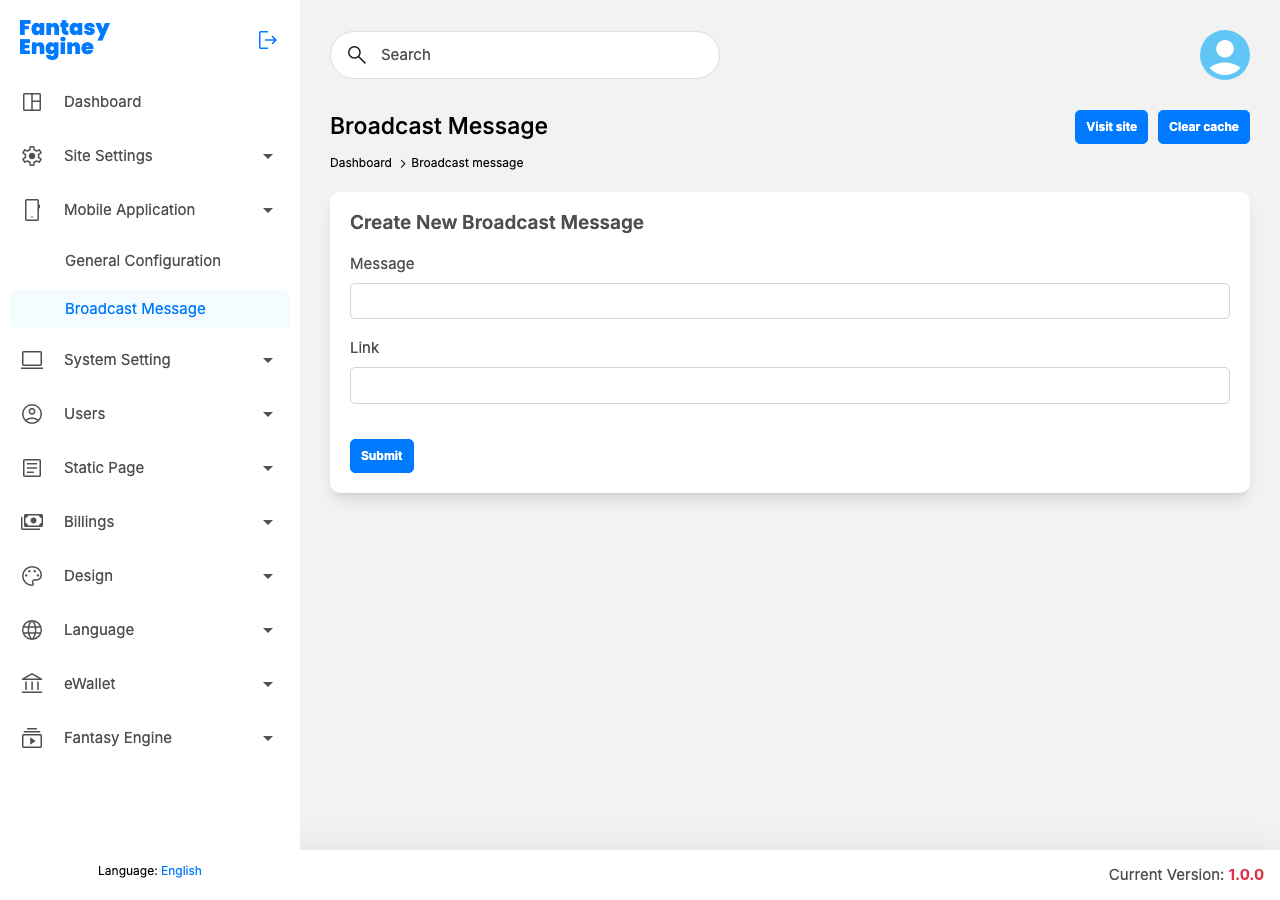
Use it for a real announcement or on a test project only: every phone where a member is signed in gets it.
2. One member's devices#
- Sign in with a test member on the phone or in the browser and allow notifications.
- Find the member's id and check that a token was stored:
mysql -e "SELECT user_id, type, created_at FROM fantasyengine.user_fcm_tokens WHERE user_id = 2;" - Send a push to that member only:
Nothing is printed; the push arrives within seconds. A failure is logged asphp artisan tinker --execute "Packages\ShaunSocial\Core\Support\Facades\Utility::pushNotify(Packages\ShaunSocial\Core\Models\User::find(2), 'Test push', '', ['url' => 'https://your-site.example/']);"[push] fcm send failedinstorage/logs/. - For a real notice, let the member enter a paid contest: the entry-fee notice is pushed and opens the entry when tapped.
Not sent on this machine: its firebase.json belongs to the vendor project and a test would reach real devices. The commands and messages are read from the code; the Broadcast Message screen shot is from the local site.
Troubleshooting#
Last updated: 2026-11-19 · v1.0.0
| Symptom | Cause and fix |
|---|---|
| Phones get contest results but no entry-fee / prize notices | Money features in the mobile app is off: money notices go to the web only (by design). |
| Web push of a site in a sub-folder never arrives | an old service worker registered at the domain root by an earlier build: the member reloads the site once (the new build registers under the folder); check DevTools → Application → Service workers. |
| No push anywhere, no error | firebase.json is missing from the project root, or FIREBASE_CREDENTIALS in .env names a file that does not exist (the backend skips every send). The Broadcast Message screen says "Please configure the Google Firebase server key." Put the file in place or correct the path, then php artisan config:clear. |
Log: fcm rejected tokens as another sender | firebase.json and the apps come from different Firebase projects. |
| iPhone gets nothing, Android works | no APNs key uploaded in Firebase, the App ID lacks the Push Notifications capability, or the iOS project was generated before this version (run npx expo prebuild -p ios --clean; The app files). The iOS simulator never gets an FCM token (messaging/unregistered): test on a device. |
| Android: no banner, the notice sits silently in the shade | the member lowered the importance of the Notifications channel, or the app was installed when another channel was in use. Android never raises a channel's importance: reinstall the app or reset it in the system settings. |
| Android: notices in "Miscellaneous" | a backend older than 1.0.0 that does not name the channel notices. |
| Two notices for one event in the foreground on iOS | someone added messaging_ios_foreground_presentation_options to the app's firebase.json: remove it (the app shows foreground notices itself). |
| Web: no permission prompt | the site is not on HTTPS, Progressive Web App is off, or the Firebase json is empty and the build carries no keys (check /api/init). |
| Web: the prompt was refused once | the browser remembers it; the member must allow notifications in the site settings of the browser. |
| A member logged out still gets pushes on that device | the logout deletes the device token; a device that was offline at logout keeps it until FCM reports it invalid. |
| Money notices missing on phones | expected while Money features in the mobile app is off. |
Change log#
Last updated: 2026-11-19 · v1.0.0
| Date (GMT+7) | Section | What changed |
|---|---|---|
| 2026-10-22 | all | First version, checked against daily-fantasy c68e20c. |
| 2026-10-22 | app-config-files, web-push-settings, push-troubleshooting | The app config carries the iOS push entitlement and background mode (IOS_APS_ENVIRONMENT=development for a dev-client device build), a device proof is still open; the Firebase json accepts the console object and JSON and refuses an unreadable value; the two warnings replaced; checked against the 9c4fba6. |
| 2026-10-28 | push-overview | Table of the Fantasy Engine notices, their text and where a tap leads; the new type df_resettle_contest (extra prize after a re-settle, a money notice). |
| 2026-10-28 | web-push-settings, push-troubleshooting | The service worker is registered under the site's path (sub-folder sites); two troubleshooting rows (money notices in money-off mode, an old root worker). |
| 2026-10-29 | push-troubleshooting | The AdminCP message quoted as it now reads: "Please configure the Google Firebase server key." |
| 2026-10-30 | backend-service-account, push-overview, push-test, push-troubleshooting | The push switch follows the Firebase SDK's key setting since daily-fantasy 5daa011: FIREBASE_CREDENTIALS (or GOOGLE_APPLICATION_CREDENTIALS) may name the key file elsewhere, or hold its JSON; the "do not set FIREBASE_CREDENTIALS" note removed; the Broadcast Message refusal quoted as "Please configure the Google Firebase server key.". |
| 2026-10-30 | push-overview | Notice texts as members read them since 94fe444 (the contest named, the place and the prize), older notices keep their text; the admins' withdrawal / verification request notices open the AdminCP list (35f1cbc). |
| 2026-11-16 | push-overview | Checked against 3e10186: the notice of a contest the site cancelled reads "Contest "..." was cancelled: your fee was refunded." (no fee clause for a free contest or an auto-join entry), sent by the site with no member name or picture; a push of a notice nobody else caused carries no picture. |
| 2026-11-16 | all, change-log | This copy of the guide describes version 1.0.0 (a separate copy describes 1.1.0). An internal label taken out of an older row and the page-source comment; wording only. |
| 2026-11-19 | all | Moved to the documentation site: this page holds the sections push-overview, firebase-project, backend-service-account, app-config-files, push-test, push-troubleshooting of the former Firebase and push notifications document. Page frame, headings and links between the pages updated; the text of the sections is unchanged. A note near the top says that store and console steps were not run for this guide. |
| 2026-11-19 | push-snake, app-config-files | This guide describes Fantasy Engine only: the section push-snake removed; the snake draft notes taken out of app-config-files (the snake draft product has its own documents). |
| 2026-11-19 | app-config-files, firebase-project, push-troubleshooting | References to the tabs of the former single-page document replaced by links to the sections they meant; wording only. |