Fantasy Engine mobile app guide 1.0.0 / Your app
Build the apps
For the developer team that builds the web app, the sale packages and the Android / iOS apps, and prepares the store release.
The steps in the Google Play Console, App Store Connect, the Apple Developer website, Xcode and the Firebase console are described in text and were not run for this guide; those tools rename their menus from time to time, so look for the same words if a menu is named a little differently. The note at the end of each section says what was run and what was read from the code.
What you can build#
Last updated: 2026-10-28 · v1.0.0
The app is one Expo SDK 57 project (React Native 0.86, New Architecture, expo-router) in
resources/expo of the full package. It builds three things:
| Output | Built with | Where it goes |
|---|---|---|
| Web app | build_web.sh (an expo export for web) | the site's public/ folder; Laravel serves it at the site root or in a sub-folder (one build for any address) |
| Android app | Gradle after expo prebuild, or EAS Build | Google Play (AAB) or a test APK |
| iOS app | Xcode after expo prebuild, or EAS Build | App Store / TestFlight |
The developers of the product use build_release.sh (or build_release.ps1 on Windows) to
make the sale packages from the repository; you need it only if you maintain your own fork.
Tools#
| Tool | Version used by the team |
|---|---|
| Node.js | 24.x (22 LTS also fine) |
| Yarn | 1.22.22 - the lock file is Yarn v1: npx [email protected] install --frozen-lockfile |
| Android | Android Studio / SDK platform 36, build-tools 36, NDK 27.1, JDK 21 |
| iOS (macOS only) | Xcode 26, CocoaPods 1.16 |
cd resources/expo
npx [email protected] install --frozen-lockfile
Build the web app#
Last updated: 2026-11-04 · v1.0.0
The standard package already contains the web build. Rebuild it only after changing the app source or its
EXPO_PUBLIC_* values.
bash resources/expo/build_web.shWeb Bundled 19966ms node_modules/expo-router/entry.js (4407 modules)
...
Exported: dist
web-base-template: 26 base path token(s) in 1 file(s): _expo/static/js/web/entry-<hash>.js
build_web: installed into /var/www/fantasyengine/public:
_expo
assets
firebase-messaging-sw.js
logo192.png
logo512.png
manifest.json
metadata.json
build_web: web template in /var/www/fantasyengine/resources/web-template (public/ holds the root build; php artisan shaun_core:web_base writes a sub-folder base)
build_web: css 3, js 1 file(s) in _expo/static- It exports with
--clear(Metro's cache does not notice a changedEXPO_PUBLIC_*value), removes exactly the files of the previous build (listed inpublic/_expo/installed-files.txt) and copies the new ones. It never writesindex.htmlorlocales/(Laravel renders the page and owns the language files) and stops before removing anything if the export would overwrite a file it did not install. - The served web app takes the API address from the page (the AdminCP Site url): one build works on any
domain. The script compiles
EXPO_PUBLIC_API_URLempty, whatever.env.production,.env.localor the environment say, so no address of the build machine is in the bundle. The served page setswindow.siteConfig.siteUrland the app reads it first, so this changes nothing for a site. - One build also works in any sub-folder: the export is made for a placeholder path, a copy with the placeholder
goes to
resources/web-template, andpublic/gets the root build. A sub-folder site writes its own path intopublic/_expofrom that template at install, when the Site url changes, at every update and withphp artisan shaun_core:web_base- run that command after rebuilding a sub-folder site by hand. LeaveEXPO_PUBLIC_WEB_BASE_URLempty: the script stops when it is set to anything else. --workboxalso generates an offline service worker (sw.js,workbox-*.js);--public <dir>installs into another folder.- Nothing has to be cleared afterwards: the page shell notices the new files by their folder's modification time.
Verified on 2026-10-22: build_release.sh standard and full were run from daily-fantasy c68e20c into a test folder (each about 55 s, web build included); the standard package was then installed and served. On 2026-10-28 build_release.sh all on the 7b8ff49 printed the build_web lines above (web-base-template, web template, css 3 / js 1).
Build the sale packages (developers)#
Last updated: 2026-11-19 · v1.0.0
bash build_release.sh all --out /tmp/release      # or: standard | full; add --workbox for the offline worker
# Windows PowerShell 5.1 / 7, same arguments and the same files:
powershell -NoProfile -ExecutionPolicy Bypass -File build_release.ps1 all -Out C:\releasebuild_release: fantasyengine 1.0.0 -> /tmp/release (all)
...
build_release: standard: no development package, no internal address, no value of a secret file (9 values checked)
build_release: /tmp/release/fantasyengine-1.0.0.zip (20964 files, 37.1 MB)
build_release: fantasyengine-1.0.0.zip holds all 20964 staged files
...
build_release: full: no development package, no internal address, no value of a secret file (9 values checked)
build_release: /tmp/release/fantasyengine-full-1.0.0.zip (21700 files, 44.1 MB)
build_release: fantasyengine-full-1.0.0.zip holds all 21700 staged files
build_release: done- Needs
phpwith the zip extension,composer,gitand an installedresources/expo. The version comes frompublic/version.txt. - The file list is git's view of the working tree: tracked files and untracked files that are not ignored. Remove stray files before building; nothing has to be committed.
- The zips hold the files at the root of the archive (no top folder). Left out:
tests/,phpunit.xml,firebase.json,README.md, both scripts; the web build is produced fresh,vendor/is a freshcomposer install --no-dev,storage/an empty skeleton. - The full package adds
resources/expowith the*.examplefiles under the real names (.env,.env.production,assets/firebase/google-services.json,GoogleService-Info.plist); the real ones never enter. The build fails if any value offirebase.json,resources/expo/.env,.env.localor the real Firebase files is found in what it would zip, or if a development dependency slipped intovendor/. - The web export of the package runs with the values of
.env.production, so a developer's.env.localnever reaches a package (EXPO_PUBLIC_API_URLis still compiled empty, see the web build). - The build also fails if a file outside
vendor/names one of the vendor's own servers, or if the web build (public/_expo/,resources/web-template/) holds an address of a build machine: a loopback, "any" or private IPv4 address with or without a port (127.0.0.1,0.0.0.0,10.*including the Android emulator's10.0.2.2,172.16.*to172.31.*,192.168.*),localhost:<port>or a port-lesshttp://localhost/<folder>(a barehttp://localhostis a library default and passes):build_release: standard: an internal address (10.0.2.2:8090) is in public/_expo/....
Verified on 2026-10-22: build_release.sh standard and full were run from daily-fantasy c68e20c into a test folder (each about 55 s, web build included); the standard package was then installed and served. Run again on 2026-10-28: build_release.sh all on the 7b8ff49, exit 0, the output above (about 70 s); the working tree stayed clean. On 2026-11-04 (the code of bd2f162) the two stage checks print the lines above with "no internal address"; the zips then held 21264 (standard) and 21995 (full) files. On 2026-11-16 the 1.0.0 packages were built again from daily-fantasy b567338 on macOS (about 60 s, the web export included; 3e10186 changes the content of one app file only): the figures above, both stage checks passed, the working tree stayed clean; the version stays 1.0.0, so these packages carry the fixes made to 1.0.0 since it shipped.
App identity: names and identifiers#
Last updated: 2026-11-19 · v1.0.0
| Value | 1.0.0 default | Where | Must match |
|---|---|---|---|
| App name | Fantasy Engine | app.json expo.name | store listing |
| Android package | com.dailyfantasy.app | expo.android.package | the Firebase Android app, google-services.json; cannot change after the first Play upload |
| iOS bundle ID | com.dailyfantasy.app | expo.ios.bundleIdentifier | the Firebase iOS app, the plist, the Apple App ID |
| URL scheme | fantasyengine | expo.scheme | AdminCP → Mobile Application → General Configuration → App scheme (fantasyengine://), used to come back into the app after a social login |
| Version | 1.0.0 | expo.version | shown in the stores |
| Build number | not set (= 1) | add expo.android.versionCode and expo.ios.buildNumber | must grow with every store upload |
| Icons, splash | assets/mobile/*.png | expo.icon, android.adaptiveIcon, the splash plugin |
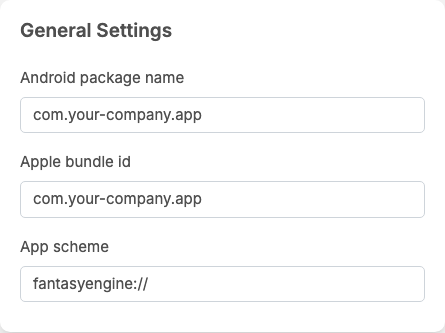
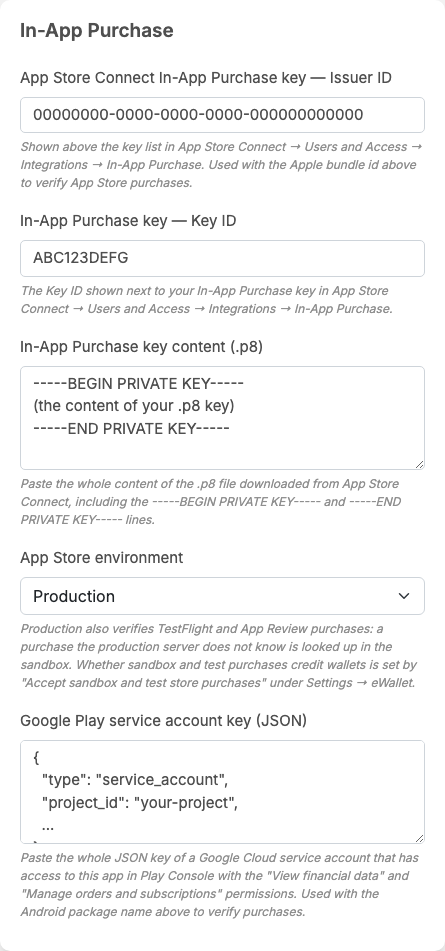
Only App scheme is used today. Android package name and Apple bundle id on that card,
and the In-App Purchase card below it (App Store Connect In-App Purchase key: Issuer ID, Key ID, the .p8 key
content, App Store environment; Google Play service account key (JSON)), are the store credentials of in-app
purchases, which are switched off in 1.0.0. They are AdminCP settings only: nothing is read from .env or
from a key file on the server. When in-app purchases are switched on, the package name and the bundle id must equal
expo.android.package and expo.ios.bundleIdentifier. After changing any identifier: new
Firebase app files, then npx expo prebuild --clean.
The purchase routes of the site are switched off, and the apps do not sell credits: their Add Credits says "This function is not available on the app! Please tap here to deposit." and opens the website wallet, where members pay with PayPal or Stripe. The settings above are in place for a later release that switches in-app purchase on; two more of them belong to it: App Store environment (default Production: a purchase the production server does not know - TestFlight, App Review - is looked up in the sandbox) and, under Site Settings → General Configuration → eWallet, Accept sandbox and test store purchases (on by default: store reviewers pay with sandbox accounts, and those purchases would credit real wallets). Neither has an effect in 1.0.0.
EXPO_PUBLIC_* values#
Last updated: 2026-11-04 · v1.0.0
They are compiled into the bundle at build time. Files, from weakest to strongest:
| File | Used for |
|---|---|
resources/expo/.env | development (dev server, dev client) |
resources/expo/.env.production | release builds and expo export |
resources/expo/.env.local | your machine only (not in git, never in a package); read by expo export and by native release builds too, where it wins over .env.production |
| the process environment | wins over every file (EXPO_PUBLIC_API_URL=... npx expo export ...) |
| Key | Release value | Meaning |
|---|---|---|
EXPO_PUBLIC_API_URL | https://your-site.example | required for the mobile apps: the backend they call; a native release build stops while it is empty or a placeholder (below). The served web app takes it from the page; build_web.sh compiles it empty |
EXPO_PUBLIC_WEB_BASE_URL | (empty) | leave it empty: build_web.sh exports for a placeholder and stops on any other value; the site writes its own base path (domain root or sub-folder) into the installed build (php artisan shaun_core:web_base), so one build serves every address |
EXPO_PUBLIC_APP_ASYNC_ROUTES | true | load screens on demand in the native apps |
EXPO_PUBLIC_WEB_PUSH_ENABLE + ..._NOTIFICATION_KEY, ..._API_KEY, ..._AUTH_DOMAIN, ..._PROJECT_ID, ..._STORAGE_BUCKET, ..._MESSAGING_SENDER_ID, ..._APP_ID, ..._MEASUREMENT_ID | false / empty | web push compiled in; used only when the site sends no usable Progressive Web App settings - set web push in the AdminCP instead |
EXPO_PUBLIC_DEFAULT_EMAIL, EXPO_PUBLIC_DEFAULT_PASSWORD | empty | pre-fill of the login form for development; never set in a release build |
Metro caches compiled modules and does not see a changed value. build_web.sh always clears; for a
native release build run npx expo start --clear once (or delete Metro's cache) before building.
When the JavaScript is bundled into a release app - Gradle assembleRelease / bundleRelease
(yarn build_android), an Xcode Release build or Archive, EAS Build,
npx expo run:android --variant release, npx expo run:ios --configuration Release -
app.config.js stops the build when EXPO_PUBLIC_API_URL is empty, is not an
http(s):// address, or is still a placeholder (your-site.example, any *.example
host, example.com / .net / .org, a host with your-site or
your-domain):
Error: Error reading Expo config at .../resources/expo/app.config.js:

Native release build refused (expo export:embed): EXPO_PUBLIC_API_URL is "https://your-site.example".
Set it to your site's address (https://...) in resources/expo/.env.production before a release build.
A .env.local or a value in the shell wins over that file. Development builds and the web build are not checked.
Gradle shows it in the task createBundleReleaseJsAndAssets, Xcode in the build phase Bundle React
Native code and images. Not checked: development builds and the dev client, expo start,
expo prebuild, expo config and the web build. The check reads the value the build will
compile in, so a .env.local with a development address (http://127.0.0.1:8090) passes it and
ends up in the app: build releases on a machine without .env.local, or set the value in the shell
(EXPO_PUBLIC_API_URL=<your site address> ./gradlew assembleRelease).
Development builds (dev client)#
Last updated: 2026-10-22 · v1.0.0
The app uses native modules (Firebase, notifee), so Expo Go cannot run it: development uses a dev client, a debug build of the app that loads its JavaScript from Metro.
cd resources/expo
npx expo prebuild --platform all          # generates android/ and ios/ (never edit them by hand)
(cd ios && pod install)                   # macOS
npx expo run:android                      # builds + installs the debug app (first build ~12 min)
npx expo run:ios                          # macOS (first build ~17 min: React Native builds from source)
npx expo start --dev-client # Metro for bothandroid/andios/are generated fromapp.jsonand the plugins (npx expo prebuild --cleanafter a change there): a hand edit is lost at the next prebuild.- An Android emulator reaches a backend on your computer's
127.0.0.1only throughadb reverse tcp:8090 tcp:8090(andtcp:8081for Metro), after every emulator restart. - The developer-menu gear and red LogBox cards exist only in dev builds.
- A dev client for a real iPhone is signed with a development profile, whose push entitlement is
development: prebuild iOS withIOS_APS_ENVIRONMENT=development npx expo prebuild -p ios --clean(app.jsonasks forproduction, the value of a release build). The simulator needs nothing.
Commands as used by the developers on macOS; not rebuilt for this document.
Android release build#
Last updated: 2026-11-19 · v1.0.0
- Fill
resources/expo/.env.production(at leastEXPO_PUBLIC_API_URL: the build stops while it is empty or stillhttps://your-site.example, EXPO_PUBLIC_* values), put the realgoogle-services.jsoninassets/firebase/, raiseandroid.versionCode. - The script of the project builds an APK:
Outputcd resources/expo npx [email protected] build_android # = expo prebuild --platform android && cd android && ./gradlew assembleReleaseresources/expo/android/app/build/outputs/apk/release/app-release.apk
The generated android/app/build.gradle signs the release variant with debug.keystore.
It installs on test phones, but Google Play refuses it, and Play wants an Android App Bundle (AAB). The project has
no store signing set up. Two ways:
- EAS Build (Expo's build service; keeps the upload key for you):
npm install -g eas-cli eas login eas build:configure # creates eas.json eas build --platform android --profile production # an .aab signed with your upload key - Local Gradle: create an upload key
(
keytool -genkeypair -v -storetype PKCS12 -keystore upload.keystore -alias upload -keyalg RSA -keysize 2048 -validity 10000), add a releasesigningConfigthrough a config plugin (a hand edit of the generated file is lost at the next prebuild), then./gradlew bundleRelease→app/build/outputs/bundle/release/app-release.aab.
Keep the upload key and its passwords safe: every later update must be signed with it.
Read from package.json and the generated android/app/build.gradle (release uses signingConfigs.debug); no release build was made for this document, EAS is not set up in the repository. The address check was run on 2026-11-04 with the bundling command Gradle runs (npx expo export:embed --platform android --dev false): refused for the placeholder and for an empty value, a full release bundle for a real address; Gradle itself was not run.
iOS release build#
Last updated: 2026-11-04 · v1.0.0
- Requirements: a Mac with Xcode, an Apple Developer account, an App ID with the bundle ID of
app.jsonand Push Notifications enabled. - Fill
.env.production(a Release build stops whileEXPO_PUBLIC_API_URLis empty or stillhttps://your-site.example), put the realGoogleService-Info.plistinassets/firebase/, set your bundle ID and raiseios.buildNumber. The push entitlement and the background mode are already in the file (keepIOS_APS_ENVIRONMENTunset for a release build): resources/expo/app.json (excerpt)"ios": { "bundleIdentifier": "com.your-company.app", "googleServicesFile": "./assets/firebase/GoogleService-Info.plist", "supportsTablet": true, "buildNumber": "2", "entitlements": { "aps-environment": "production" }, "infoPlist": { "UIBackgroundModes": ["remote-notification"] } } - Generate and open the project:
cd resources/expo npx expo prebuild --platform ios --clean (cd ios && pod install) open ios/FantasyEngine.xcworkspace - In Xcode: target FantasyEngine → Signing & Capabilities → your Team; scheme Release;
Product → Archive; Organizer → Distribute App → App Store Connect. Or with EAS:
eas build --platform ios --profile production.
React Native is built from source (buildReactNativeFromSource): a clean archive takes a while.
Read from app.json and the generated iOS project; the push keys checked with npx expo config --type introspect on 2026-10-22 (9c4fba6). No archive was made and no real iPhone received a push with this build yet (the test machine signs nothing).
Store review: money-off mode#
Last updated: 2026-10-29 · v1.0.0
Paid contests with real prizes are treated by Apple and Google as real-money gaming, with requirements of their own (licences, regions). For a review, or for a store release without money, switch the money features off for the mobile apps only:
- AdminCP → Site Settings → General Configuration → Fantasy Engine → Money features in the mobile app
= off.
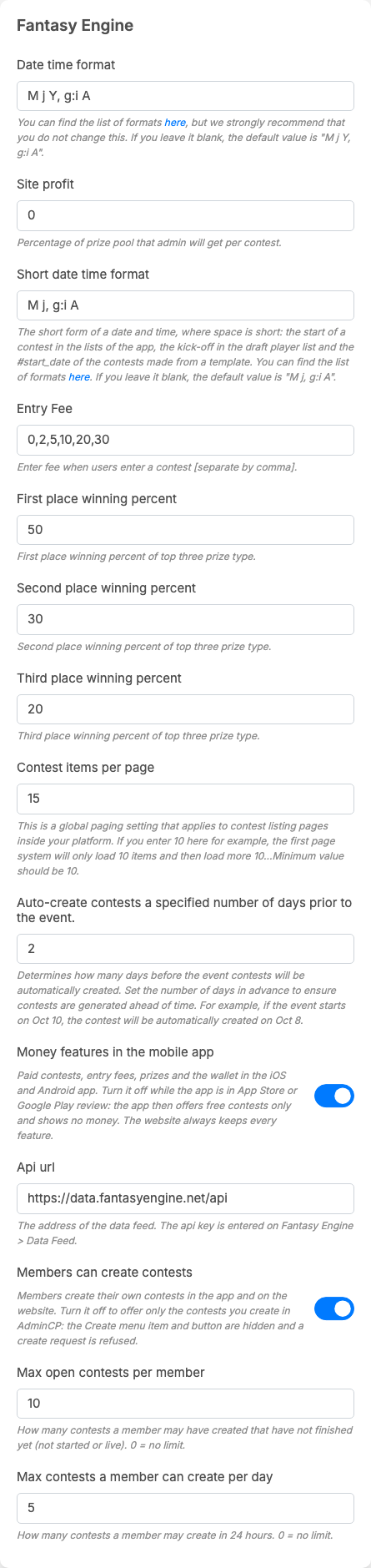
store-money-off - the switch "Money features in the mobile app" on the Fantasy Engine settings card (the card re-shot with the three member contest settings) (2026-10-29) - The apps send
X-Client-Platform: ios | androidwith every request; for them the site now answersmoney_enabled: falsein/api/init, lists free contests only and refuses a paid contest or the wallet. The apps hide every fee, prize, balance and wallet link (the entry confirmation and the "Not enough credits" window never appear), and money notices (entry fee, prize, the extra prize of a re-settle, wallet notices) are not pushed to phones; in the app a tap on a contest money notice opens the lobby and a wallet notice opens nothing. The How to play pages, the Rules tab and the Help page leave out their money parts (the default texts mark them; keep that mark when you edit those pages), and the contest rule reads "Results are final once the contest is complete." instead of the payout sentence. - The website keeps every feature.
- Switch it back on after approval if your licence allows. The apps read the switch at start and each time they come back to the foreground.
Other store notes#
- Permissions declared: camera and photo library (uploads), notifications. Their texts are in the
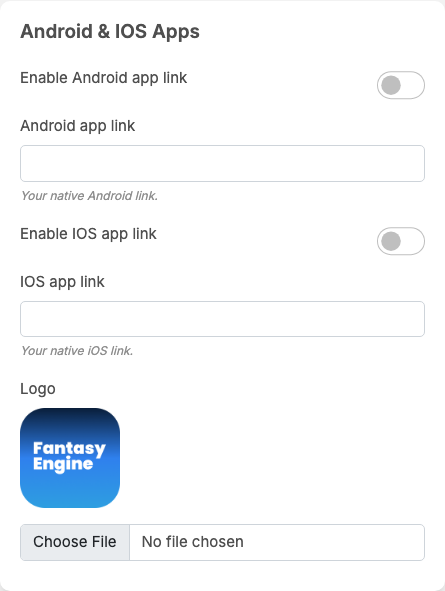
expo-image-pickerentry ofapp.json; write your own before submitting. - Store links on the website: AdminCP → Site Information → Android & IOS Apps (switch on, paste the store address).
- Give the reviewer a test account and contest data that shows the main flow (free contests).
Read from the code; covered by the backend tests of the product; not re-run for this document.
Troubleshooting#
Last updated: 2026-11-19 · v1.0.0
| Symptom | Cause and fix |
|---|---|
build_web.sh: "dependencies are missing" | run npx [email protected] install --frozen-lockfile in resources/expo. |
build_web.sh: "... exists and was not installed by this script" | a file of that name was put into public/ by hand; move it away (the script refuses to overwrite it). |
build_web.sh: "EXPO_PUBLIC_WEB_BASE_URL is set to '...': leave it empty" | remove that line from .env / .env.local; the site writes its own base path (Build the web app). |
| A site in a sub-folder shows a blank page after a rebuild by hand | run php artisan shaun_core:web_base (the rebuild put the root build into public/). |
A changed EXPO_PUBLIC_* value does not show | Metro cache: build with --clear. |
| Android app starts on a white screen for some seconds | it waits for /api/init and /user/me; check the API address and adb logcat before calling it a crash. |
Android crash at start: AppearanceModule.setColorScheme ... NullPointerException | NativeWind below 4.2.7: install from the lock file, never downgrade it. |
| "undefined is not a function" at the first navigation | a custom root index.js was added: keep main = expo-router/entry, restart Metro with --clear. |
| The layout sits under the status bar on a phone | the app-level SafeAreaProvider in app/_layout.jsx was removed. |
| iOS: no push token | simulator (never has one), the App ID lacks Push Notifications, or an ios/ generated before the entitlement was added (npx expo prebuild -p ios --clean; iOS release build). |
Xcode: the provisioning profile does not match the aps-environment entitlement | a dev-client build for a device: prebuild with IOS_APS_ENVIRONMENT=development (Development builds). |
| Release build: "Native release build refused (expo export:embed): EXPO_PUBLIC_API_URL is ..." | set your site's address in resources/expo/.env.production (or in the shell); remove a .env.local that sets it to a placeholder (EXPO_PUBLIC_* values). |
build_release: "an internal address (...) is in public/_expo/..." | a build-machine address was compiled into the web build; build_web.sh compiles the API address empty, so look for another EXPO_PUBLIC_* value (for example EXPO_PUBLIC_WEB_BASE_URL) in .env.production, .env.local or the shell. |
| Play Console refuses the upload | debug-signed APK: build an AAB signed with your upload key (Android release build), and raise versionCode. |
Change log#
Last updated: 2026-11-19 · v1.0.0
| Date (GMT+7) | Section | What changed |
|---|---|---|
| 2026-10-22 | all | First version, checked against daily-fantasy c68e20c; build_web.sh and build_release.sh verified, native builds described from the code. |
| 2026-10-22 | dev-client, ios-release, build-troubleshooting | app.json carries aps-environment: production and UIBackgroundModes: remote-notification; IOS_APS_ENVIRONMENT=development for a dev client on a device; the "add the push entitlement" step removed; a real-device proof is still open; checked against the 9c4fba6. |
| 2026-10-23 | env (EXPO_PUBLIC_WEB_BASE_URL) | The key stays empty: the web build is made for a placeholder and the site writes its base path (root or sub-folder) at install / Site url change / update. |
| 2026-10-28 | build-overview, web-build, sale-packages, build-troubleshooting | One web build for a domain root or any sub-folder (web template, shaun_core:web_base, EXPO_PUBLIC_WEB_BASE_URL left empty); build_release.ps1; zips without a top folder; output and counts of the 7b8ff49. |
| 2026-10-28 | store-money-off | Money parts of How to play / Rules / Help and the re-settle notice in money-off mode; settings card re-shot (the api key is no longer on it). |
| 2026-10-28 | app-env | Re-checked against daily-fantasy 35188bf, which holds the web base path change (date unchanged). |
| 2026-10-28 | android-release | npx [email protected] build_android (Yarn is not assumed installed). |
| 2026-10-28 | app-identifiers, store-money-off | Shots named after their section: app-identifiers__general-configuration, store-money-off__android-ios-apps; the Fantasy Engine settings card is the shared first-settings__fantasy-engine-settings of the install guide. |
| 2026-10-29 | store-money-off | The shared Fantasy Engine settings shot replaced (now with the three member contest settings); text unchanged. |
| 2026-10-29 | store-money-off | Re-checked against the 94fe444 (money notice types and the money switch unchanged): section dated, one note that the new entry confirmation and "Not enough credits" window never show while money is off. |
| 2026-11-04 | web-build, sale-packages, app-env | build_web.sh (and the export of build_release.ps1) compile EXPO_PUBLIC_API_URL empty: the served web app reads its address from the page, no build-machine address in the bundle; the package build fails on an internal address. |
| 2026-11-04 | sale-packages, app-env, android-release, ios-release, build-troubleshooting | The package build also refuses loopback, "any" and private IPv4 addresses (10.0.2.2, 10.*, 172.16-31.*, 0.0.0.0) and port-less http://localhost/<folder> in the web build; a native release build stops while EXPO_PUBLIC_API_URL is empty or a placeholder (app.config.js); two troubleshooting rows. |
| 2026-11-04 | web-build, sale-packages, app-env, android-release, ios-release, build-troubleshooting, change-log | Sections re-checked against daily-fantasy abd2077 (web-build) and bd2f162 (the others), date unchanged. The expected build_release output shows the stage check line with "no internal address"; one line on window.siteConfig in web-build. |
| 2026-11-05 | app-identifiers | The store credentials of in-app purchases are AdminCP settings (Mobile Application → General Configuration: Apple bundle id, and the new In-App Purchase card), no .env or key file; the shared secret field is gone. The card screenshot still shows the 2026-10-22 fields (re-shoot pending). |
| 2026-11-05 | app-identifiers | General Settings card re-shot (Android package name, Apple bundle id, App scheme; the old shot of 2026-10-22 replaced) and a new shot of the In-App Purchase card; re-checked against daily-fantasy 5845c80. |
| 2026-11-05 | app-identifiers | A box on in-app purchase in 1.0.0: the purchase routes are off, the apps send members to the website wallet (PayPal, Stripe); the App Store environment's sandbox lookup and the eWallet switch "Accept sandbox and test store purchases" (both without effect in 1.0.0). Re-checked against daily-fantasy 5e767e8; the two shots of the day still match. |
| 2026-11-16 | sale-packages | Expected output of the 1.0.0 packages rebuilt on 2026-11-16 (standard 20,964 files / 37.1 MB, full 21,700 / 44.1 MB); the secret-value count depends on the build machine. Checked against 3e10186. |
| 2026-11-16 | all, change-log | This copy of the guide describes version 1.0.0 (a separate copy describes 1.1.0). Internal labels and file names taken out of older rows, "checked" lines and a page-source comment; wording only, those Last updated lines stay. |
| 2026-11-19 | all | Moved to the documentation site: this page holds the sections build-overview, web-build, sale-packages, app-identifiers, app-env, dev-client, android-release, ios-release, store-money-off, build-troubleshooting of the former Build the web and mobile apps document. Page frame, headings and links between the pages updated; the text of the sections is unchanged. A note near the top says that store and console steps were not run for this guide. |
| 2026-11-19 | app-identifiers, sale-packages | This guide describes Fantasy Engine only: the snake draft notes taken out of app-identifiers, sale-packages (the snake draft product has its own documents). |
| 2026-11-19 | android-release, build-troubleshooting | References to the tabs of the former single-page document replaced by links to the sections they meant; wording only. |