
Table of Contents
The Import / Export Event Results feature allows administrators to manage match results and player statistics in bulk using Excel files. This helps ensure accurate scoring and timely settlement of contests.
1. Export Event Result Template #
- Go to Admin Dashboard → Event → Import result
- Select the relevant Sport / League → Click Import results
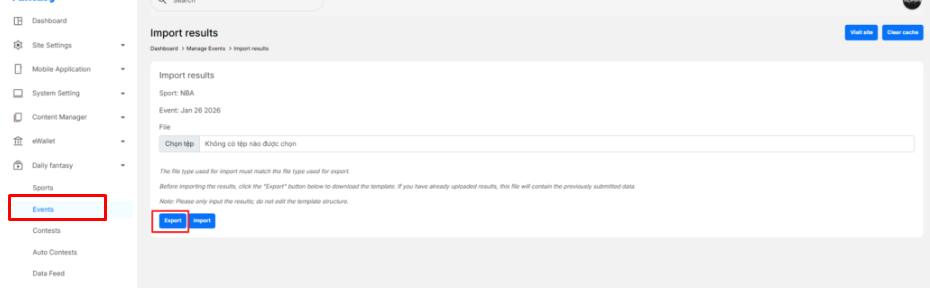
- Click Export results
- Downloaded Excel file will include:
- Fixtures sheet: Match information (Home Team, Away Team, Scores, Status).
- Match detail sheets (per fixture): Player statistics template.
2. Update Fixture Results #
In the Fixtures sheet, fill in the following columns:
- Home Team Score
- Away Team Score
- Status
Allowed values:scheduledinprogressfinalpostponedcanceled
✅ Set the status to final when the match is completed.

3. Update Player Statistics #
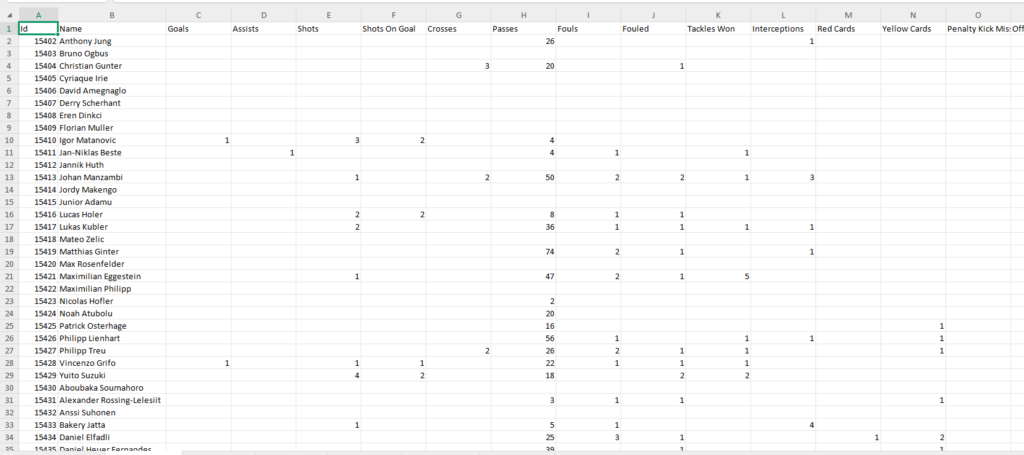
In each fixture’s sheet
- Each row represents one player.
- Fill in statistical values
Leave cells empty if a player has no stats for that category.
4. Import Event Results #
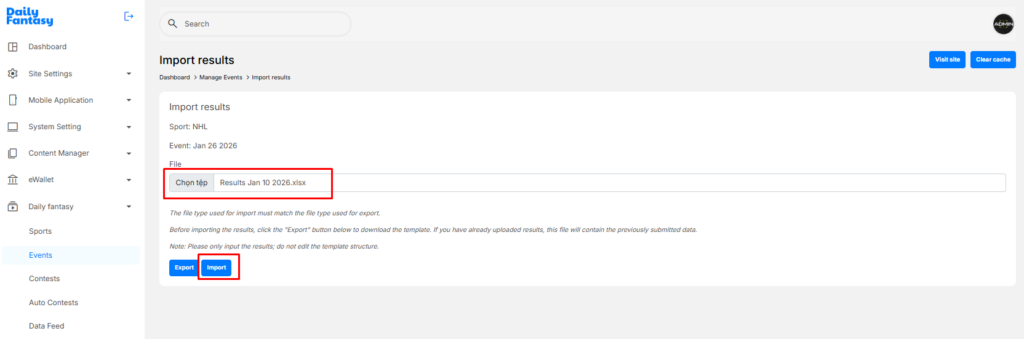
- After completing the Excel file, return to Export Results.
- Click Choose file and select the edited Excel file.
- Click Import.
- The system will:
- Update fixture results
- Update player statistics
- Recalculate fantasy points
- Update contest standings automatically
5. Verify Imported Data #
After importing, verify:
- Fixture status
- Scores are correct
- Player statistics are reflected correctly
- Contest rankings and fantasy points are updated


