
Table of Contents
This guide explains how to withdraw funds from your wallet using PayPal or Bank Transfer.
Step 1: Open the Wallet
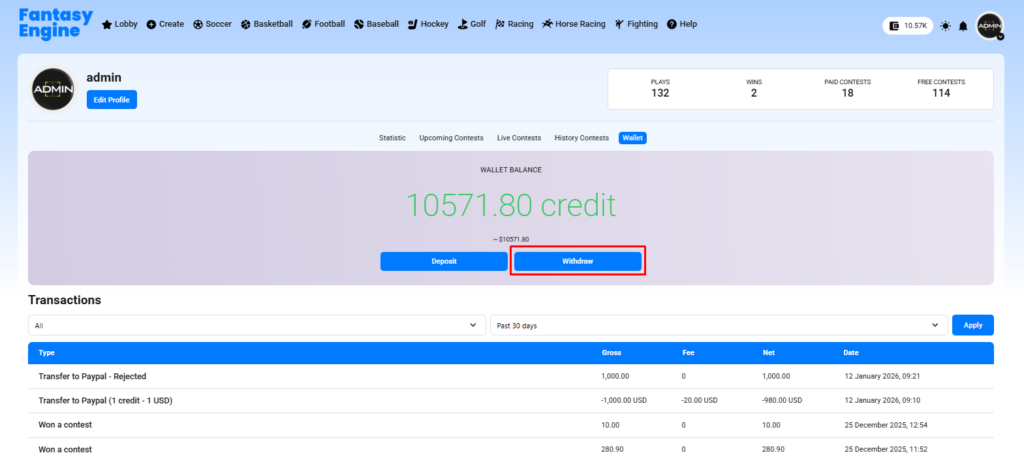
- Go to Profile → Wallet.
- Click the Withdraw button.
Step 2: Choose Withdrawal Amount
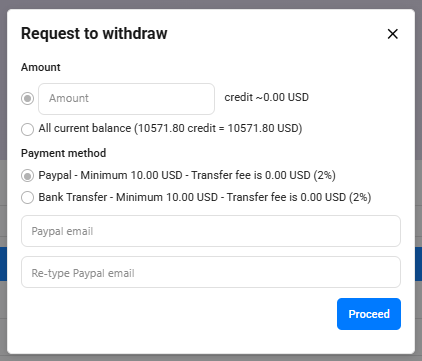
- Enter a custom amount, or
- Select All current balance to withdraw your full wallet balance.
The equivalent value in USD will be displayed automatically.
Step 3: Select a Payment Method
You can choose one of the following methods (availability depends on admin configuration):
Option 1: PayPal #
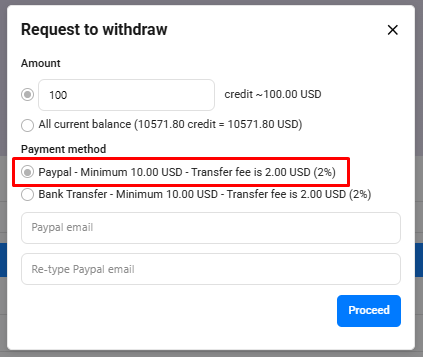
- Select PayPal as the payment method.
- Enter your PayPal email address and re-type it to confirm.
- Review the minimum withdrawal amount and transfer fee shown on the screen.
Option 2: Bank Transfer #
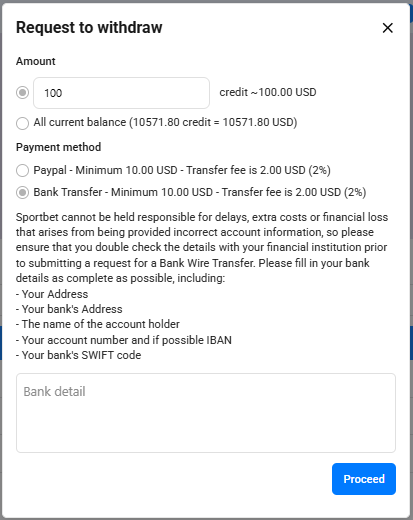
- Select Bank Transfer as the payment method.
- Carefully enter your bank details in the provided field, including:
- Bank name
- Bank address
- Account holder name
- Bank account number (and IBAN if applicable)
- SWIFT/BIC code
Step 4: Submit the Request
- Click Proceed to submit your withdrawal request.
Important Notes
- The withdrawal amount is deducted immediately after you submit the request.
- All withdrawal requests are reviewed and processed by the admin.
- Only verified user accounts are allowed to withdraw funds.
- Minimum withdrawal amounts, transfer fees, and available payment methods are configured by the admin in General Configuration.
- If all withdrawal methods are disabled by the admin, the Withdraw option will not be available.
Once approved, your funds will be transferred via the selected payment method based on the information you provided.


