
This section explains how to update event results so that contest scores, rankings, and rewards are calculated correctly.
Navigation Path: Admin Dashboard > Fantasy Engine > Events > Manage Events > Update results.
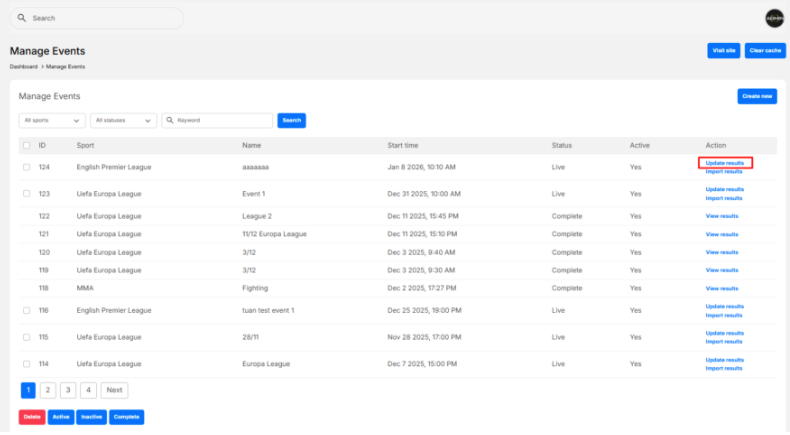
1. Choose the correct fixture (Albania vs Andorra) from the Fixtures dropdown.

2. Input Team Scores
- Enter the final or current scores for Home Team and Away Team.

3. Update Match Status
From the Status dropdown, select the appropriate status:
- Scheduled – Match has not started
- In-progress – Match is live
- Final – Match has finished
- Postponed – Match delayed
- Canceled – Match canceled

⚠️ If an event has multiple fixtures, remember to click Save before switching to another fixture.

4. Input Player Statistics
For each player, enter match statistics such as: Goals, Assists, Yellow Cards, Red Cards…
These values are used to calculate fantasy points based on scoring categories.
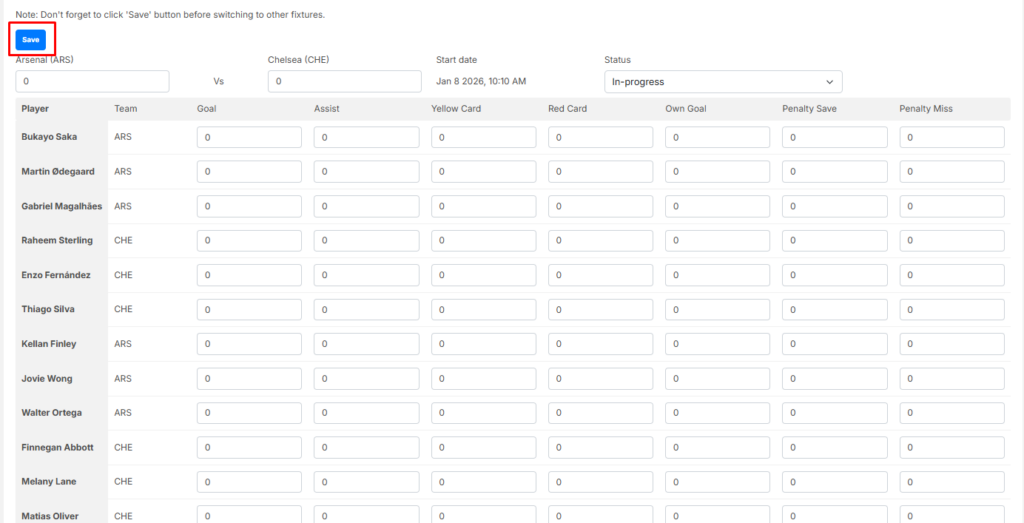
5. Save Results
- Click Save to store the updated results.
- Once the match is finished, set the status to Final.


